Cold email infrastructure is the domains and mailboxes you send outbound from, and a founder should own it without running a mail server. That leaves two paths: connect the Google Workspace or Microsoft 365 inboxes you already pay for, or buy domains and mailboxes from the same place you send from. The expensive middle ground is buying mailboxes from one vendor, warming them in a second, exporting them into a third, and reconciling what broke by hand. The providers below shorten that work in different ways, and the differences come down to what kind of mailbox you get, what you pay per mailbox, what you commit to up front, and who watches the mailbox after it ships.
Who this comparison is for
This page is for founders and sales teams of one to five people who send their own cold email and have outgrown a single domain. You have a Google Workspace or Microsoft 365 account for real business mail, you know you should not send cold email from it, and you want to know where to buy the secondary domains and mailboxes without turning infrastructure into a part-time job.
It is not written for agencies running hundreds of client mailboxes. Several of the providers below sell to agencies first, and their plan structures show it. Where a plan is sized for an agency, the section says so, so you can skip it.
What a cold email infrastructure provider does
InboxKit's guide to email infrastructure tools defines the category as the mailbox, domain and authentication setup that lets a team send hundreds of cold emails a day without burning its primary domain. The job has four parts: provision mailboxes on dedicated sending domains, configure SPF, DKIM and DMARC, warm each mailbox so it earns a sender reputation, and watch blacklist and bounce signals so placement holds up.
GMass's hands-on review of the category makes a sharper point: these services are, in effect, small email providers. They run their own sending servers and IP pools, register domains for you, create mailboxes in bulk, set the DNS records, and hand you credentials that work in any sending tool. GMass also notes that many of them feel alike, down to near-identical dashboards, so the decision usually narrows to deliverability and price.
Snov.io's roundup of infrastructure tools splits the market into done-for-you setup software, warmup tools, authentication tools and monitoring tools, and its glossary is a fair reminder of the vocabulary: SPF says which servers may send for your domain, DKIM signs each message so it cannot be altered in transit, and DMARC tells the receiving server what to do when those checks fail.
One distinction matters before you read the table. Google Workspace and Microsoft 365 mailboxes are real accounts at the two providers most of your prospects use. Provider-run infrastructure, the kind Maildoso sells on a shared pool and Infraforge sells on dedicated servers, runs on the vendor's own servers and IP addresses. Primeforge's pricing page argues for the first kind on the grounds of ESP matching, meaning you send from the same provider your recipient uses. Maildoso's pricing page argues for the second on cost, with a table comparing the price of sending 1,000 emails a day through Google Workspace, Azure tenants and its own mailboxes. Both are selling you something, but the distinction is real and it is the first fork in your decision.
How to judge a provider
Snov.io's buying guide suggests weighing your technical level, the extra feature set, pricing, how deep the setup goes, and integration options. GMass narrows it to deliverability and price. For a small team, the list looks like this.
- Mailbox type. Google Workspace, Microsoft 365, or the provider's own servers. Decide this first.
- Price per mailbox, after everything. Domains, warmup, placement tests and dedicated IPs are often separate lines. The table below lists each one the provider states.
- Minimum commitment. Some providers sell plans with a fixed number of mailboxes included. Others sell slots in blocks of ten. Others let you add a single mailbox to a plan you already have.
- Warmup model. Pre-warmed before delivery, warmed by the provider, or warmed inside your sequencer. Each provider describes its own below.
- Daily volume per mailbox. Vendors disagree, and the number sets how many mailboxes you need. The table and the sizing section carry each vendor's own figure.
- Monitoring after purchase. Setup is the easy part. What drifts later is a DNS edit, an SPF record that crosses its lookup limit when you add a vendor, a tracking domain that lands on a blacklist while the sending domain stays clean, and a single mailbox that passes every authentication check and still lands in spam. A provider that provisions well may do none of this.
- Where the sending happens. Pure infrastructure vendors export mailboxes to a sequencer. Three options on this page are sequencers that also sell the mailboxes, so there is no export step.
Comparison table
| Provider | What you get | Prices on its site | Minimum and billing | Domains |
|---|---|---|---|---|
| Zapmail | US- or EU-hosted Google and Microsoft mailboxes, with a pre-warmed option | Starter $39/mo with 10 Google mailboxes, extras $3.50 each; Growth $99/mo with 30, extras $3.25; Pro $299/mo with 100, extras $3.00 | Plans billed monthly, quarterly or yearly; yearly gets two months free | Bring your own or buy in the platform |
| Primeforge | Google Workspace and Microsoft 365 mailboxes on US IPs, ready in about 30 minutes | $4.50 to $3.50 per mailbox per month; the calculator prices 25 mailboxes at $94/mo yearly or $113/mo monthly | Minimum 10 mailbox slots; cancel anytime; two months free on yearly; no free trial, though you can explore the app without buying | .com at $14 per year, charged once |
| Maildoso | SMTP mailboxes on Maildoso's own servers and IPs | 30 mailboxes for $75/mo ($2.50 each); 300 for $225/mo ($0.75); 1,000 for $499/mo ($0.49); quarterly plans with domains from $299 per quarter for 32 mailboxes and 8 domains | Pay per mailbox monthly; custom counts from $0.49; 30-day money-back guarantee | $15 per year; included on quarterly plans; connect your own |
| SuperSend | Sequencer that connects your own Google or Outlook inboxes free, or sells inboxes and domains inside the app | Plans from $59/mo (15,000 emails), $99/mo (50,000), $319/mo (200,000); inboxes $5/mo each; domains $13/yr | Monthly or yearly at about 15% off; sign up free with no card; 7-day free trial starts when you launch | $13 per year with SPF, DKIM and DMARC set up for you |
| Instantly | Sequencer that sells done-for-you Google inboxes, or AirMail inboxes hosted on Instantly's own infrastructure | Google inboxes $5/mo per account; AirMail $4 per inbox; Outreach plans Growth $47/mo, Hypergrowth $97/mo, Light Speed $358/mo | Outreach plans monthly or yearly ($37.60, $77.60 and $286.30/mo); start for free | Done-for-you setup registers domains and configures DNS for you |
| Smartlead | Sequencer that resells Google, Outlook and SMTP mailboxes through SmartSenders | Base $39/mo, Pro $94/mo, Smart $174/mo, Prime $379/mo; SmartSenders Google or Outlook mailboxes $4.50/mo, SMTP from $3.99/mo, pre-warmed $9/mo | Monthly or yearly at 17% off; free trial; 50% off the first month on any plan | $13 to $19 per domain per year through SmartSenders, depending on provider |
| Infraforge | Private email infrastructure on dedicated servers, with domains and mailboxes created in bulk and DNS set automatically | $4 to $3 per mailbox per month; the calculator prices 25 mailboxes at $83/mo yearly or $100/mo quarterly; IP addresses $99 per IP per month as an add-on | Minimum 10 mailbox slots; cancel anytime; two months free on yearly; no free trial, though you can explore the app without buying | .com at $14 per year, charged once |
Prices and plan details come from each provider's homepage or pricing page as written. Vendors change pricing often; read the page on the day you buy.
The baseline: Google Workspace or Microsoft 365 on your own
Before any provider, the default is to register a few secondary domains at any registrar, open a Google Workspace or Microsoft 365 account for each, create two or three mailboxes per domain, set the DNS records by hand and connect them to your sequencer. This is what every infrastructure provider competes with, and it is a fair option for a team with one or two sending domains. Our guide to setting up cold email domains and inboxes walks through that route step by step.
Its cost is time, not money. Each domain means an admin console, a billing relationship, a DNS panel and a set of records to type. Zapmail's homepage compares its automated OAuth setup against buying through Google or Microsoft resellers, where it says app passwords are set manually and setup can take up to 48 hours, and puts its own fully automated setup at ten minutes. Primeforge's homepage promises mailboxes ready in 30 minutes with DNS configured automatically. Both are selling against the baseline, but the point stands: the manual route is cheap on paper and expensive on a Tuesday afternoon when a DKIM record is wrong and you cannot see why.
Sizing is where vendors disagree, and you should notice it. The pricing calculators at Primeforge and Infraforge both recommend 30 emails per mailbox per day with a maximum of 100, and two or three mailboxes per domain. Maildoso's pricing page caps its mailboxes at 15 cold emails a day, allows up to 99 mailboxes per domain and recommends no more than eight. SuperSend's default cap is 15 emails per mailbox per day, adjustable per mailbox. At 15 a day, 200 cold emails means about 14 mailboxes; at 30 a day, it means seven. Do that math before you decide whether the baseline is enough.
1. Zapmail
Zapmail sells US- or EU-hosted Google and Microsoft mailboxes in three plans listed on its homepage. Starter is $39 per month and includes 10 Google mailboxes with extras at $3.50 each. Growth is $99 per month for 30 mailboxes with extras at $3.25. Pro is $299 per month for 100 mailboxes, extras at $3.00, priority support and API access. Billing is monthly, quarterly or yearly, and yearly gets two months free. On Starter, 10 mailboxes for $39 works out to $3.90 each; on Pro, 100 for $299 is $2.99 each, and with the two free months on yearly billing that comes to about $2.49, close to the homepage's "starts at $2.5 per mailbox" headline.
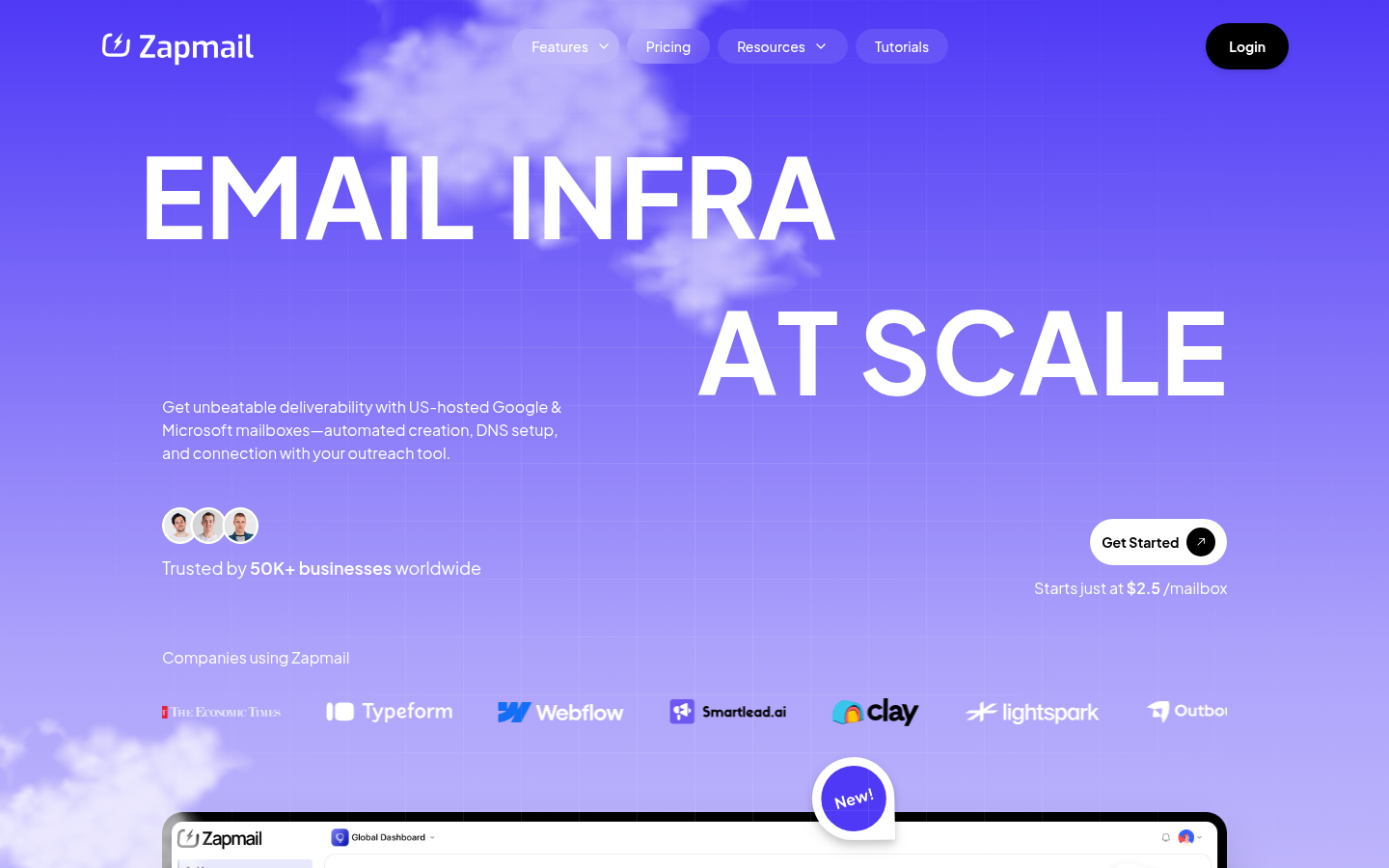 The pricing plans on Zapmail's homepage, as of October 3, 2026.
Zapmail's distinct offer is pre-warmed mailboxes: accounts that have already built reputation before you receive them, so you send on day one instead of waiting weeks. The homepage also describes one domain per workspace for isolation, automated SPF, DKIM, DMARC and custom tracking domains, the choice to bring your own domains or buy new ones, and export to more than 50 outreach tools including Instantly, Smartlead, ReachInbox, Reply and Lemlist. Each plan includes deliverability test credits and AI Insights credits per month: 3 on Starter, 10 on Growth and 30 on Pro.
The plan structure is the thing to weigh. Starter's 10 included mailboxes is a reasonable size for a founder sending a couple of hundred emails a day. Zapmail labels Growth as best for mid-size agencies and Pro as best for agencies with multiple clients.
Best for: a team that wants to skip warmup and is happy with ten mailboxes as the starting block.
2. Primeforge
Primeforge is the Google Workspace and Microsoft 365 product in the Forge Stack, and its homepage pitches real mailboxes on US IPs configured automatically and ready to send in 30 minutes, with no EDU tricks or loopholes. Mailboxes are $4.50 to $3.50 per month, with two months free on annual billing. .com domains are $14 per year, charged once, and the subscription includes automated DNS setup, hosting and maintenance, expert support and API access.
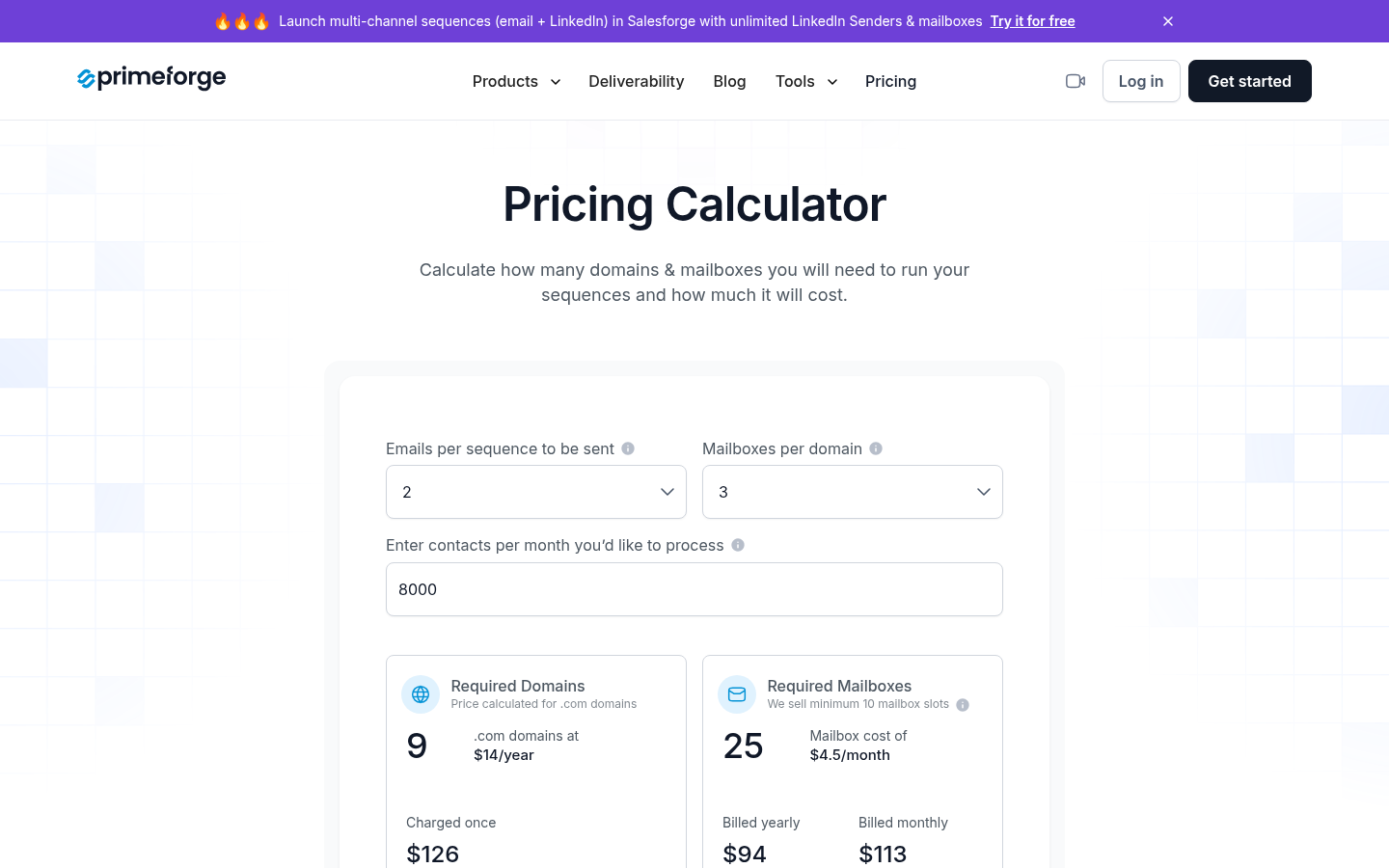 Primeforge's pricing page, as of October 3, 2026.
Primeforge sells mailbox slots in minimums of ten. The pricing page is direct about what that means: if you buy 10 slots and create 5 mailboxes, you pay for 10. The upside is that a slot can be emptied and refilled with a new mailbox at no extra cost, which matters when one goes bad. The calculator example on the page prices 25 mailboxes at $4.50 each, which comes to $94 per month billed yearly or $113 billed monthly, with nine .com domains at $126 per year.
Primeforge's own recommendation is to pair it with its siblings Mailforge or Infraforge so you always have a mailbox on the same provider your prospect uses, which the page calls ESP matching. The pricing page also says each Forge product needs its own subscription, so the pairing is two bills. There is no free trial, you can explore the app without buying domains or mailboxes, and you can cancel at any time.
Best for: a team that wants real Google or Microsoft mailboxes, is fine starting at ten, and values the option to swap a bad mailbox into the same slot.
3. Maildoso
Maildoso sells SMTP mailboxes on its own servers and IP addresses, built for outbound rather than daily use. Its pricing page lists three monthly plans: 30 mailboxes for $75 ($2.50 each), 300 for $225 ($0.75 each) and 1,000 for $499 ($0.49 each), with custom counts available inside the platform from $0.49. Quarterly plans bundle domains: 32 mailboxes and 8 domains for $299 per quarter, 68 and 17 for $499, and 400 and 100 for $2,199. On monthly plans, domains are bought separately at $15 per year, or you connect your own.
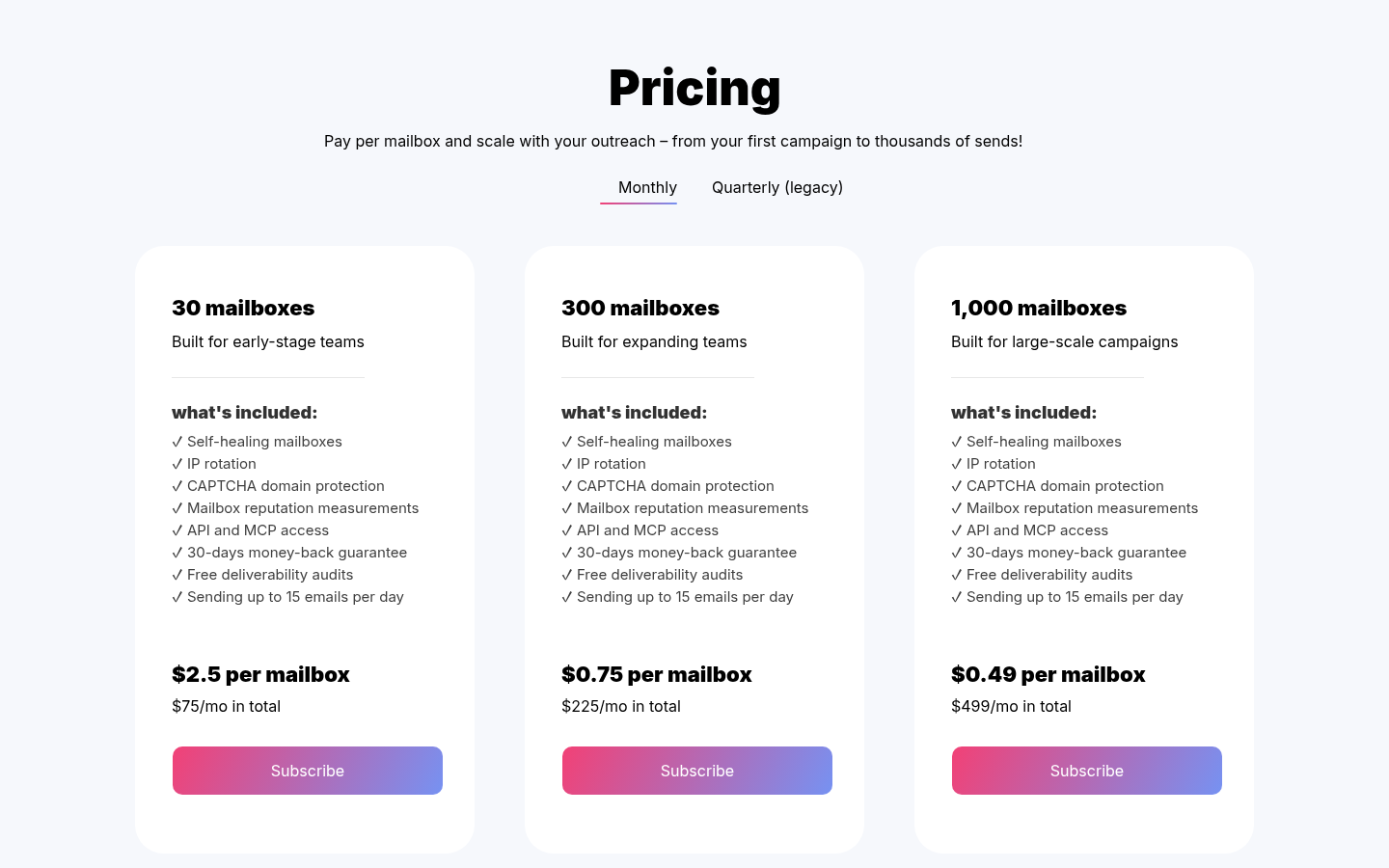 Maildoso's pricing page, as of October 3, 2026.
Every plan includes self-healing mailboxes, IP rotation, CAPTCHA domain protection, mailbox reputation measurements, API and MCP access, free deliverability audits and a 30-day money-back guarantee. The FAQ explains what self-healing means: campaigns send from different IPs that Maildoso replaces when they stop working, burned-out mailboxes are disconnected from campaigns for 14 days to recover, and inbox placement tests run every three days with a health score per mailbox. Setup is described as under ten minutes, with SPF, DKIM and DMARC configured when you enter mailbox names, and exports to Instantly, Smartlead, Saleshandy and others.
Two limits shape who this fits. Each mailbox sends up to 15 cold emails a day with no slow ramp-up, so volume comes from mailbox count rather than per-mailbox throughput. And the FAQ says the infrastructure is optimized for B2B outreach, so campaigns targeting personal addresses at providers like Gmail or Yahoo may see reduced placement. Domains bought through Maildoso stay registered with Maildoso while you use the service and are transferred back at no charge when you ask. You buy a license for a number of mailboxes rather than specific accounts, so deleting and recreating costs nothing, though new mailboxes need warmup.
Best for: a cost-sensitive B2B team willing to send from provider infrastructure rather than Google or Microsoft accounts, starting at 30 mailboxes.
4. SuperSend
Every provider above hands you mailboxes to carry somewhere else. SuperSend is the other path from the opening paragraph: it is the sequencer, and you either connect the Google or Outlook inboxes you already have for free, or buy inboxes and domains inside the same app you send from. Purchased inboxes are $5 per month each and domains are $13 per year, set up with SPF, DKIM and DMARC. Purchased inboxes do not arrive pre-warmed; warmup runs on them inside SuperSend the same way it runs on any connected inbox. Either way you never run a mail server, and there is no export step and no second dashboard.
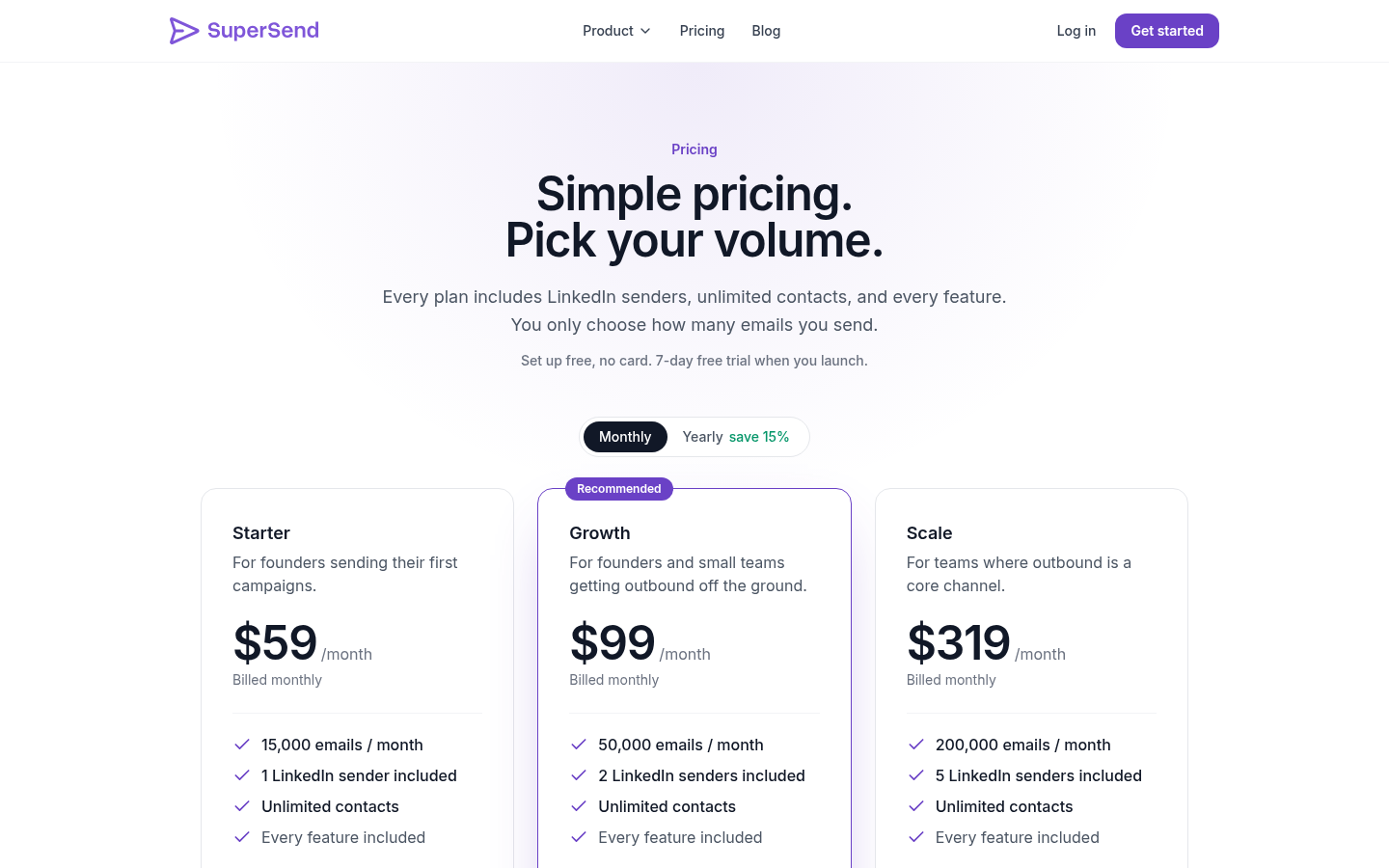
Plans are set by email volume, not by contacts or mailbox count, and every feature is in every plan. Plans start from $59 per month for 15,000 emails, then $99 for 50,000 and $319 for 200,000, with yearly billing saving about 15%. Contacts are unlimited on every plan. Emails over the limit on monthly plans are billed per email at $0.006 on Starter, $0.004 on Growth and $0.0025 on Scale. Full plan details are on the SuperSend pricing page. Signup is free with no card; launching a campaign or turning on warmup starts a 7-day free trial with a card on file, charged on day 7 unless you cancel first.
Because the mailbox lives next to the campaign, the deliverability work does too. Warmup runs on every connected inbox. Placement tests run against 10 seed inboxes by default, always including Google and Outlook, at 5 credits per seed, so a default test uses 50 credits. Email validation costs 1 credit per address. Starter includes 1,000 plan credits, Growth 2,000 and Scale 8,000. A bounce guard pauses a campaign when its invalid-recipient bounce rate passes 3%, checked after 100 or more sends, with small campaigns pausing after 10 such bounces; the threshold is adjustable per campaign. The default send cap is 15 emails per mailbox per day, adjustable per mailbox. The deliverability monitoring page describes how those pieces fit around the send. SuperSend also runs LinkedIn steps in the same sequence as email, with one contact record, so a reply on either channel stops both; that is outside an infrastructure comparison, but it is one reason a founder might buy mailboxes here rather than export them from a pure vendor.
Best for: teams who want to buy mailboxes and send from them in one place, and who do not want infrastructure to be a separate vendor relationship.
5. Instantly
Instantly is a sequencer with two infrastructure products. Its email accounts page sells done-for-you Google inboxes at $5 per month per account, set up and added to your Instantly account in 24 to 72 hours, with MX, SPF, DKIM and DMARC configured on US IPs and a pre-warmed option ready to send on day one. The page describes the price as about 20% less than buying the same inboxes directly from Google, which is Instantly's claim. Its AirMail page sells inboxes hosted entirely on Instantly's own infrastructure at $4 per inbox, spun up in about 30 seconds with authentication configured automatically and no Google or Outlook account involved.
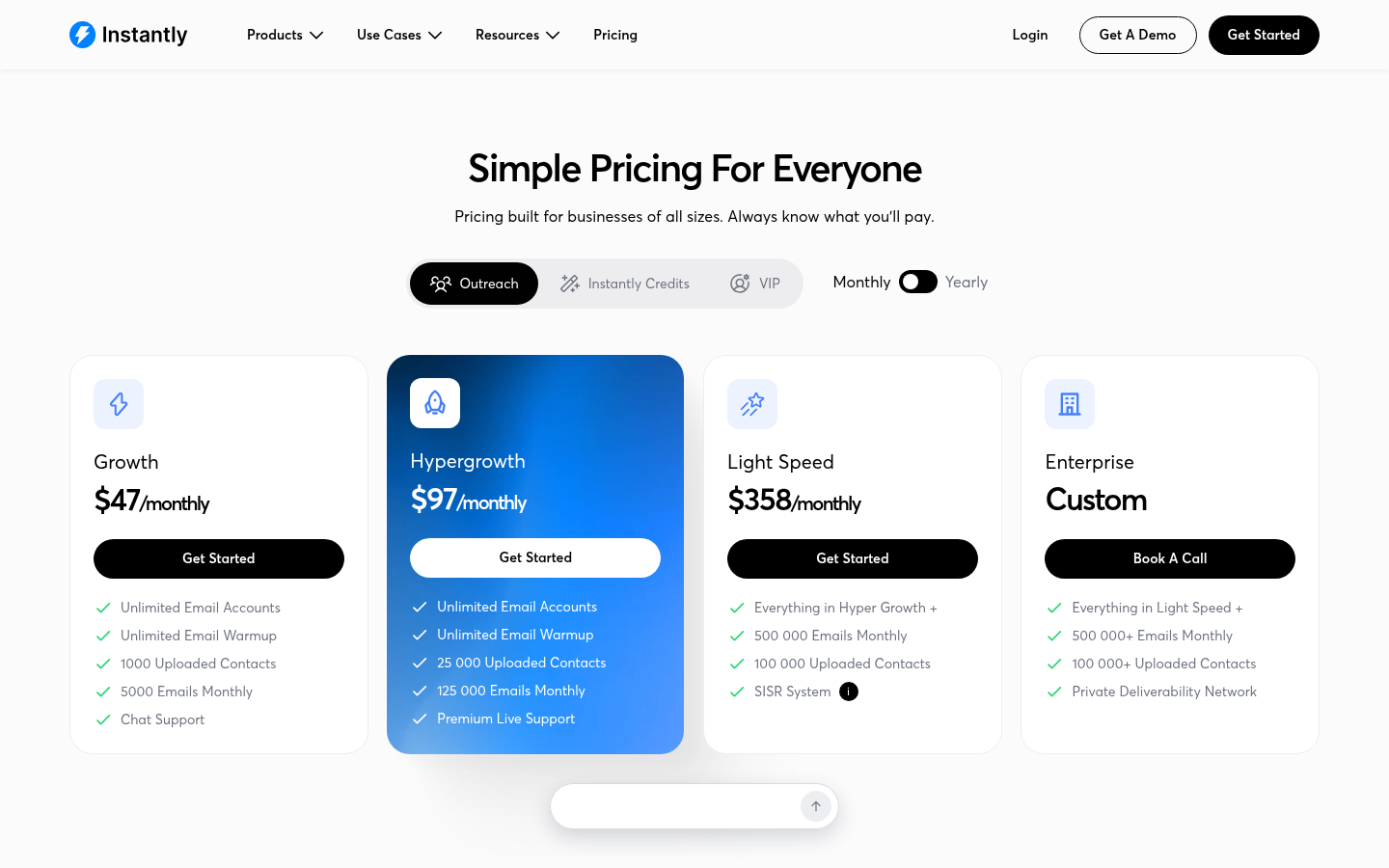 Instantly's pricing page, as of October 3, 2026.
The mailboxes sit on top of an Outreach plan. Growth is $47 per month with unlimited email accounts, unlimited warmup, 1,000 uploaded contacts and 5,000 emails a month. Hypergrowth is $97 per month with 25,000 contacts and 125,000 emails. Light Speed is $358 per month with 100,000 contacts, 500,000 emails and the SISR system, which the pricing page describes as dedicated private server and IP blocks that swap out flagged IPs. Yearly billing brings those to $37.60, $77.60 and $286.30 per month. Bundles that add the lead database, credits and AI agents run $94, $194 and $555 per month. The pricing page lists a free start.
The math a founder should run is the stack cost: an Outreach plan plus $4 or $5 per inbox, and the contact cap on each tier. Growth's 1,000 uploaded contacts is the number to check against your list size. For a longer look at the sequencer side, see our comparison of Instantly alternatives for dedicated infrastructure.
Best for: teams already sending from Instantly who want mailboxes added to the account they have.
6. Smartlead
Smartlead is a sequencer whose SmartSenders add-on resells mailboxes from other infrastructure vendors, and the pricing page names them. Fresh Google and Outlook mailboxes powered by Zapmail are $4.50 per mailbox per month with domains at $13 per year. Google with admin access, also via Zapmail, is the same price. Fresh Outlook via InfraInbox is $5 per mailbox with domains at $16. SMTP via Mailreef is $3.99 per mailbox with domains at $19, and SMTP via AeroSend is $4.20 with domains at $13. Pre-warmed Google or Outlook via Zapmail is $9 per mailbox with domains at $18. That list is useful even if you do not buy from Smartlead: it shows which vendors sit underneath a sequencer's mailbox button.
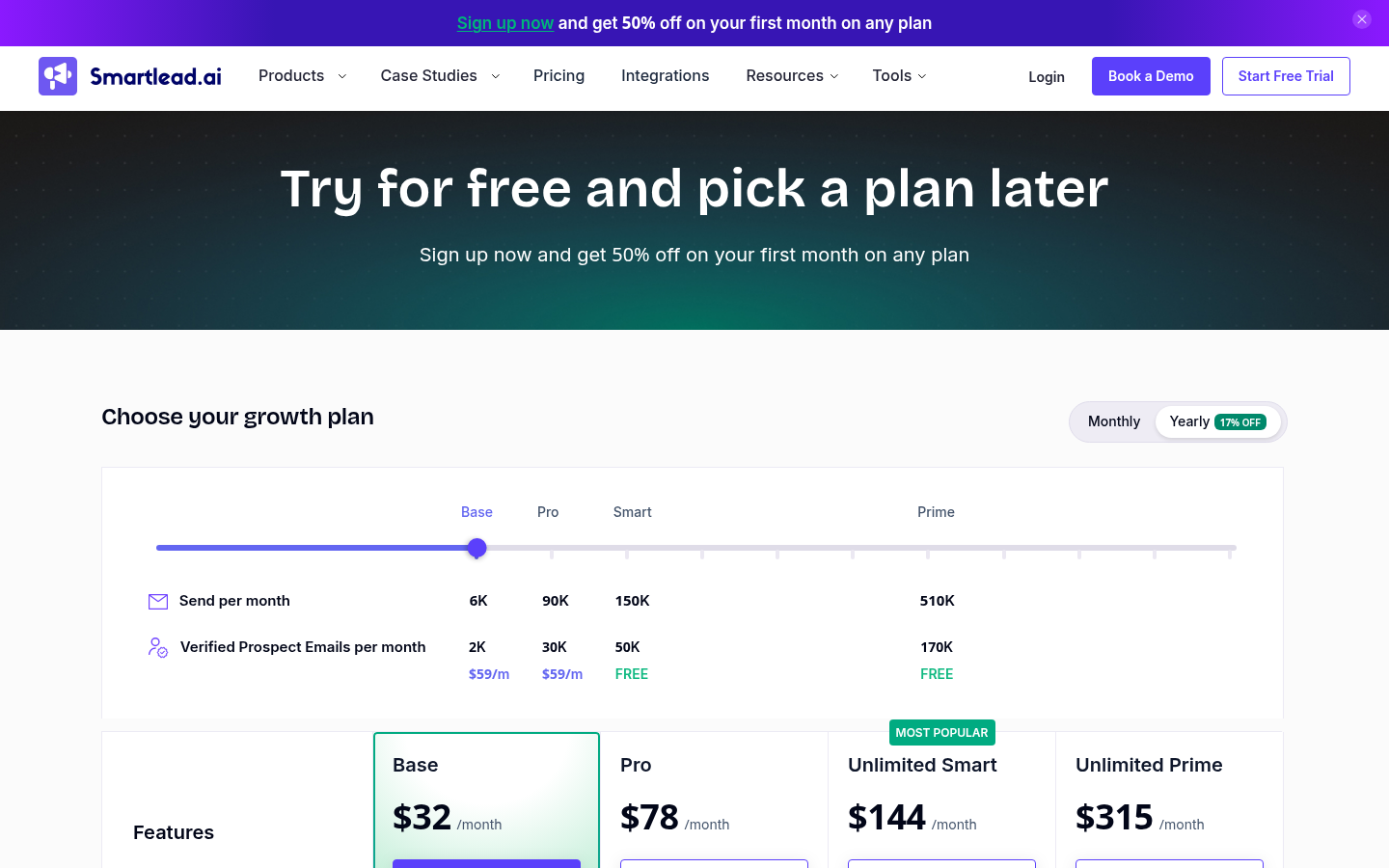 Smartlead's pricing page, as of October 3, 2026.
The sending plans are Base at $39 per month (2,000 contacts, 6,000 sends, 2,000 verified emails), Pro at $94 (30,000 contacts, 90,000 sends), Smart at $174 (unlimited contacts, 150,000 sends) and Prime at $379 (unlimited contacts, 500,000 sends, three SmartServers included). Yearly billing takes 17% off, to $32.50, $78.30, $144.50 and $314.60. SmartServers, dedicated IP servers, are $39 per server per month. SmartDelivery placement testing is a separate line at $49, $174 or $599 per month, and email verification credits start at $32 for 6,000. The pricing page offers a free trial and 50% off the first month on any plan.
As with Instantly, add the plan, the mailboxes, the domains and any placement testing before comparing against a flat per-mailbox vendor. Our rundown of Smartlead alternatives covers the sequencer comparison in more depth.
Best for: teams on Smartlead who want Zapmail or SMTP mailboxes without leaving the app.
7. Infraforge
Infraforge is the private email infrastructure product in the same Forge Stack as Primeforge. Its homepage prices mailboxes at $4 to $3 per month and describes creating thousands of domains and mailboxes with a dedicated IP and automated DNS setup. The point of the product is that your mail goes out from dedicated servers rather than from a pool shared with other senders. Infraforge's pricing page draws the line against its sibling Mailforge: Mailforge sends through a shared IP pool spread across many businesses, Infraforge through dedicated servers, and the page says it recommends Mailforge if you expect a high volume of spam reports and Infraforge if you stick strictly to deliverability best practice.
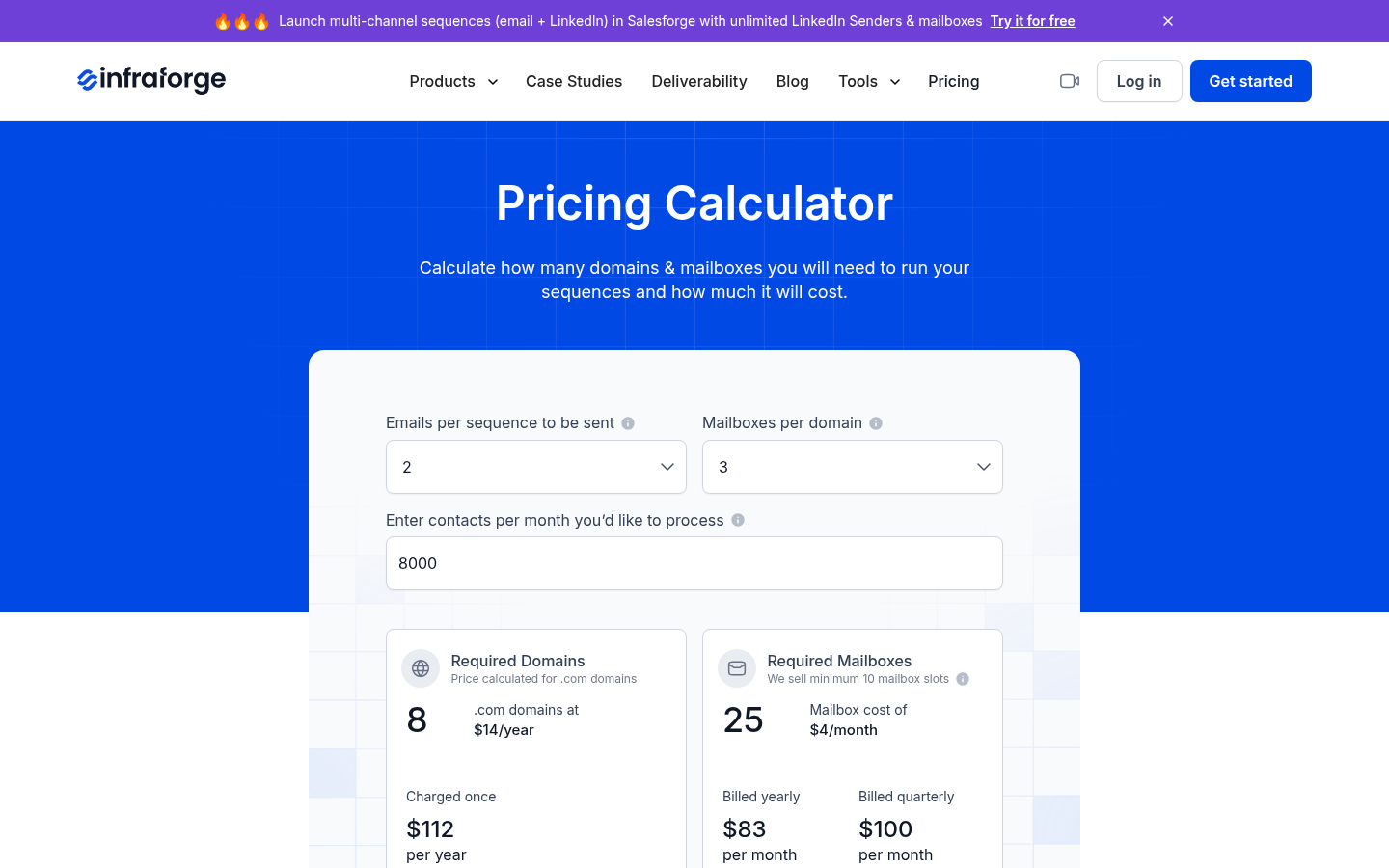 Infraforge's pricing page, as of October 3, 2026.
The slot model matches Primeforge's. The minimum is 10 mailbox slots, you pay for slots rather than active mailboxes, and a slot can be emptied and refilled with a new mailbox at no extra cost. The calculator example on the pricing page prices 25 mailboxes at $4 each, which comes to $83 per month billed yearly or $100 per month billed quarterly, plus eight .com domains at $14 per year, charged once. The subscription includes automated DNS setup, inbox hosting and maintenance, expert support and API access.
The add-ons are where the bill grows, and they are the lines to read before you compare Infraforge to a per-mailbox vendor. IP addresses are $99 per IP per month, billed quarterly. SSL and domain masking, which redirects and masks your sending domains so a branded site shows without revealing the primary domain, is $2 per domain per month billed quarterly or $6 per domain per year billed annually. Masterbox, a real-time view of every email across all the accounts in a workspace, is $7 per workspace per month on annual billing or $9 on quarterly. There is no free trial, you can explore the app without buying domains or mailboxes, annual billing takes two months off mailboxes but not domains, and there is no contract.
Best for: a team that wants its own sending servers, keeps clean lists with low complaint rates, and has budgeted the IP add-on as part of the cost.
The pick
If you want real Google Workspace or Microsoft 365 mailboxes and nothing else, Zapmail's Starter plan at $39 for ten mailboxes is the smallest block on this page for that mailbox type, and its pre-warmed option means you send on day one. Primeforge sells the same kind of mailbox at $3.50 to $4.50 in slots of ten, and the slot model is the better fit if you expect to swap mailboxes often.
If you are willing to send from provider infrastructure, Maildoso's 30 mailboxes for $75 a month is the cheapest entry here, provided your list is B2B and you plan around 15 emails per mailbox per day. If you want that infrastructure to be private rather than pooled, Infraforge sells dedicated servers at $4 to $3 per mailbox in slots of ten, with IP addresses at $99 each per month on top; its own pricing page steers senders who expect spam complaints to its shared-pool sibling instead, so it is a choice for a team confident in its lists.
If you already send from Instantly or Smartlead, their mailbox add-ons save you an export, but add the plan price, the contact cap and the per-mailbox and per-domain lines before you compare them to a flat vendor.
If you would rather not run a second vendor at all, SuperSend lets you connect your own inboxes free or buy inboxes at $5 and domains at $13 inside the tool you send from, with warmup, placement tests and a bounce guard next to the campaign, on plans from $59 a month. For a team that wants to spend time on messaging rather than infrastructure tickets, that is the path this page recommends.
FAQ
Do I still need Google Workspace or Microsoft 365 if I use a provider? Keep your primary domain's account for real business mail and never send cold email from it. For the sending domains, the provider either gives you Google or Microsoft mailboxes (Zapmail, Primeforge, Instantly's email accounts, Smartlead's Zapmail-powered SmartSenders, SuperSend's purchased inboxes) or mailboxes on its own servers (Maildoso, Infraforge, Instantly's AirMail, Smartlead's SMTP options). You do not need a separate Workspace or 365 subscription for the sending domains in either case.
How many mailboxes per domain, and how many emails per mailbox? The calculators at Primeforge and Infraforge recommend two or three mailboxes per domain and about 30 emails per mailbox per day, with a maximum of 100. Maildoso allows up to 99 per domain, recommends no more than eight, and caps each at 15 cold emails a day. SuperSend's default cap is 15 per mailbox per day, adjustable per mailbox. Work backwards from your daily target to the number of mailboxes and domains, and keep per-mailbox volume low enough that one bad mailbox is a small loss.
Shared IPs, dedicated IPs, or Google and Microsoft? Maildoso rotates your campaigns across its IP pool and replaces IPs that stop working. Infraforge sends from dedicated servers and sells IP addresses as a $99 per month add-on. Instantly's Light Speed plan assigns dedicated server and IP blocks through SISR, and Smartlead sells dedicated-IP SmartServers at $39 per server per month. Google Workspace and Microsoft 365 mailboxes send through those providers' own infrastructure, which is the model Primeforge argues for on ESP-matching grounds. For a small team, the Google and Microsoft route needs the least IP management.
Pre-warmed mailboxes or warm them myself? Zapmail, Instantly's email accounts and Smartlead's $9 SmartSenders tier sell pre-warmed mailboxes so you can send immediately. Maildoso's mailboxes send 15 cold and 80 warmup emails a day with no slow ramp. SuperSend's purchased inboxes are not pre-warmed; warmup runs on every connected or purchased inbox inside the sequencer. Whichever you choose, ask whether the warmup pool is closed to that provider's customers or mixes with outside addresses, and whether the warmup messages read like real mail.
What does an infrastructure provider not do? Most provision. Fewer monitor. Setup is correct on day one and drifts afterwards: a DNS record gets edited, SPF crosses its lookup limit when you add a vendor, or a single mailbox passes every authentication check and still lands in spam. Maildoso's three-day placement tests and health scores, Zapmail's monthly test credits, Smartlead's SmartDelivery and SuperSend's seed-inbox placement tests each cover part of that. Our cold email deliverability checklist lists what to check on a schedule once the mailboxes are live.
What DMARC policy should a new sending domain use? DMARC's policy tells receiving servers what to do with mail that fails SPF and DKIM alignment: none means deliver and report, quarantine means send it to spam, reject means refuse it. On a brand-new sending domain where you control every sender, there is no legacy mail to break, so you can move from none to reject once you have confirmed your sequencer's mail passes both checks. Primeforge, Infraforge, Maildoso, Instantly's email accounts, Zapmail and SuperSend all say they configure the DNS records for purchased domains; confirm the published policy yourself after setup.
Is a sequencer like Instantly or Smartlead an infrastructure provider? A sequencer sends; an infrastructure provider supplies the mailboxes. Instantly, Smartlead and SuperSend are sequencers that also sell mailboxes, so the same subscription covers both. Smartlead's pricing page shows that its Google and Outlook mailboxes are powered by Zapmail, so in that case the infrastructure vendor and the sequencer are still two companies even if the bill is one.
What happens when a mailbox goes bad? On Primeforge and Infraforge you delete it and create a new one in the same paid slot at no extra cost. On Maildoso you hold a license for a number of mailboxes rather than specific accounts, burned-out mailboxes are disconnected for 14 days to recover, and recreating costs nothing beyond the warmup period. Before you replace any mailbox, check the domain: a fresh mailbox on a damaged domain hides the problem for a few weeks and then repeats it.
Where to start
If you want to buy the domains and mailboxes in the same place you send from, with warmup and placement tests beside the campaign, set up SuperSend free and start the 7-day trial when you launch your first sequence. If you want mailboxes alone, pick from the table above by mailbox type first and price second, and read the provider's pricing page on the day you buy.