Whether your mail lands in the inbox is part of the campaign, not a separate chore you finish before the real work starts. Warmup, SPF, DKIM and DMARC checks, bounce monitoring and placement tests belong next to the send button, because the only moment they matter is the moment you send. A warmup tool that lives in a different tab from your sequences can tell you a mailbox looks healthy, but it cannot pause the campaign that is quietly burning the domain. That is the lens this page uses to compare eight tools: seven deliverability services you run alongside whatever sender you already use (TrulyInbox, Mailivery, Warmforge, MailReach, Lemwarm, InboxAlly and Folderly) and one sender that builds warmup into the campaign (SuperSend).
Who this comparison is for
This page is for founders and small sales teams who run their own cold outreach from a handful of Google Workspace or Microsoft 365 mailboxes and want warmup handled in a way that fits the tool they already send from. If you are an agency warming dozens of client inboxes from one dashboard, your math is different and most of the plans below will not map cleanly onto your situation.
It is also for the reader who already pays for a sending platform and a separate warmup service, has watched placement slip anyway, and wants to know whether two invoices are buying anything that one would not.
What a warmup tool actually does
Saleshandy's roundup of warmup tools makes a point worth repeating before any comparison: no warmup tool directly gives you inbox placement. What it does is build sender reputation gradually, by sending and receiving mail on your behalf and generating engagement signals that Gmail and Outlook read as evidence you are a real sender. Warmup is a reputation-building process, and the campaign you send afterwards still has to earn its place with clean lists, sane volume and copy that does not read like spam.
That framing matters when you read vendor claims. A tool can run warmup well and your mail can still go to spam if the domain has a listing, the list is dirty, or you ramped campaign volume faster than the reputation could carry.
How to choose a warmup tool
Five things decide whether a warmup tool is doing its job. Check each one against the vendor's own pricing and feature pages, not against a roundup.
Network quality. Warmup works by exchanging mail with other inboxes. Warmup Inbox's homepage frames the distinction plainly: providers can tell real engagement from scripted engagement, and a pool of recycled domains with bad history or scripted replies teaches spam filters nothing good. When you evaluate a tool, look at what it says about the inboxes in its pool and whether those are real accounts on the same providers your prospects use. A tool that says nothing about its pool is asking you to trust it.
Ramp length and daily volume. Warmup ramps a mailbox from a few emails a day toward a working volume over days or weeks. The question that comes up again and again is whether the slow ramp is still necessary on every new inbox. The honest answer is that the ramp is about the ratio providers see between what you send and how much of it gets engagement, plus how steady the pattern looks over time. Fast-ramp results reported on infrastructure a vendor controls end to end do not transfer cleanly to a domain you registered last week with no history at Google or Microsoft. A slower default is still the safe starting point for a brand-new domain. Look for a tool that lets you set the per-mailbox daily cap and the step size yourself, because that cap is a warmup lever as much as a campaign lever.
Bundled with sending, or standalone. Saleshandy's roundup notes that some tools charge for every inbox you connect while others offer unlimited accounts at a flat rate or include warmup inside a cold email platform. Of the eight tools here, SuperSend is the one that bundles warmup with the campaigns it sends, which changes the cost question from "what does warmup cost per inbox" to "what does the plan cost and what does it cap." Two others arrive with a sender you may already pay for: Lemwarm's pricing page says every lemlist plan includes lemwarm, and Warmforge's pricing page says Salesforge users get unlimited mailbox slots in Warmforge. The rest are standalone, and among them the pricing model differs again: per mailbox or slot (MailReach, Folderly, Warmforge), per sender profile (InboxAlly), or per warmup email sent with unlimited mailboxes (TrulyInbox, Mailivery). The bundled approach also changes the operational question. A warmup tool that is part of the sender can see the campaign's bounce rate and placement, and a standalone one cannot.
Placement testing. A warmup tool's own health score tells you how its warmup emails are landing. It does not tell you how your actual campaign copy lands at Gmail and Outlook. Placement tests send a real message to seed inboxes on those providers and report where it arrived. Warmforge's roundup lists inbox placement on Gmail and Outlook as its first evaluation criterion for exactly this reason. A tool that runs warmup without placement tests leaves you reading silence.
Infrastructure checks and guards. Warmforge's criteria also include SPF, DKIM, blacklist and other infrastructure checks, and whether the tool automates replies, ramp-up and pauses. The pause is the one to look for. A campaign that keeps sending to a list with a high invalid-recipient rate is the fastest way to undo weeks of warmup, and the tool that sees both the warmup and the bounces is the one that can stop it.
The eight tools side by side
Every price and limit below comes from each tool's own pricing page.
| Tool | Plans and prices | What each plan caps | Warmup | Placement testing |
|---|---|---|---|---|
| Warmforge | Warmup: $10 per slot per month, billed quarterly ($30 a quarter for one slot); first slot free. Placement tests: Pro $39 a month, or $32.5 a month billed annually; Growth $169 a month, or $140.8 a month billed annually | One slot warms one mailbox. Pro: 100 tests a month, 50 mailboxes per test. Growth: unlimited tests, 250 mailboxes per test | Automated AI warmup on Google and Microsoft mailboxes; unlimited slots for Salesforge users | 1 free placement test a month with a warmup subscription; health checks on DNS, MX and blacklist status |
| Mailivery | Starter $29, Professional $79, Business $199 a month; yearly billing marked as saving 25%, with Starter at $21.75, Professional at $59.25 and Business at $149.25 a month on that toggle; 7-day free trial | Shared daily warm-up volume: 200, 800 or 2,500 emails. Unlimited mailboxes on every plan. 2, 10 or 50 blacklist monitors; 100, 500 or 2,000 verification credits; 2, 4 or 10 team users | AI content plus peer-to-peer network; response rate up to 30% on Starter, 55% above; connects to Gmail, GSuite or SMTP | 10, 30 or 100 inbox placement test credits across Google, Microsoft, Yahoo and more |
| SuperSend | Starter $59 ($50 yearly), Growth $99 ($84), Scale $319 ($271) | Starter: 15,000 emails a month and 1 LinkedIn sender. Growth: 50,000 emails and 2 senders. Scale: 200,000 emails and 5 senders. Unlimited contacts on every plan | Included on every plan for every inbox at no extra cost; ramps Google and Outlook inboxes from 3 warmup emails a day to a default 15 over about a week (SMTP inboxes step by 3 to 30) | 10 seed inboxes per test by default, including Google and Outlook, on plan credits at 5 credits per seed |
| TrulyInbox | Free $0; Starter $29 ($22 billed annually); Growth $99 ($84); Scale $199 ($169); Scale Plus $479 ($407) | Daily warmup emails: 10 on Free (1 account), 200 on Starter, 1,000 on Growth, 3,000 on Scale, 5,000 on Scale Plus, with 10,000 and 20,000 tiers. Unlimited accounts on every paid plan | Core product; AI Adaptive strategy on Free and Starter, all 4 strategies from Growth; its pricing page recommends 2 warmup emails for every cold email | Deliverability intelligence and score listed in the Starter plan's feature set; analytics and targeting by email provider from Growth |
| Lemwarm | Essential $29 per email account a month, or $24 billed yearly; Smart $49, or $40 billed yearly; custom plan above 10 users. Yearly marked as saving 20%, quarterly 10% | Priced per email account. Smart adds personalized warm-up emails, warming your real templates, custom alerts and an industry-tailored network | Core product; warms across 20,000+ healthy domains in 100+ countries with human warm-up emails. Included with every lemlist plan | Deliverability score with alerts, deliverability reports and a technical setup check |
| Folderly | Folderly $96 per mailbox a month (yearly billing); Inbox Insights free, $79 a month, or $799 a year; Pulse free | Folderly is priced per mailbox. Inbox Insights caps tests: 2 a month on Free, 100 a month on Monthly and Yearly | Folderly, the core product, is for sender reputation and mailbox deliverability | Inbox Insights tests placement, IPs and DNS; Pulse monitors placement over time with free real-time alerts |
| MailReach | All-in-one warmer from $25 per mailbox a month (1–5 mailboxes) down to $16 at 51+; $20 to $12.8 billed yearly; spam test credits sold monthly or pay as you go: 200 credits are $95 a month, or $123.5 pay as you go | Per mailbox, up to 100 emails a day each; at least 20 spam test credits included with the warmer | AI warming algorithm, network of Google Workspace and Office 365 inboxes, any SMTP provider | Spam test with inbox placement by provider, automatic tests with Slack and webhook alerts, free spam test on the homepage |
| InboxAlly | Starter $149, Plus $645, Premium $1,190 a month, Enterprise custom; billed monthly; 10-day free trial, no card | Seed emails a day: 100, 500, 1,000, custom. Sender profiles: 1, 5, 10, unlimited | Adaptive Autowarmup on every plan; positioned as reputation repair; its pricing page puts the seed-to-send ratio at 5%, so 100 seeds support 2,000+ daily sends | Live inbox placement testing with provider breakdown, blacklist monitoring and DMARC reporting on every plan |
Four notes on reading the table. Warmforge's pricing page loads with the quarterly toggle selected, so the $10 per slot figure is a quarterly-billing price ($12 monthly, $9 a month billed annually, for up to 10 slots); its FAQ says annual billing gives two months free. Lemwarm's pricing page loads on yearly billing and strikes through the monthly price, so $29 is Essential's monthly price and $24 its yearly price per month ($26 on quarterly). TrulyInbox and Mailivery both size plans by shared daily warmup volume rather than by mailbox, and TrulyInbox's pricing page tells you how to translate: at its recommended 2:1 ratio, a Starter plan's 200 warmup emails a day covers about 3 inboxes sending roughly 33 cold emails each. InboxAlly's plans are the only ones here with a human on every tier; its pricing page assigns a dedicated customer success manager from Starter upward.
Warmforge
Warmforge's homepage describes itself as a premium email warmup and deliverability center, and the offer at the top of it is a free one: 1 warming slot for a Google or Microsoft mailbox and 1 free placement test that renews every month, available on your first workspace. The pricing page explains how the warmup works: the tool mimics human behaviour in your mailboxes, with unique AI-written emails that signal to providers the inboxes are legitimate.
Pricing is a calculator rather than tiers. Warmforge's pricing page shows email warmup at $10 per slot per month, billed quarterly, with the first slot free, and a one-slot total of $30 for the quarter. A slot is the unit: buy 10 slots and you can connect 10 mailboxes, and the page recommends buying as many slots as you run mailboxes for cold outreach, because if you have fewer slots than mailboxes it warms from the top of your list and disables the rest. The subscription includes automated AI warmup, 1 free placement test a month, and health checks on each mailbox's DNS and MX records plus blacklist status. The FAQ notes there is no free trial, since you buy slots to warm anything, but you can sign up to explore the features and run a free placement test.
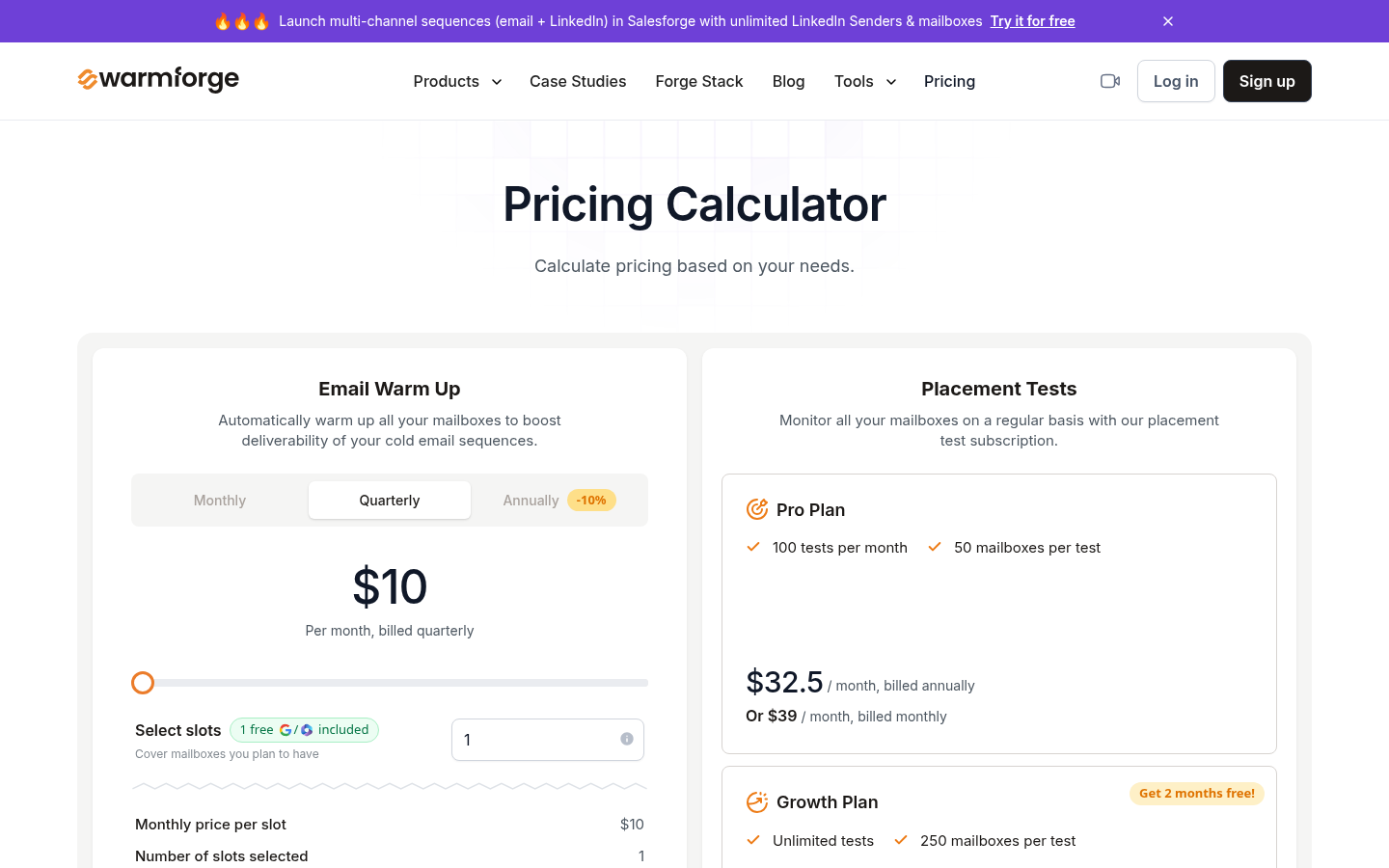
Warmforge's pricing page, as of October 4, 2026.
Placement tests beyond the free monthly one are a separate subscription. The Pro plan covers 100 tests a month at 50 mailboxes per test for $39 a month, or $32.5 a month billed annually. The Growth plan covers unlimited tests at 250 mailboxes per test for $169 a month, or $140.8 a month billed annually. The pricing page also sells a Forge Expert double session, two 1:1 consulting sessions, for $500.
The line that changes the math is the Salesforge one: Warmforge's pricing page says Salesforge users get unlimited mailbox slots to warm up, with no extra steps. If you send from Salesforge, warmup is already covered. If you do not, the per-slot price times your mailbox count is the number, and the quarterly billing is the commitment.
Mailivery
Mailivery's homepage describes an email warm-up and deliverability tool that improves sender reputation by having real conversations in your inbox with a network of active mailboxes, using AI and a peer-to-peer network. The homepage describes what the warmup does in practice: the algorithm moves your emails from spam or Promotions to the inbox and replies to them positively. The headline offer is a 7-day free trial and a promise never to pay per mailbox.
Mailivery's pricing page prices by shared daily warm-up volume, with unlimited mailboxes on every plan. Starter is $29 a month for 200 warm-up emails a day shared across your mailboxes, 2 blacklist monitors, 100 email verification credits, 10 inbox placement test credits, a maximum 30% response rate on warm-up emails, 2 team users and a 100 email a day limit per connected mailbox. Professional is $79 a month for 800 a day, 10 blacklist monitors, 500 verification credits, 30 placement test credits, a 55% response rate cap, 4 users and 250 a day per mailbox. Business is $199 a month for 2,500 a day, 50 blacklist monitors, 2,000 verification credits, 100 placement test credits, 55% response rate and 10 users. Yearly billing is marked as saving 25%, with Starter at $21.75, Professional at $59.25 and Business at $149.25 a month on that toggle. Custom pricing is available for higher volume.
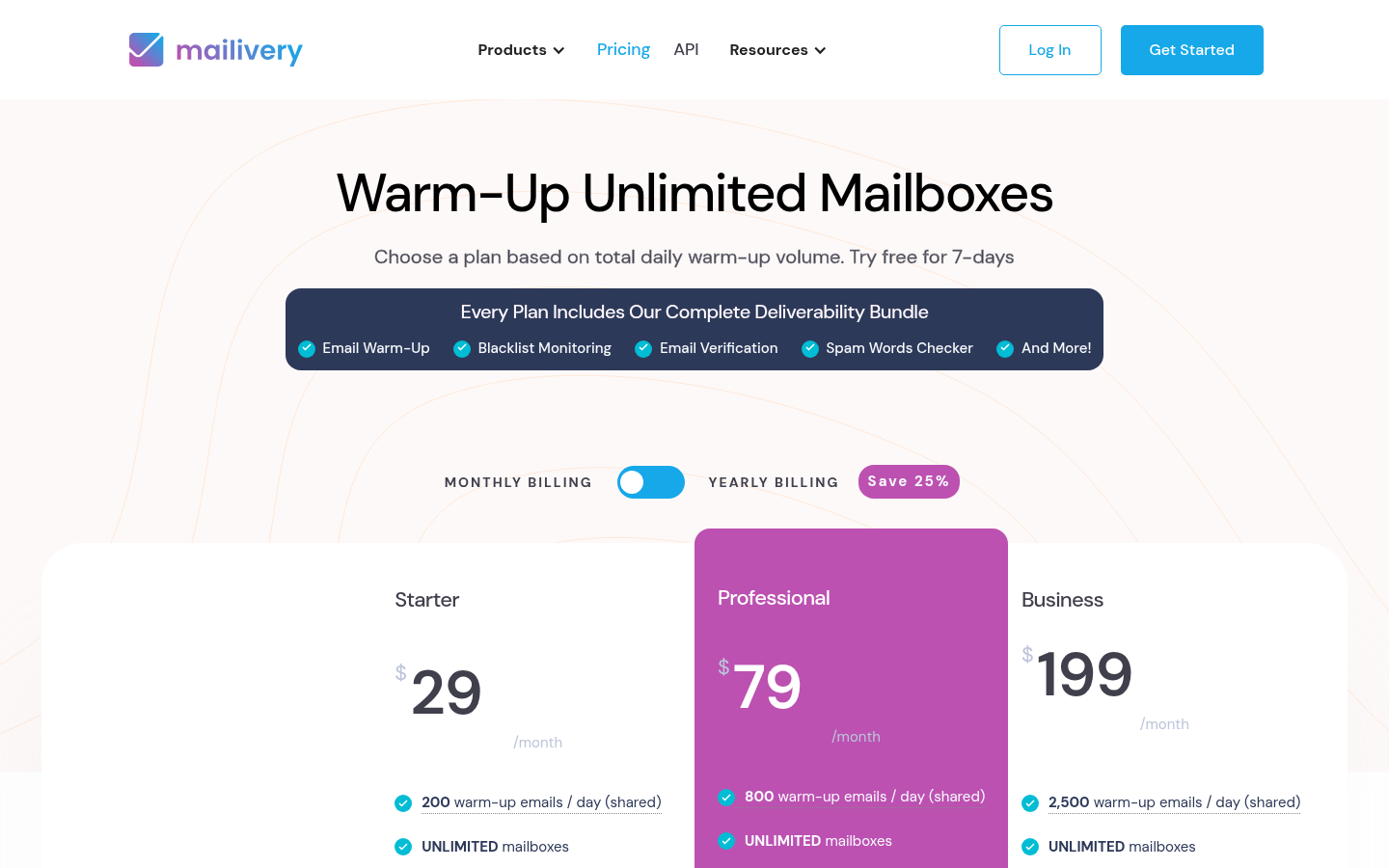
Mailivery's pricing page, as of October 4, 2026.
Every plan includes the same feature bundle: custom warm-up templates, an analytics dashboard for spam rate and email health, real email text plus AI-generated content, scheduling and balancing to mimic natural behaviour, peer-to-peer interactions between customers, advanced settings such as weekend sending, time zones and custom signatures, and automatic reading and moving of warm-up emails so they do not jam your inbox. Mailboxes connect through Gmail, GSuite or SMTP.
Read Mailivery as the budget option for someone with several mailboxes and modest volume. The thing to size is the shared daily cap: 200 warm-up emails a day spread across five mailboxes is 40 each, which is fine for a slow ramp and tight for anything faster.
SuperSend
SuperSend is an outbound sequencer for cold email and LinkedIn, and the reason it belongs on a warmup page is that warmup is not a separate product inside it. Warmup runs on every connected inbox on every plan at no extra cost, and the campaign that sends from that inbox can see what warmup sees.
The warmup facts are simple. Connect your own Google or Outlook inbox by signing in and turn warmup on. Warmup starts at 3 emails on day 1 and adds 2 a day, reaching the default maximum of 15 a day after about a week. An inbox connected over SMTP steps up by 3 a day to a default maximum of 30, which takes about 10 days. Both the step and the cap can be changed per inbox, which is the ramp lever described in the how-to-choose section above. Turning warmup on for your own inboxes starts a 7-day free trial with a card on file, charged on day 7 unless you cancel; signup itself is free with no card. Or buy inboxes and domains inside SuperSend at $5 a month per inbox and $13 a year per domain. Bought inboxes and domains arrive with SPF, DKIM and DMARC already set up and start warming on their own, from zero, with no warmup history behind them. Either way you never run a mail server. Our guide to setting up cold email domains and inboxes walks through the DNS side if you are connecting your own.
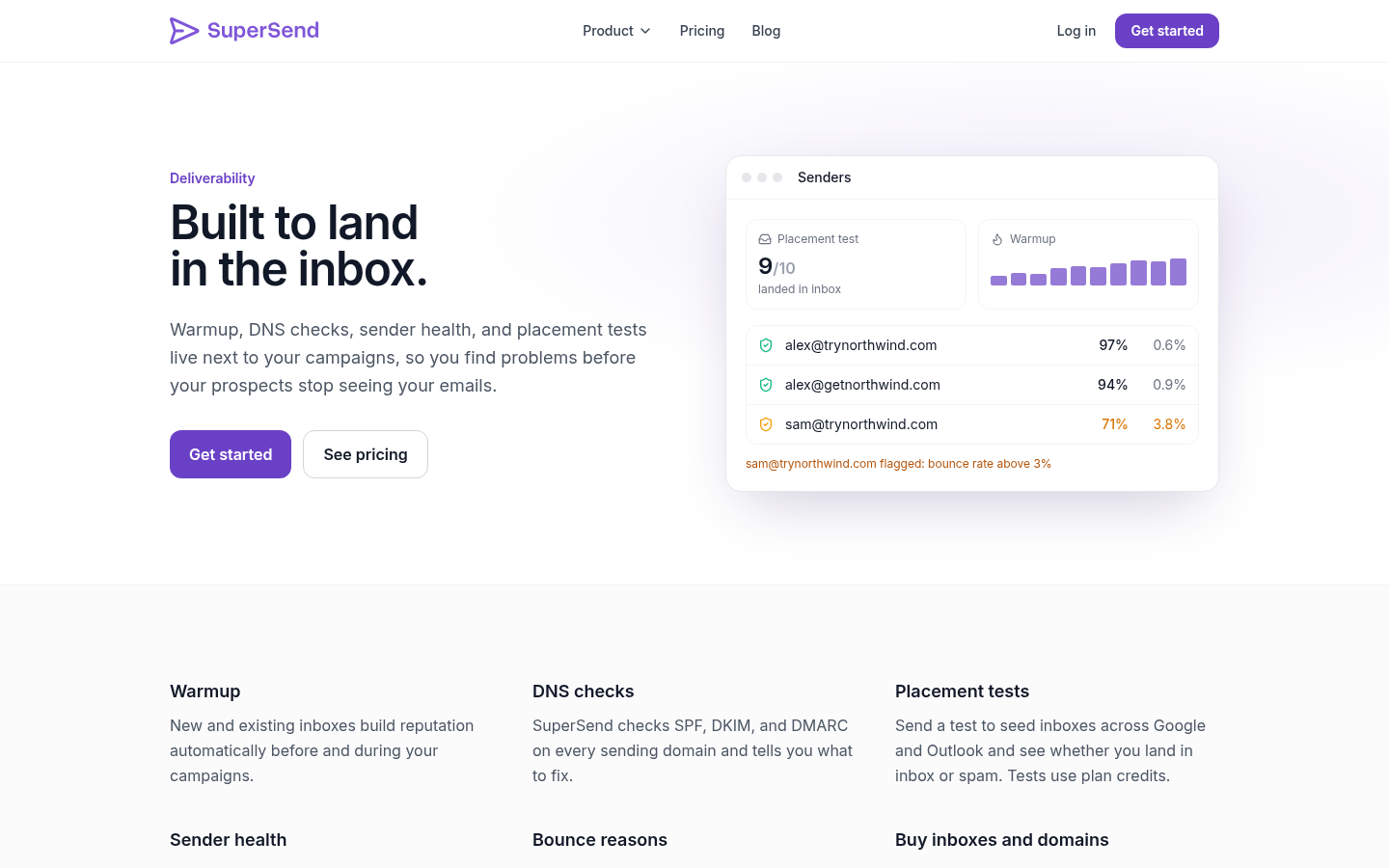
Placement tests run against 10 seed inboxes by default, including Google and Outlook, on plan credits at 5 credits per seed, so a default test costs 50 credits. Email validation costs 1 credit per address. A bounce guard auto-pauses any campaign whose invalid-recipient bounce rate passes 3% once it has sent 100 or more emails; small campaigns pause after 10 invalid-recipient bounces, and the threshold is adjustable per campaign. The guard pauses the campaign only. Warmup keeps running while campaigns send from the inbox, and it has its own bounce handling: an inbox that collects too many warmup bounces drops to 5 warmup emails a day. The default daily send cap for campaigns is 15 emails per mailbox per day, adjustable per mailbox. The deliverability monitoring page covers how those pieces fit together, and our cold email deliverability checklist is the order to work through them in.
Plans start at $59 a month. Starter at $59 covers 15,000 emails a month and 1 LinkedIn sender, Growth at $99 covers 50,000 emails and 2 senders, and Scale at $319 covers 200,000 emails and 5 senders. Yearly billing saves about 15%: $50, $84 and $271 a month respectively. Contacts are unlimited on every plan, every feature is in every plan, and overage on monthly plans is billed per email at $0.006 on Starter, $0.004 on Growth and $0.0025 on Scale. An extra LinkedIn sender is $29 a month. The pricing page has the full breakdown.
What SuperSend does not do is warm inboxes you send from somewhere else. It is a sender with warmup built in, not a standalone warmup service, and it is not built for agencies warming client inboxes.
TrulyInbox
TrulyInbox's homepage describes a warmup platform where AI generates warmup emails that match your industry, you pick the strategy, and a deliverability intelligence layer tells you when a mailbox is ready to send. The homepage lists 40K+ warming accounts, 500K+ emails a day, a 2-minute setup, a 7-day free trial with no credit card, and sign-up with Google or Microsoft. It is rolling out a V2 in phases.
Its pricing model is the opposite of per-mailbox. TrulyInbox's pricing page states that it charges for the warmup emails it sends, not for accounts connected, and every paid plan allows unlimited email accounts. The Free plan covers 1 account at 10 warmup emails a day with basic deliverability tracking. Starter is $29 a month, or $22 a month billed annually at $264 a year, for 200 warmup emails a day, which the page says suits about 3 inboxes. Growth is $99 a month, or $84 billed annually at $1,008, for 1,000 a day, sized for about 15 inboxes. Scale is $199 a month, or $169 billed annually at $2,028, for 3,000 a day, sized for about 50 inboxes. Scale Plus is $479 a month, or $407 billed annually, for 5,000 a day, with 10,000 and 20,000 tiers and a custom option beyond that. The page also lists a 14-day money-back guarantee.
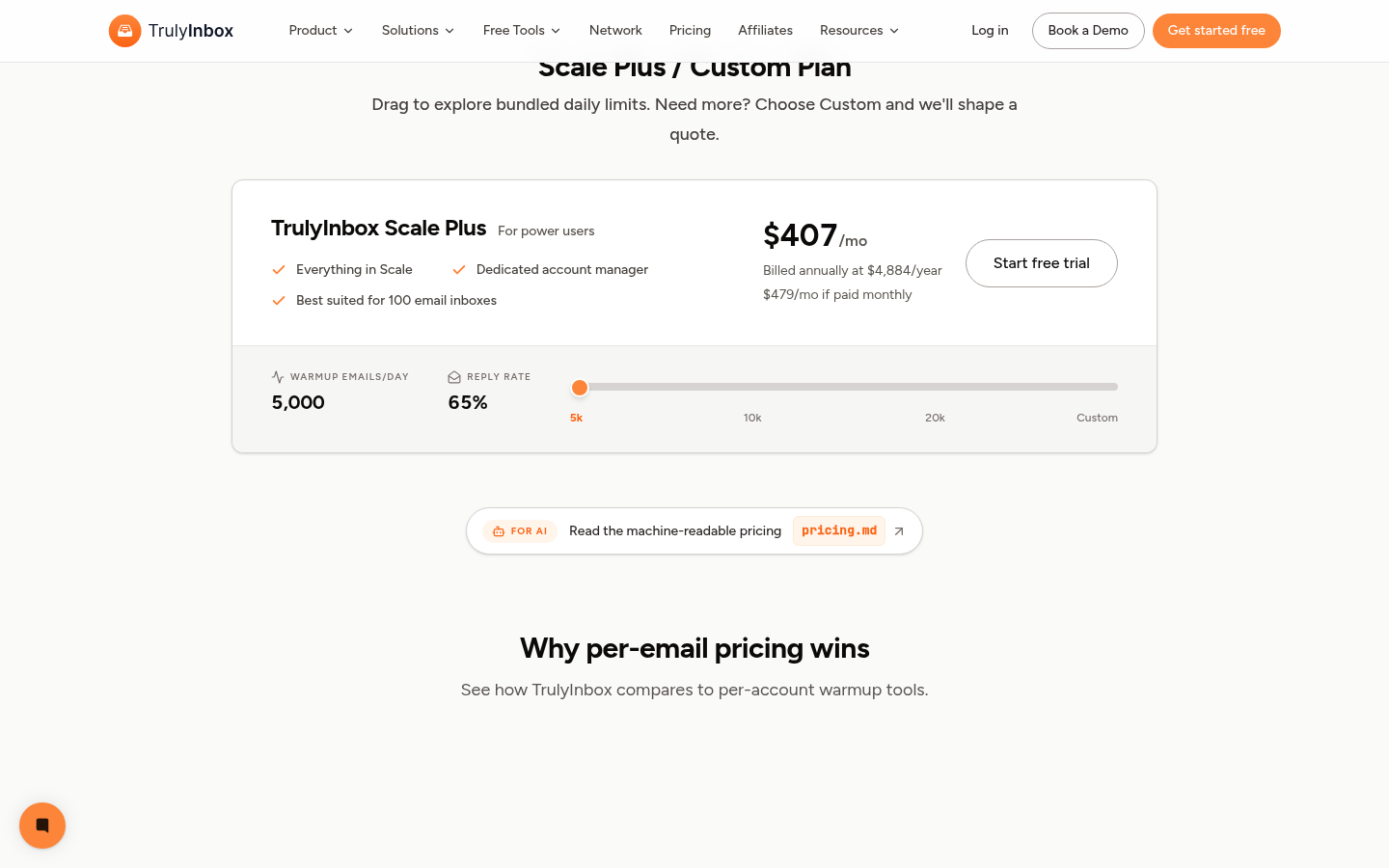
TrulyInbox's pricing page, as of October 4, 2026.
The sizing rule on its pricing page is worth copying into your own math regardless of which tool you pick: warmup runs at a 2:1 ratio, two warmup emails for every one cold email, every day and ongoing. If each inbox sends 50 cold emails a day, keep it warming at 100 a day, then add that up across inboxes and choose the plan that covers the total.
Features split by plan, as the plan cards on TrulyInbox's pricing page lay them out. The Free plan lists 1 account, 10 warmup emails a day and basic deliverability tracking. The Starter card lists the AI Adaptive strategy, AI warmup content, API access, deliverability intelligence and score, account health monitoring and chatbot support. The Growth card adds all 4 strategies (AI Adaptive, Progressive, Random and Flat), lets you fine-tune ramp speed, send caps and reply ratios, generates AI content by topic and industry, adds analytics and targeting by email provider so you can see Gmail and Outlook separately, exports per-mailbox reports, allows custom sending schedules and includes priority email support. The Scale card adds a priority onboarding call and a dedicated account manager.
Lemwarm
Lemwarm's homepage describes a deliverability tool with three parts: warm-up across 20,000+ healthy domains in 100+ countries with real inboxes and real replies, monitoring that alerts you on your deliverability score and flags spam risks based on your sending behavior and content, and daily tips on content, sending and setup with detailed reports. The homepage also lists what usually goes wrong when open rates are poor: missing or misconfigured SPF, DKIM, DMARC or MX records, spammy copy, irregular sending that spikes volume, an unverified list, and no monitoring so you only learn you are in spam when replies stop.
Lemwarm's pricing page lists two plans, both priced per email account. Essential is $29 per email account a month, or $24 a month billed yearly ($26 quarterly), and includes automatic email warm-up, a technical setup check, deliverability reports, human warm-up emails and the 20k+ domain network; the page describes it as best for solo senders just starting out. Smart is $49 per email account a month, or $40 billed yearly ($43 quarterly), and adds personalized warm-up emails, warming of your real email templates, custom deliverability alerts and tips, and a warm-up network tailored to your industry. Teams with more than 10 users are directed to a custom plan with volume pricing and priority support. The billing toggle marks quarterly as saving 10% and yearly as saving 20%, so the lower of each pair is the discounted figure.
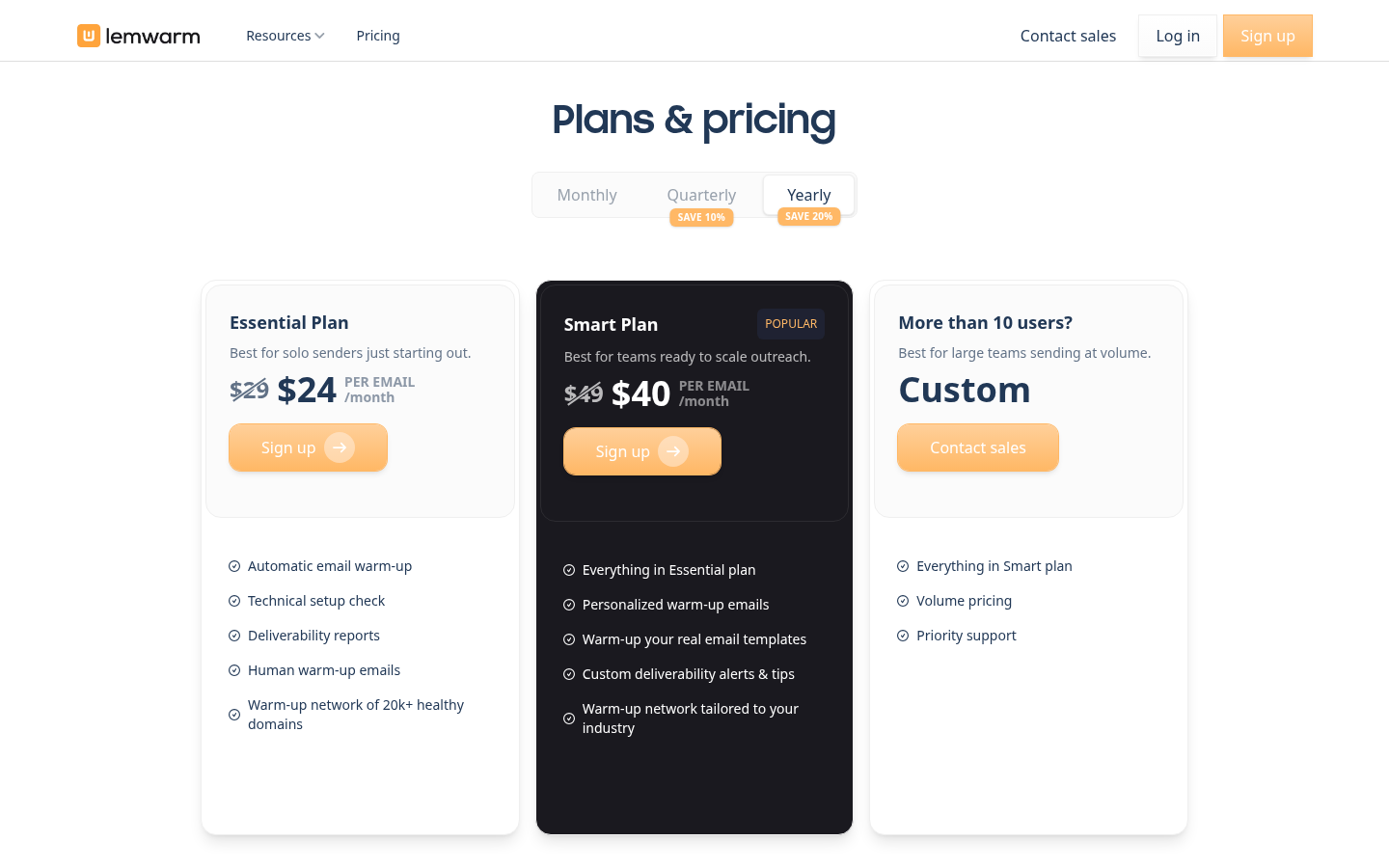
Lemwarm's pricing page, as of October 4, 2026.
The line that changes the math is at the bottom of the pricing page: every lemlist plan includes lemwarm. If you already send from lemlist, warmup is covered by that subscription. If you send from anything else, the per-account price is the number to multiply by your mailbox count.
Folderly
Folderly's homepage presents a suite of AI and email deliverability tools for B2B teams rather than a single warmup product. The core deliverability products are Folderly, for improving sender reputation and mailbox deliverability through everyday maintenance; Inbox Insights, for testing inbox placement, sending IPs and DNS before a campaign; and Pulse, for monitoring placement over time and alerting you when it slips. Around those sit Folderly AI for campaign drafts, DMARC Pilot for aggregate authentication reports, Lens for public domain and IP signals, Mirror (in beta) for previewing email HTML, and Flash for testing a real message sent from your actual tool and domain. The homepage lists G2 at 4.8, Capterra at 4.9 and TrustRadius at 5.0.
Folderly's pricing page prices the core Folderly product at $96 per mailbox a month on yearly billing, which it marks as saving 20%. Inbox Insights has a Free tier at $0 a month for 2 tests a month, a Monthly plan at $79 a month for 100 tests a month, and a Yearly plan at $799 for 100 tests a month, marked as saving 15%. Pulse is free, with real-time alerts by email, Slack, SMS and other channels at $0 a month. The page notes that availability, access and plans vary by product and that no single plan includes every product.
Read Folderly as the diagnostic end of this list. The free Inbox Insights tier and free Pulse alerts let you find out where a message lands and get told when that changes, before you spend anything on repair. The per-mailbox price of the core product puts it closer to a managed deliverability service than to a flat-rate warmup pool, which is a different purchase from the one most founders with three mailboxes are making.
MailReach
MailReach's homepage opens with a question rather than a feature list: are you here because you are worried about your spam rate? The first offer is a free spam test, and the product is framed as a deliverability tool built on two halves, email warmup and spam testing. The homepage lists a 4.9 rating on Capterra and says the warmup network is made of Google Workspace and Office 365 inboxes, the two providers it calls the ones that matter most, with organic human-like activity rather than canned responses. It works with any provider that supports SMTP, and the site lists dedicated warmup pages for Outlook, Google, SendGrid, Mailgun and Amazon SES.
MailReach's pricing page is a calculator. The all-in-one plan, email warmer plus spam tester, costs $25 per mailbox a month for 1–5 mailboxes, $19.5 for 6–20, $18 for 21–50 and $16 above that, or about 20% less billed yearly ($20 per mailbox for 1–5). Every warmer plan includes at least 20 spam test credits, because the page treats spam testing as part of deliverability rather than an extra. The plan covers fully automated warmup for the mailboxes you select, the AI warming algorithm, multi-provider warmup across Google, Outlook and others, up to 100 emails a day per mailbox, a reputation tracking dashboard, and domain and inbox health checks for blacklists, SPF, DKIM, DMARC and ETS. Spam test credits on their own are sold monthly or pay as you go, with 200 credits at $95 a month or $123.5 pay as you go, and that spam tester includes automatic tests with Slack and webhook alerts, an inbox placement view by provider, a blacklist checker, test history, a links checker, seed list rotation, a spam words checker and a reverse DNS checker. Agencies are pointed to custom pricing, and the page was running an autumn sale of 20% off the first 30 days of warming a first mailbox.
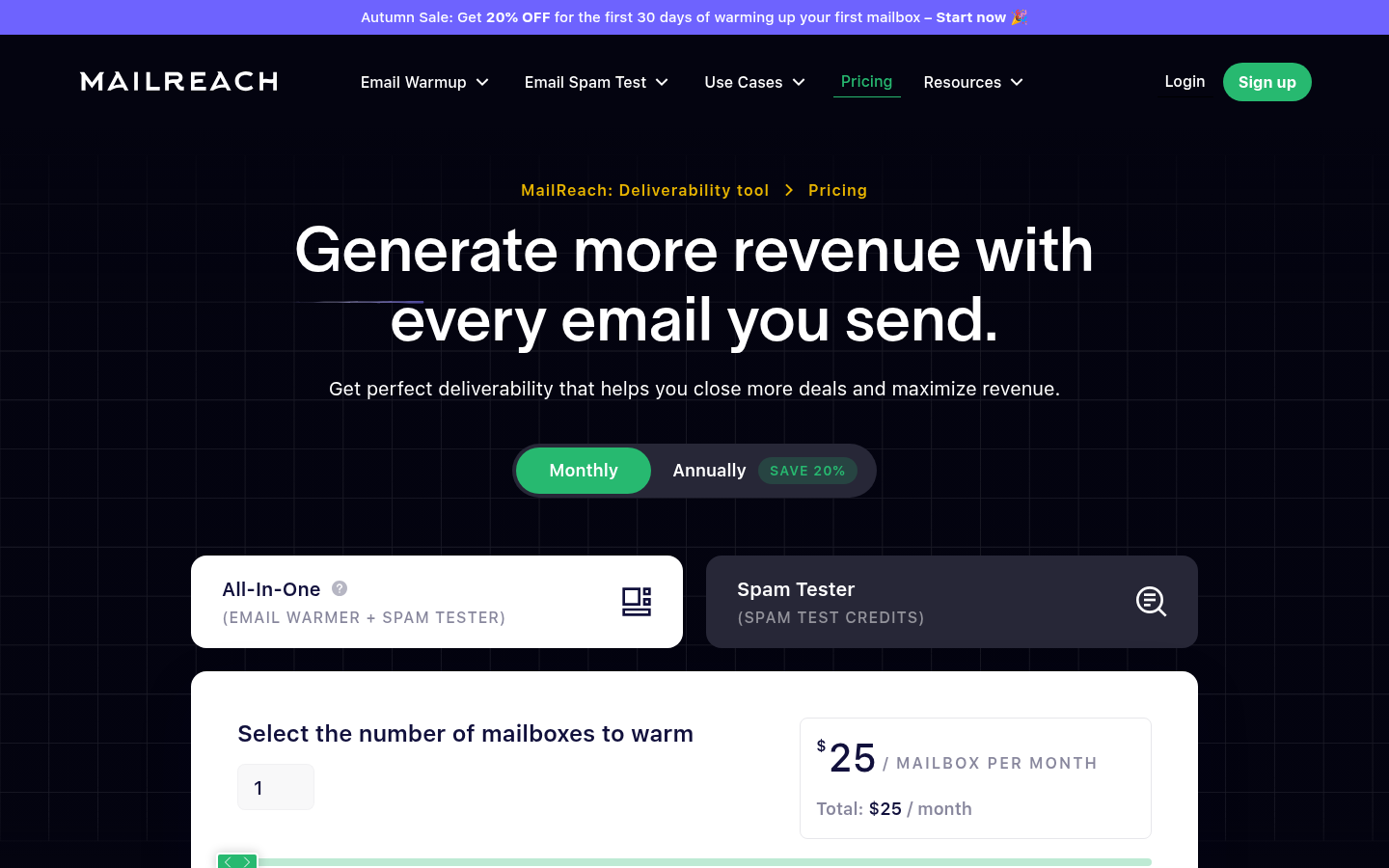
MailReach's pricing page, as of October 4, 2026.
Read MailReach as the tool for the sender who wants the test and the warmup from the same vendor and is happy to pay per mailbox for it. The free spam test on the homepage is also a reasonable first step for anyone who does not yet know whether warmup is the problem.
InboxAlly
InboxAlly's homepage calls itself the most powerful email deliverability tool and leads with sender reputation repair rather than warmup. Its pricing page explains the distinction: most tools build reputation from scratch, while InboxAlly is engineered to reverse bad classifications, pulling messages out of spam and Promotions and back into the primary inbox, using seven distinct engagement actions executed at human cadence from a seed network across the US. You can run it fully hands-off with Adaptive Autowarmup, include its seeds in your own list segments so your real campaigns become the warmup, or mix the two. An in-app IA Assistant answers questions against your own dashboard data, and IA Score predicts inbox placement through a proprietary ML model while IA Reputation rates each domain LOW, MED or HIGH.
InboxAlly's pricing page lists four plans, all billed monthly in USD, with a 10-day free trial and no credit card required. Starter is $149 a month for 100 seed emails a day, 1 sender profile and email support. Plus is $645 a month for 500 seeds a day, 5 sender profiles and email plus live chat support. Premium is $1,190 a month for 1,000 seeds a day, 10 sender profiles, phone and Zoom support, a 1-hour setup session and weekly 30-minute strategy reviews. Enterprise is custom, with thousands of seeds a day, unlimited sender profiles and dedicated deliverability experts. Every plan includes a dedicated customer success manager, the full REST API, live inbox placement testing with provider breakdown, blacklist monitoring, DMARC reporting, workspaces for multi-account switching and native integrations with HubSpot, Klaviyo and others. The page puts the seed-to-send ratio at 5%, so 100 seeds a day supports 2,000 or more daily sends.
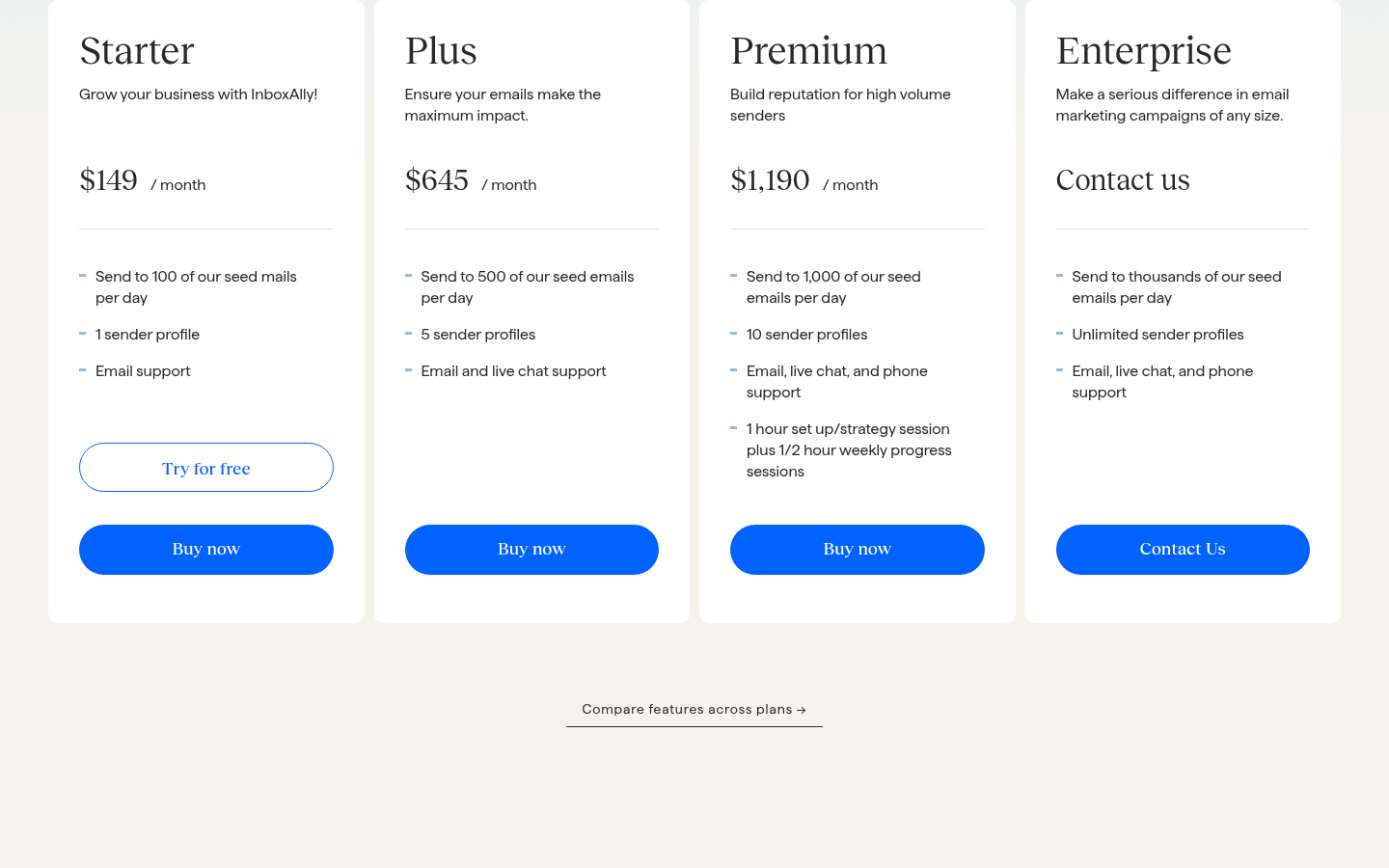
InboxAlly's pricing page, as of October 4, 2026.
InboxAlly is the most expensive entry here per sender profile and the only one that positions itself around repair rather than maintenance. It is the tool you look at when a domain has already been classified as spam and you want a person assigned to getting it back, not when you are warming three fresh inboxes for a first campaign.
Which one to pick
The right answer depends on what you send and how many mailboxes you run, so here it is by situation rather than as a single ranking.
You run a few mailboxes and want warmup, placement tests and sending on one invoice. SuperSend is the pick. Warmup is on every inbox at no extra cost, placement tests run on plan credits against 10 seed inboxes by default, including Google and Outlook, the bounce guard pauses a campaign before it hurts the domain while warmup keeps running, and plans from $59 a month cover 15,000 emails with unlimited contacts. If LinkedIn is part of your outreach, the sender comes with the plan rather than as a separate tool.
You like the sender you have and only need warmup on many inboxes. TrulyInbox charges for warmup emails sent, not accounts connected, so Starter at $29 a month ($22 billed annually) covers 200 warmup emails a day across unlimited accounts, and the Free plan warms 1 account at 10 a day for as long as you like. Use its 2:1 rule to size the plan. Mailivery works the same way at a similar price, with Starter at $29 a month for 200 shared warm-up emails a day across unlimited mailboxes, and bundles blacklist monitors, verification credits and placement test credits into each plan.
You run Google or Microsoft mailboxes and want to pay only for the ones you warm. Warmforge's per-slot pricing is $10 a slot a month billed quarterly, the first slot is free, and 1 placement test a month plus DNS, MX and blacklist health checks come with the subscription. If you send from Salesforge, Warmforge's pricing page says the slots are unlimited.
You have one or two inboxes to warm, or you already send from lemlist. Lemwarm's Essential plan, at $29 per email account a month ($24 billed yearly), is the simplest per-mailbox purchase here, and every lemlist plan includes it.
You want the spam test and the warmup from the same vendor. MailReach prices its all-in-one warmer at $25 per mailbox a month for up to 5 mailboxes ($20 billed yearly) with at least 20 spam test credits included, and the spam tester reports placement by provider with Slack and webhook alerts.
You do not know yet whether warmup is your problem. Folderly's Inbox Insights free tier gives you 2 placement tests a month and Pulse gives you free alerts when placement moves. MailReach's homepage also offers a free spam test. Find out where the mail is landing before you pay anyone to fix it; Folderly's $96 per mailbox a month core product is a decision for after the test.
A domain is already in spam and you want a person on it. InboxAlly's Starter plan at $149 a month covers 100 seed emails a day and 1 sender profile, with a dedicated customer success manager and a 10-day free trial, and its pricing page frames the product around reputation repair rather than warming from scratch.
Frequently asked questions
Do I need a separate warmup tool if my sending platform includes one?
Usually not, and often it works against you. A standalone warmup tool cannot see your campaign's bounce rate or placement, so it cannot pause anything when a domain starts slipping. Check the pricing page of the sender you already pay for before adding a second invoice: Lemwarm's pricing page says every lemlist plan includes lemwarm, Warmforge's pricing page says Salesforge users get unlimited warmup slots, and SuperSend includes warmup on every inbox on every plan. If your sender has no warmup at all, TrulyInbox and Mailivery are the two standalone services on this page priced by shared warmup volume with unlimited mailboxes, and MailReach, Lemwarm and Warmforge are priced per mailbox or slot.
Is a slow warmup still necessary for every new inbox?
For a brand-new domain with no history at Google or Microsoft, yes. What providers read is the ratio between how much you send and how much of it gets engagement, and how steady that pattern is over time. Fast-ramp results tend to come from warmup traffic on infrastructure a vendor controls end to end, and that does not transfer cleanly to a domain you bought last week. Start conservative, raise the per-mailbox daily cap based on bounce and placement data, and treat a dip as the signal to pull back. For a sense of what conservative looks like in practice: a Google or Outlook inbox connected to SuperSend starts at 3 warmup emails on day 1, adds 2 a day, and reaches the default 15 a day after about a week. An SMTP inbox steps by 3 to a default 30 over about 10 days. Both are per-inbox settings you can change. TrulyInbox's Growth plan likewise lets you dial in ramp speed and send caps, and Mailivery's pricing page lists ramp-up to mimic natural behaviour on every plan.
Should warmup keep running once my campaigns start?
Yes. The reputation warmup builds is the same reputation your campaign draws on, and TrulyInbox's pricing page describes its 2:1 warmup-to-cold ratio as "every day and ongoing" for that reason. Where the two interact is volume: if placement dips, the first lever is campaign volume on that mailbox, not warmup. The pause logic should follow the same split. In SuperSend, warmup keeps running while campaigns send from the inbox, the bounce guard pauses only the campaign that is bouncing, and warmup handles its own bounces by dropping an inbox with too many warmup bounces to 5 warmup emails a day.
I warmed two domains identically and one lands in spam. Why, and what should I do?
Identical setup does not mean identical reputation. A domain can carry a prior listing, sit on a noisy IP block, or have a message-level problem that the other does not. The wrong move is adding more inboxes to the healthy domain and hoping. The right move is to pause the failing domain, run a placement test from one inbox on each domain with the same plain message to seed inboxes at Gmail and Outlook, and compare. If the same domain fails every time, check its authentication alignment and blacklist status before you decide whether to repair or replace it. SuperSend's placement tests run against 10 seeds by default, including Google and Outlook; MailReach's spam tester shows an inbox placement view by provider; Mailivery's plans include placement test credits across Google, Microsoft and Yahoo; Folderly's Inbox Insights tests placement, IPs and DNS, with 2 tests a month on its free tier; and Warmforge includes 1 placement test a month with a warmup subscription.
How do I check placement without trusting the warmup tool's own score?
A warmup health score reports how warmup emails land. A placement test reports how a real message lands. Send the message you intend to use, from the mailbox you intend to send from, to seed inboxes at Google and Outlook, and read the result. Do this per domain, not per account, since reputation often fails at the domain level.
Can I warm up an inbox for free?
TrulyInbox's pricing page has a free-forever plan for 1 account at 10 warmup emails a day, and a 7-day free trial with no credit card on paid plans. Warmforge's homepage offers 1 free warming slot for a Google or Microsoft mailbox plus 1 free placement test a month on your first workspace. Lemwarm is included with every lemlist plan, so it costs nothing extra if you already pay for lemlist. Mailivery offers a 7-day free trial and InboxAlly a 10-day one with no card. SuperSend signup is free with no card, and turning on warmup for your own inboxes starts a 7-day free trial with a card on file. Folderly's free tiers and MailReach's free spam test are for testing and monitoring rather than warming: 2 Inbox Insights placement tests a month, free Pulse alerts, and a one-off spam test from MailReach's homepage.
Are pre-warmed mailboxes a shortcut?
They remove the wait on day one, but the domain they sit on still has to earn reputation with your actual sending. Inboxes bought inside SuperSend are not pre-warmed: they cost $5 a month each, arrive with SPF, DKIM and DMARC already configured, and start warming on their own from zero with no warmup history. Whatever the source, keep campaign volume on a new mailbox low until a placement test says it is landing.
Start with warmup running
If you have a few Google or Outlook mailboxes, the fastest way to see whether bundled warmup fits is to connect one inbox and turn it on. Sign up for SuperSend without a card, connect or buy an inbox, and warmup, placement tests and the bounce guard are on the same screen as the sequence you send from. The 7-day trial starts when you turn warmup on or launch a campaign.