LinkedIn automation tools do the repetitive half of prospecting: profile visits, connection requests, follow-up messages, and the daily pacing that keeps an account out of trouble. The eight below cover the range a founder actually chooses between, from a €19 per-user plan (billed yearly) to a sequencer that runs email and LinkedIn as one campaign. One belief shapes how this page ranks them: a reply on any channel should end the sequence on every channel. A prospect who answers your LinkedIn message and then gets your third cold email the next morning has learned that you are not reading replies. Email and LinkedIn belong in one sequence with one contact record, not in two tools joined by a CSV export, and the tools here are judged partly on how close they get to that.
Who this list is for
This page is for founders and small sales teams who run their own outbound: you write the messages, you own the LinkedIn account, and you are the one who answers when someone replies. HeyReach's homepage is titled for agencies, sales and growth teams, lemlist and Dripify both sell custom Enterprise tiers, Expandi's pricing page offers a custom Agency plan for 10+ seats, and Botdog's pricing page sells an Agency plan and a Managed service from $690 per month per seat. Those tiers are noted where they appear, but they are not what this page ranks. If you manage client accounts, your criteria are different and this is not the list for you.
How to choose, in short
Our buyer's guide to LinkedIn and email outreach automation tools walks through the criteria in detail, so this page only lists the four that decide most purchases:
- Where it runs. A browser extension needs your machine on and your session open. A vendor-run service does not. Taplio's post on LinkedIn tools puts cloud-based sending versus click-simulating browser extensions first on its list of things to verify before buying. Dripify's pricing page lists cloud-based performance under its safety features, and Expandi's pricing page describes its software as cloud-based with a dedicated country-based IP address.
- Pacing and limits. Every account has a ceiling on daily actions. You want a tool that lets you set the number and spreads actions through the day. Our post on LinkedIn automation limits covers what those ceilings look like in practice, and the FAQ below gives the default numbers where a vendor publishes them.
- What happens on reply. Trellus's post on LinkedIn outreach tools treats reply detection that stops a campaign as a basic expectation rather than a premium feature. The sharper question is whether a reply stops the LinkedIn steps only, or every step on every channel, including an email step that runs in a different product.
- Price per seat, monthly and yearly. Every tool here publishes both a monthly price and a yearly discount. The gap between them runs from about 15% to 50%, so the yearly figure is the one to compare if you plan to run outbound all year.
The eight tools side by side
Prices come from each vendor's pricing page as of October 4, 2026. Waalaxy shows euros in Europe and dollars in the US; the rest price in dollars.
| Tool | Who it suits | Plan | Monthly | Yearly | What the plan includes |
|---|---|---|---|---|---|
| HeyReach | A founder paying per LinkedIn sender, with email running in Instantly or Smartlead | Growth, per sender | $79 | $63 per sender per month ($756 billed yearly, 20% off) | Unlimited campaigns, all LinkedIn actions including voice notes and profile views, "If Connected" condition, unified LinkedIn inbox, multichannel through native Instantly and Smartlead integrations, 100 enrichment credits per sender, integrations, API and webhooks, workspaces and permissions, MCP server |
| Dripify | A solo seller or small team that wants LinkedIn and email steps in one sequence, priced per user | Basic / Pro / Advanced, per user | $59 / $79 / $99 | $39 / $59 / $79 per user per month | Basic: 1 drip campaign, 20 connection requests and 30 messages a day; Pro: unlimited campaigns, 75 connection requests and 100+ messages a day, dedicated inbox, CSV export, webhooks, HubSpot, open API and MCP; Advanced: multi-team management, advanced LinkedIn protection, lead tagging, step analytics, A/B testing, evergreen leads; LinkedIn and email sequences plus 100 email finder credits on every plan |
| Waalaxy | A founder starting LinkedIn outreach at the lowest price, adding email later | Pro / Advanced / Business, per user | €39 / €99 / €139 | €19 / €49 / €69 per user per month (about 50% off; quarterly about 20% off) | Pro: 300 invites a month, unlimited campaigns, pre-built sequences, automated follow-ups, CRM sync, 25 email finder credits; Advanced: 800 invites a month, maximum LinkedIn invitation limits, API, Make, Zapier and N8N modules, live chat; Business: 800 invites a month, cold email sequences, LinkedIn plus email campaigns, 500 email finder credits; LinkedIn inbox is a paid add-on on every plan |
| SuperSend | A team running cold email and LinkedIn as one sequence with one inbox | Starter / Growth / Scale | $59 / $99 / $319 | $50 / $84 / $271 per month ($600 / $1,008 / $3,252 billed yearly) | 15,000 / 50,000 / 200,000 emails a month and 1 / 2 / 5 LinkedIn senders; every feature in every plan; unlimited contacts; warmup, SPF/DKIM/DMARC checks, placement tests and unified inbox; built-in HubSpot, Salesforce, Pipedrive and monday.com |
| Expandi | A founder or small team that wants LinkedIn automation with email follow-ups in the same sequence and strict account limits | Business, per account | $99 | $79 per month (20% off) | Cloud-based, dedicated country-based IP, profile auto warm-up, smart limit ranges, campaign types that bypass limits, unlimited campaigns, campaign prioritization, connection requests, messages and email follow-ups in one sequence, if/action sequence builder, dynamic placeholders, duplication prevention, blacklist, integrations; image and GIF personalization costs extra |
| lemlist | A team that wants LinkedIn, email, calls, SMS and WhatsApp in one campaign with a lead database attached | Email / Multichannel | $69 / $109 | $55 / $87 per month (20% off) | Email: unlimited users and email senders, 50,000 emails a month, email and phone finder, 650M+ lead database, lemAgent, warm-up and deliverability hub, CRM integrations and API; Multichannel: priced per user with 5 senders per user, unlimited emails and messages, LinkedIn automation, SMS automation, WhatsApp add-on, built-in dialer, use from Gmail and LinkedIn; lemlist's comparison grid marks unlimited users and email senders as included on Email and not on Multichannel |
| Botdog | A founder who wants LinkedIn only, especially from Sales Navigator, with a quick setup | Solo, per account | $79 | $55.33 per month ($664 billed yearly, 30% off; 3-month billing is 10% off) | Unlimited safe campaigns, all LinkedIn actions, AI-powered campaign building, AI-powered unified inbox, multi-account and team management, lead import and export, analytics and account health, API, integrations and support |
| Dux-Soup | A founder who wants LinkedIn drip campaigns and a choice between a desktop app and a hosted version | STACKED local / STACKED cloud, per seat | $55 / $99 | $41.25 / $74.17 per seat per month (25% off) | Both: unlimited concurrent campaigns, AI-powered campaign and message personalization, campaign statistics and lead management, contact export, native integrations with Slack, Salesforce, Pipedrive, HubSpot, SharpSpring, Freshsales, MS Teams, HighLevel, Zapier and Make, drip campaigns of up to 12 actions, response detection that pauses campaigns; cloud adds running continuously with no machine on, starting campaigns from anywhere, and account management |
1. HeyReach
HeyReach's homepage leads with "10x your LinkedIn outbound. Unlimited senders, one fixed cost," and its product menu splits use cases into agencies, sales teams and growth teams, with a VIP service where HeyReach runs the outbound motion and you take the meetings. It also lists a HeyReach MCP for driving outreach from AI agents and a CLI for running LinkedIn outreach from anywhere.
HeyReach's pricing page prices Growth at $79 per sender per month. Quarterly billing takes 10% off, to $71 per sender per month ($213 billed quarterly), and yearly billing takes 20% off, to $63 per sender per month ($756 billed yearly). Growth includes unlimited campaigns, with each sender held within its daily limits and safe usage levels, and all LinkedIn actions: connection requests, messages, follow-ups, voice notes and profile views, plus an "If Connected" condition that separates current connections from new ones. It also includes a unified inbox for LinkedIn messages across senders, 100 one-time enrichment credits per sender for finding verified emails, integrations with Clay, RB2B, Trigify, Make, Zapier, HubSpot, Twain and Persana, API and webhooks, and workspaces and permissions that keep each client's data and senders separate. The multichannel line is the one to read twice: HeyReach's pricing page says you use its native integrations with Instantly and Smartlead to send multichannel campaigns, which means the email half of a HeyReach sequence runs in one of those two email tools. Above Growth sit Agency at $999 per month for 25 senders (50 senders is a second option), with whitelabel, done-for-you onboarding and a dedicated Slack channel, and Unlimited at $2,999 per month capped at 300 senders under a fair-use policy. Growth and Agency both carry a "Try it free" button, and the pricing FAQ describes a 14-day trial with no card for up to 3 LinkedIn accounts.
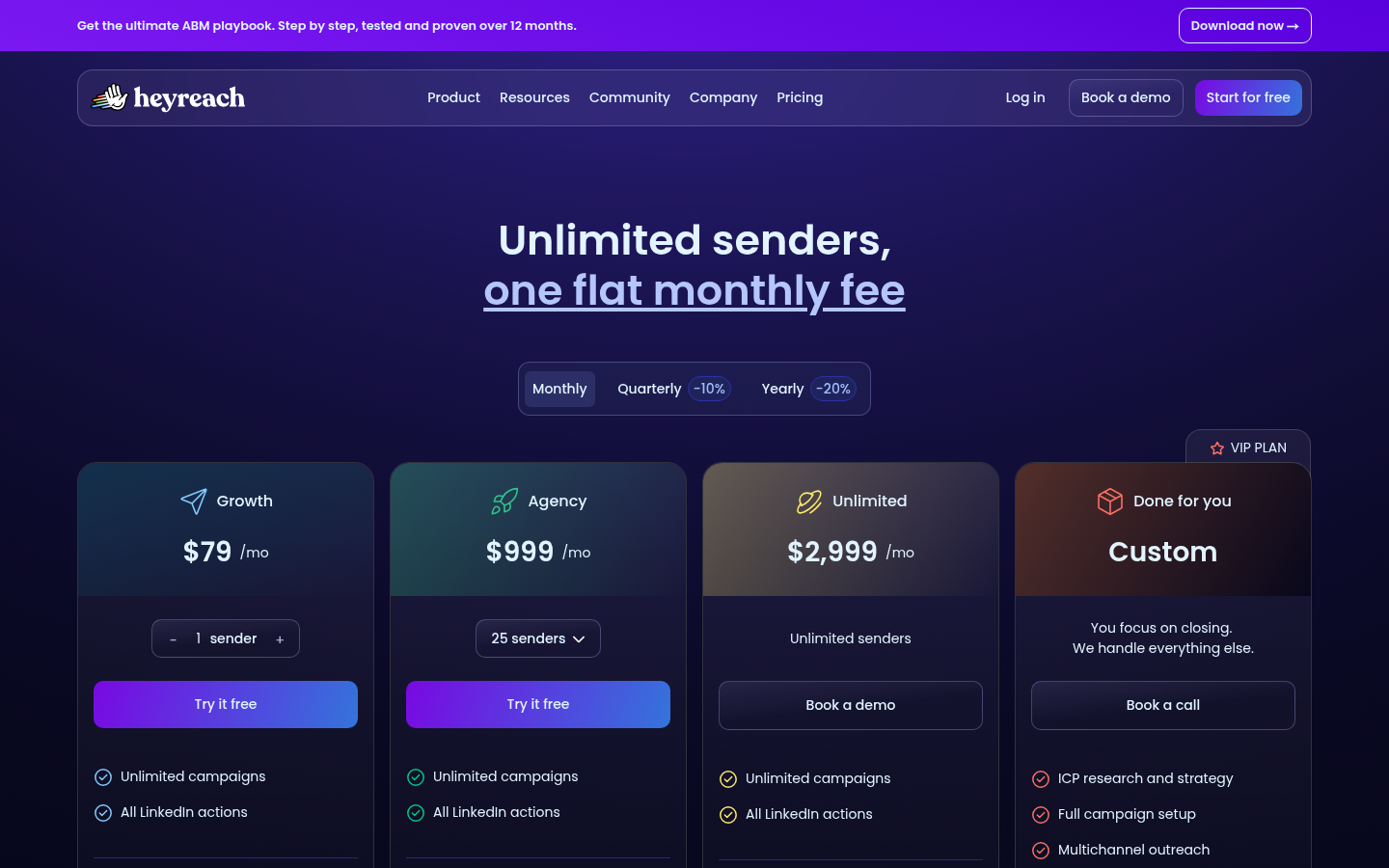
HeyReach's pricing page, as of October 4, 2026.
Who it fits: a founder who already runs cold email in Instantly or Smartlead and wants LinkedIn added through a native integration rather than a second email tool, or a team that expects to grow into many senders at a flat price. If you are weighing the per-sender price against a tool that includes the email side, our comparison of HeyReach alternatives on seats and email covers that math.
2. Dripify
Dripify's homepage headline is "LinkedIn Automation Made Ridiculously Simple," and its features menu lists multi-step LinkedIn lead generation sequences, multichannel sequences built from LinkedIn and email actions with delays and conditions, email automation, an email finder and verifier, data enrichment with 30+ attributes, LinkedIn analytics, inbox management, and team management. It has a dedicated use case page for founders alongside sales and HR.
Dripify's pricing page lists three self-serve plans, each per user with a 7-day free trial and no credit card, and its pricing FAQ spells out both billing periods. Basic is $59 per month, or $39 per user per month billed annually, for one drip campaign at limited daily quotas: 20 connection requests, 30 messages, 10 Sales Navigator InMails and 100 profile views a day. Pro is $79 per month, or $59 annually, and lifts you to unlimited campaigns at full quotas (75 connection requests, 100+ messages, 30 InMails, 200+ profile views a day), with a dedicated inbox, CSV export, webhook and HubSpot integrations, and an open API and MCP server. Advanced is $99 per month, or $79 annually, and adds multi-team management, advanced LinkedIn protection, lead tagging, step analytics, A/B testing and evergreen leads. Enterprise is custom-priced with premium onboarding and a customer success manager. Every paid plan includes LinkedIn and email sequences and 100 email finder credits a month; extra credits run from $29 for 1,000 to $99 for 10,000. The pricing FAQ says each seat connects one LinkedIn account, so five reps need five seats, and that Dripify works with all LinkedIn account types, including free ones.
Under safety, Dripify's pricing page lists cloud-based performance, access from a unique local IP address, human behavior simulation, lead duplication security and activity control, and its team features include preventing duplicate outreach across reps. Its pricing FAQ also says you connect your own email inbox and add email steps alongside connection requests, messages, InMails and profile views, with no separate cold email tool required.
Who it fits: a solo founder or small team that wants LinkedIn first, email as steps in the same sequence, and a low entry price. Basic's one campaign at 20 connection requests a day is a real cap, so most people running outbound as a job will land on Pro.
3. Waalaxy
Waalaxy's homepage headline is "Make LinkedIn your #1 acquisition channel," with the promise of reaching 800+ potential buyers a month on LinkedIn, auto-following up until prospects reply, and no complex setup, database or heavy workflows. It describes building prospect lists from LinkedIn Search, Sales Navigator or Recruiter Lite, targeting by intent signals such as post reactions, groups and events, and 99+ ready-to-use outreach sequences. The homepage cites a 4.8 rating across 2,000+ Chrome Store and G2 reviews and 200,000+ users.
Waalaxy's pricing page lists three plans per user, each with a 14-day free trial, in euros. Pro is €19 per user per month billed yearly (€39 monthly) for 300 invites a month, unlimited campaigns, pre-built sequences, automated follow-ups, CRM synchronization and team collaboration tools. Advanced is €49 for 800 invites a month, maximum LinkedIn invitation limits, API access, Make, Zapier and N8N modules, and live chat support with a 4-hour reply target. Business is €69 for 800 invites a month plus cold email sequences, LinkedIn-and-email multichannel campaigns, multiple sender accounts and 500 email finder credits a month (Pro and Advanced get 25). Those are yearly prices; month to month the plans are €39, €99 and €139, and quarterly €31, €79 and €109. The plan table lists CRM sync with 2,000+ tools, CSV import and export, imports from LinkedIn Basic, Sales Navigator and Recruiter Lite, duplicate prevention and smart reply detection on every plan. The LinkedIn Inbox, with response templates, scheduled follow-ups, tags and CRM export, is a paid add-on on every plan, with 500 free conversations to start.
Who it fits: a founder who wants the cheapest way to start sending connection requests and follow-ups, and who is fine with email arriving only on the Business plan. The 300-invite cap on Pro is the number to check against your weekly volume before you commit to the entry price.
4. SuperSend
SuperSend is an outbound sequencer where LinkedIn steps and email steps sit in the same sequence on the same contact record. The LinkedIn outreach feature page lists the LinkedIn steps available: profile visits and post likes to warm a prospect up before the first email, connection requests with or without a note using the same variables as your emails, a wait-until-connected step that holds the next action until the request is accepted and then sends a LinkedIn message or falls back to email, and LinkedIn messages whose replies land in the same inbox as email replies. LinkedIn steps run on SuperSend's servers, so there is no browser extension to install and no computer to leave open. You can also run LinkedIn-only sequences, using no email steps at all. With Sales Navigator, connection requests and InMail work from a SuperSend sequence. There is no import of Sales Navigator searches; lists come in from a CSV with a LinkedIn profile URL or email per row, the API, the people who reacted to or commented on LinkedIn posts (up to 25 post URLs), or an Apollo or HubSpot import.
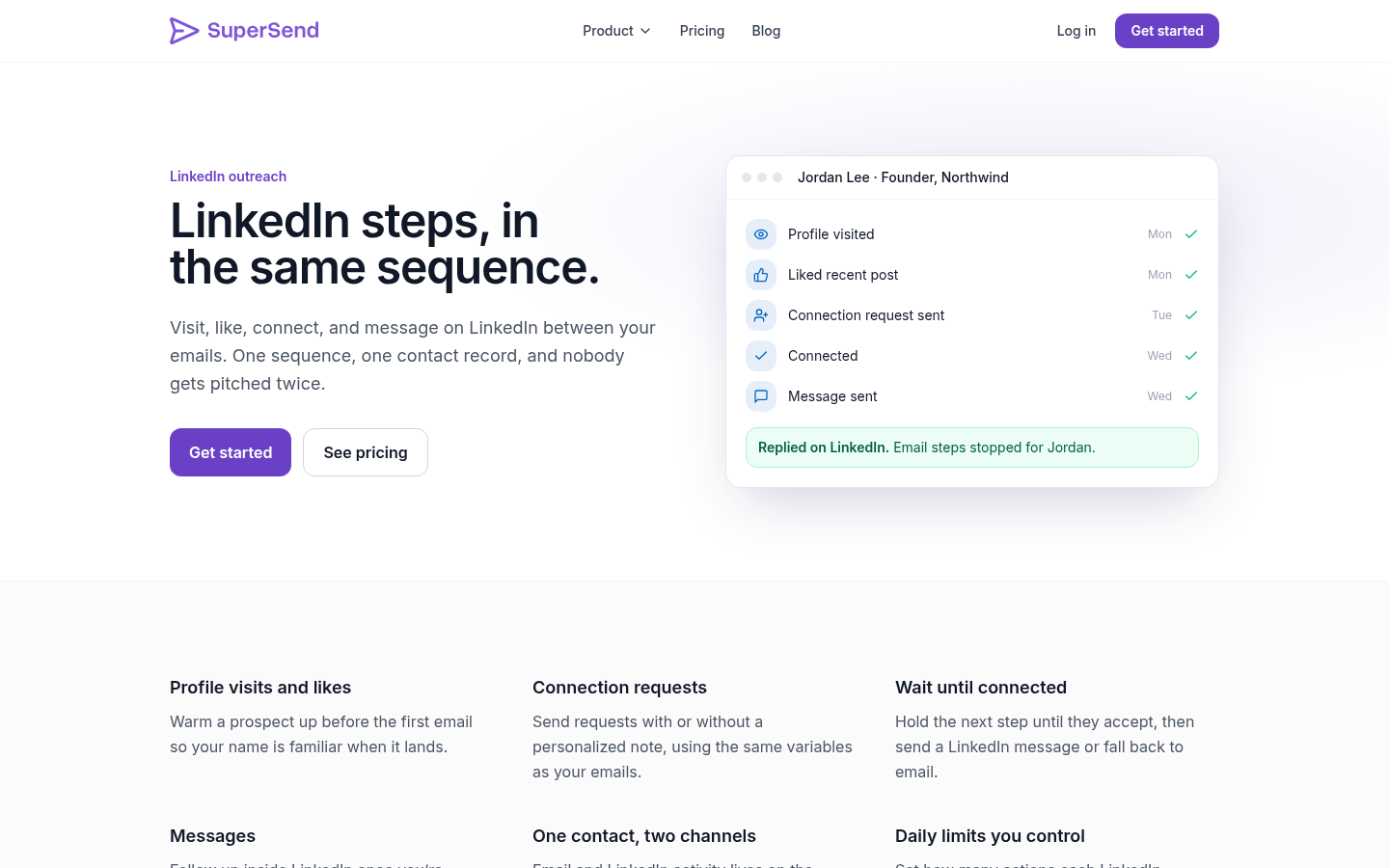
SuperSend's LinkedIn outreach feature page.
Each new LinkedIn sender starts at 10 actions a day each for connection requests, messages, profile visits and likes. You can raise those per account, up to 100 a day for connection requests and likes and up to 200 a day for messages and profile visits, which means the account ramps as fast as you decide and no faster. LinkedIn actions do not follow the sending hours set for a mailbox.
The part that matters for the belief this page opened with: because email and LinkedIn activity live on one contact, a reply on either channel stops both. Nobody gets pitched twice. Email deliverability is handled next to the campaigns rather than in a separate tool: warmup, SPF, DKIM and DMARC checks, bounce monitoring, and placement tests against 10 seed inboxes by default, including Google and Outlook. A bounce guard pauses a campaign whose invalid-recipient bounce rate passes 3% once it has sent 100 or more emails, adjustable per campaign; a small campaign pauses after 10 invalid-recipient bounces. Each mailbox starts at a default cap of 15 emails a day, adjustable per mailbox. HubSpot, Salesforce, Pipedrive and monday.com are built in, with Zapier, Make and webhooks for anything else; Close, Attio and Zoho CRM are not built in.
Plans start from $59 a month and every feature is in every plan. Starter is $59 for 15,000 emails a month and 1 LinkedIn sender; Growth is $99 for 50,000 emails and 2 LinkedIn senders; Scale is $319 for 200,000 emails and 5 LinkedIn senders. Yearly billing saves about 15%: $600, $1,008 and $3,252 a year, which works out to $50, $84 and $271 a month. Contacts are unlimited on every plan, and cost follows the email volume you send rather than the size of your list. Extra LinkedIn senders are $29 a month each. Email overage on monthly plans is billed per email over the limit: $0.006 on Starter, $0.004 on Growth, $0.0025 on Scale. You can connect your own Google or Outlook inboxes or buy inboxes at $5 a month each and domains at $13 a year inside SuperSend, with SPF, DKIM and DMARC already set up. The full breakdown is on the SuperSend pricing page. Signup is free with no card; launching a campaign or turning on warmup starts a 7-day free trial with a card on file.
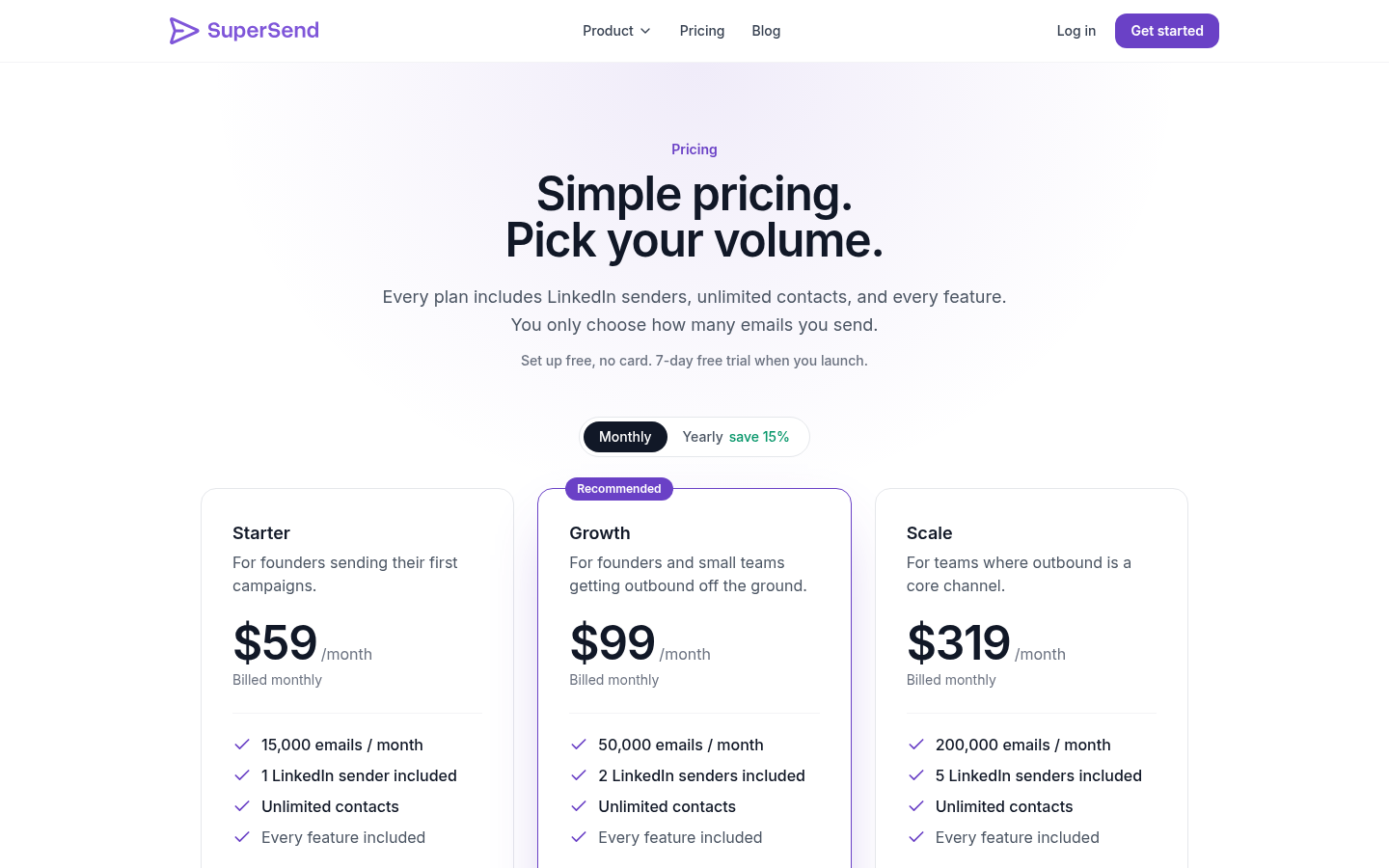
SuperSend's pricing page with its plans.
Who it fits: a team that already runs cold email, or intends to, and wants LinkedIn as steps inside that sequence rather than as a second tool.
5. Expandi
Expandi's homepage headline is "Get the 3X meeting multiplier with Expandi's LinkedIn automation tool," and its product menu lists LinkedIn outreach at up to 300+ connection requests a week, smart campaigns that branch on prospect behavior, message personalization, lead generation, workspaces for teams, CRM integrations, and an Expandi MCP for running outreach from a prompt. Its solutions menu names agencies, sales teams and recruiters.
Expandi's pricing page lists one self-serve plan. Business is $99 per month, or $79 per month on annual billing (20% off, described as two months free), with a 7-day free trial, and the page says it is better suited for small sales teams. Under account safety it lists cloud-based software, a dedicated country-based IP address, profile auto warm-up that starts slowly and lets you adjust the rate of growth, and smart algorithms for limit ranges on connections, messages, InMails and event invites, with Expandi refusing to go over the limits you set. Under conversions it lists campaign types that bypass outreach limits, such as a Mobile Connector campaign that adds 100 connection requests a week, unlimited campaigns, campaign prioritization, and multichannel outreach: connection requests, messages and email follow-ups in one sequence. The sequence builder supports if/action branching, dynamic placeholders, unlimited templates, tags and notes on conversations, duplication prevention, a blacklist and integrations. Image and GIF personalization carries an additional cost, and video personalization runs through a paid Sendspark add-on. Agency is a custom plan for 10+ seats with roles and permissions, client reports, a dedicated customer success manager and white labeling.
Who it fits: a founder or small team that wants LinkedIn as the main channel with email follow-ups inside the same sequence, and who values the warm-up and limit controls enough to pay $99 per account for them.
6. lemlist
lemlist's homepage headline is "The only platform you need to make Outbound work," and its product menu runs from a 650M+ lead database and email and phone finders, through multichannel sequences across email, LinkedIn, calls, WhatsApp and SMS, to email infrastructure and deliverability monitoring, and lemAgent, its AI layer for sourcing and researching leads. The comparison table on its pricing page lists a unified inbox, conditioned next steps, auto-stop campaign, AI reply intent detection and AI out-of-office detection, and working in lemlist from LinkedIn and from Gmail.
lemlist's pricing page lists two self-serve plans. Email is $69 per month, or $55 per month on yearly billing (20% off), and covers unlimited users and email senders, 50,000 emails a month, the email and phone number finder, the lead database, lemAgent, the MCP and CLI, email warm-up and a deliverability hub, and CRM integrations and API. Multichannel is $109 per month, or $87 per month yearly, priced per user, with 5 senders per user, unlimited emails and messages, LinkedIn automation, SMS automation, a WhatsApp add-on, a built-in call dialer and VoIP integrations, and the ability to work in lemlist from Gmail and LinkedIn. lemlist's comparison grid marks unlimited users and email senders as included on Email and not on Multichannel, so on Multichannel the per-user price is the one to budget for. Enterprise is custom, with 5 or more senders per user, custom roles, SSO and a dedicated account manager. Data add-ons are separate: lead enrichment at $20 per month ($16 yearly) for 2,000 credits, and buying intent signals at $29 per month ($21 yearly) for 100 signals. The comparison table on the same page lists LinkedIn profile visits, follows and invites, text and voice messages, InMail, in-app domain and email purchase, deliverability testing, and CRM integrations with HubSpot, Salesforce and Pipedrive, plus Zapier, Make, n8n and Clay. The 14-day free trial includes the Multichannel plan's features except in-app calls, with 200 credits. lemlist's pricing page also shows a G2 rating of 4.6 out of 5 across 2,240+ reviews.
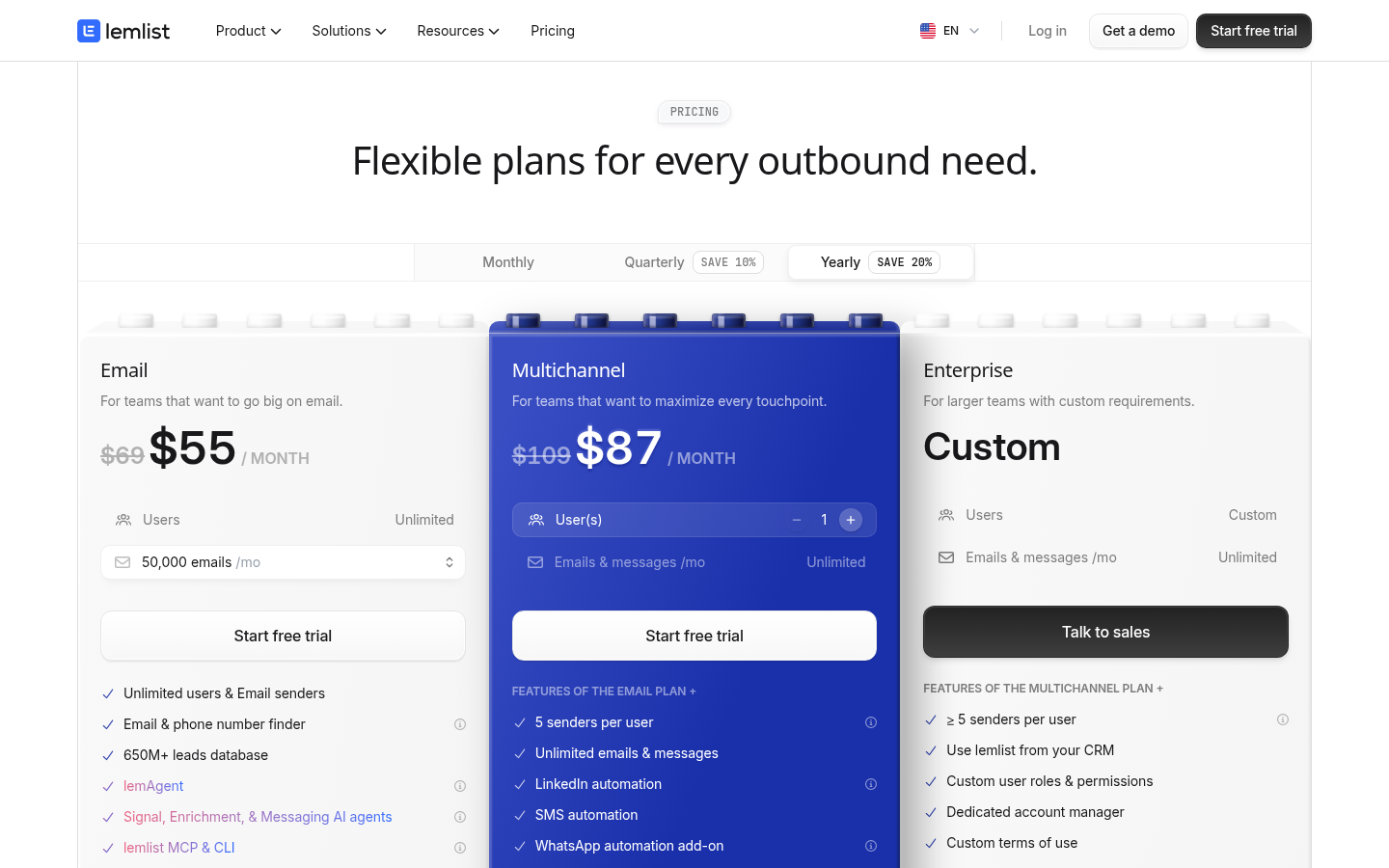
lemlist's pricing page, as of October 4, 2026.
Who it fits: a team that wants list building, enrichment and intent signals in the same product as sending, and that expects to use calls, SMS or WhatsApp alongside LinkedIn and email. The Multichannel plan at $109 per user is the one that includes LinkedIn.
7. Botdog
Botdog's homepage headline is "Automation for LinkedIn Sales Navigator," with the pitch of scheduling invitations and follow-ups without leaving LinkedIn, a 7-day free trial with no credit card, and setup in 5 minutes. It says 5,000+ professionals use it, and the testimonials on the page describe uploading a CSV of contacts and tailoring messages depending on whether you are already connected to a prospect.
Botdog's pricing page lists Solo at $79 per month per account, with 10% off on 3-month billing and 30% off on yearly billing, which brings it to $55.33 per month, or $664 billed yearly. Solo includes unlimited safe campaigns, all LinkedIn actions, AI-powered campaign building, an AI-powered unified inbox, multi-account and team management, lead import and export, analytics and account health, and API, integrations and support, with every AI feature included and no upsells. Agency is $299 per month for 5 senders ($209.33 per month yearly), with options up to 40 senders, white-glove onboarding, done-for-you migration and dedicated technical support. Managed is a done-for-you service from $690 per month per seat. The pricing FAQ says all plans carry the 7-day trial with no card, plans can be changed at any time with prorated billing, and there are no refunds, setup fees or long-term commitments. Botdog's own blog post on lead generation software, where it lists itself first, names "no email outreach" as its one con.
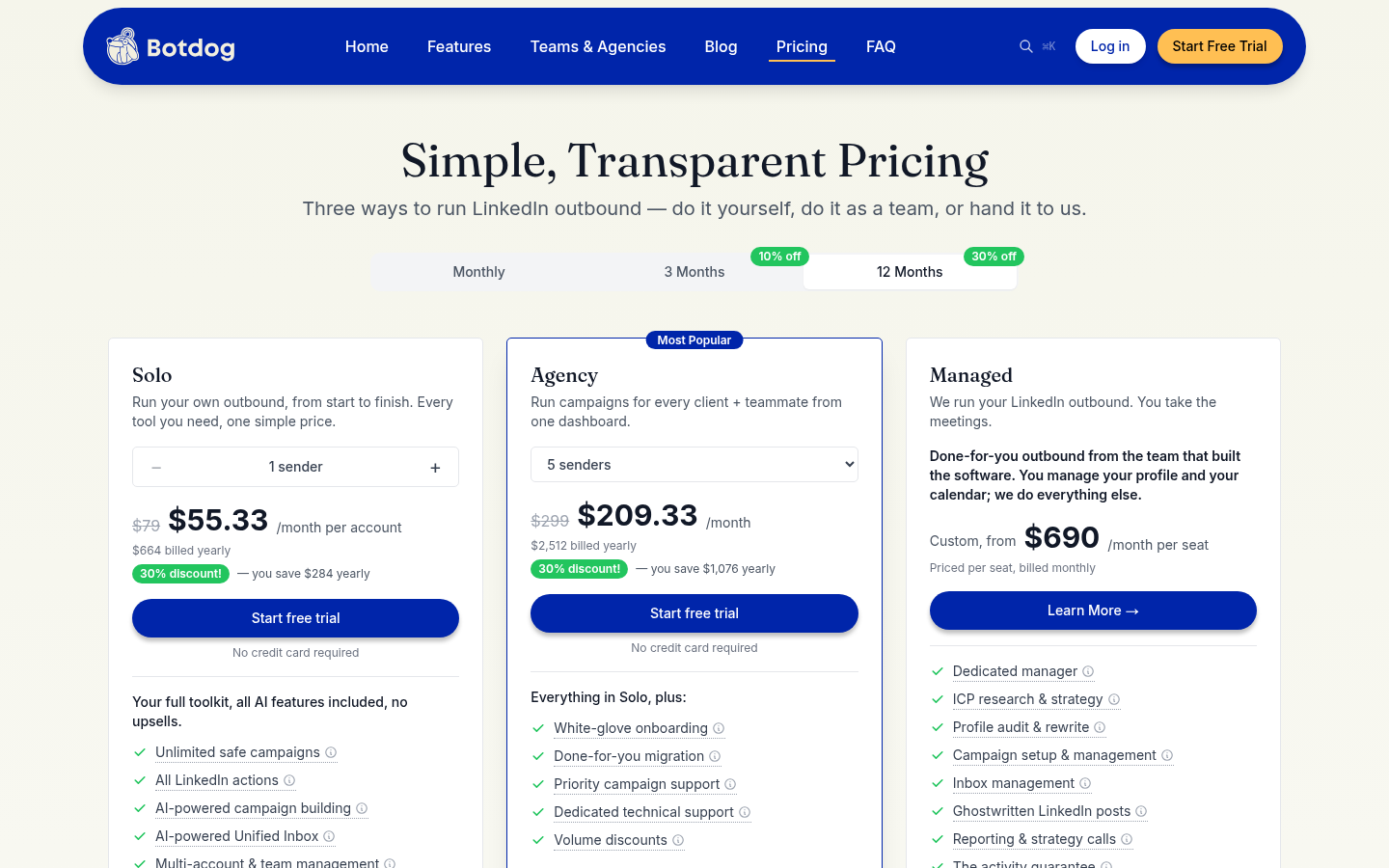
Botdog's pricing page, as of October 4, 2026.
Who it fits: a founder who prospects from Sales Navigator, wants LinkedIn automation and nothing else, and will run email elsewhere or not at all.
8. Dux-Soup
Dux-Soup's homepage is titled "LinkedIn Automation Tool | STACKED AI Outreach" and leads with AI personalization, pitched as outreach that feels relevant, authentic and human. Its product menu lists drip campaigns, messaging, profile engagement, inbox and replies, analytics, lead management and account safety, with integrations for ChatGPT, Gemini, Claude, Slack, HubSpot, Salesforce, Pipedrive, Freshsales, SharpSpring, HighLevel, Zapier and Make, and solutions for individuals, teams and agencies.
Dux-Soup's pricing page sells one product, STACKED, in two forms, with seat count and billing period chosen at checkout and yearly billing saving 25%. STACKED local runs as a desktop app on your own Mac or Windows machine at $55 per month per seat, or $41.25 per month per seat billed annually. STACKED cloud runs on Dux-Soup's infrastructure at $99 per month per seat, or $74.17 per month per seat billed annually, and adds starting campaigns from anywhere, security and account management, and running continuously with no need to keep a machine on. Both include unlimited concurrent campaigns, AI-powered campaign and message personalization, campaign statistics and lead management, contact export and a contact management tool, and the native integrations. The page's included-features list covers drip campaigns of up to 12 actions (endorse, follow, InMail, connect, message, visit, like a post), response detection that pauses a campaign, customizable time delays between actions, drag-and-drop campaign steps, shared team campaigns on two or more seats, profile tagging, an action queue and action history, CSV export, and compatibility with LinkedIn, Sales Navigator and Recruiter.
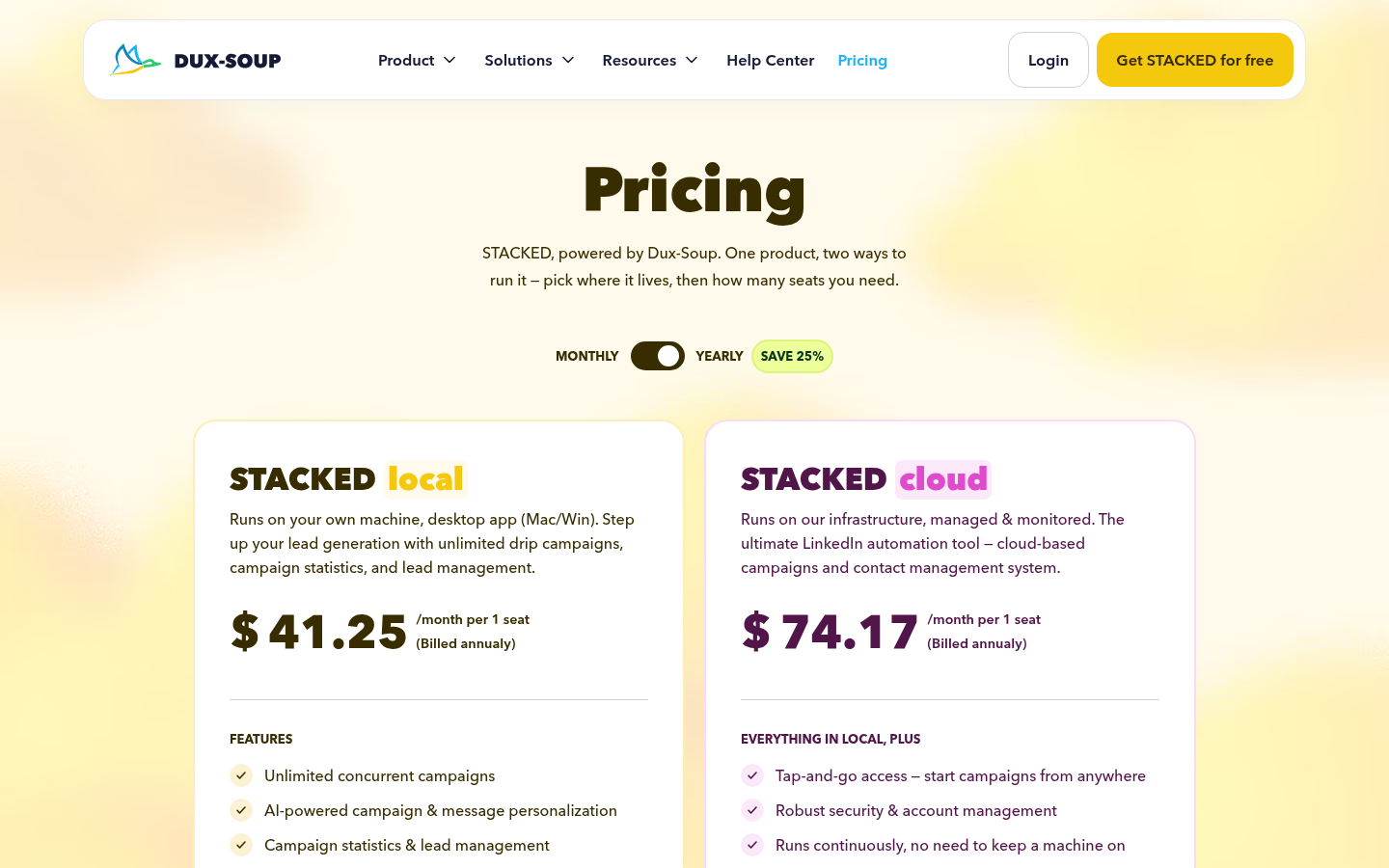
Dux-Soup's pricing page, as of October 4, 2026.
Who it fits: a founder who wants LinkedIn drip campaigns at the lowest dollar price here and is willing to run them from a desktop app, or who will pay $99 a seat to move them to Dux-Soup's cloud.
Which one to pick
Pick by the shape of your outbound, not by feature count.
- LinkedIn first, email already running in Instantly or Smartlead: HeyReach. Growth at $79 per sender includes every LinkedIn action and a unified LinkedIn inbox, and its pricing page points multichannel through native integrations with those two email tools.
- LinkedIn first, email steps in the same tool, priced per user in dollars: Dripify. Basic at $39 per user yearly is a low entry, and Pro at $59 yearly lifts the daily quotas and unlocks unlimited campaigns.
- Cheapest start, email later: Waalaxy. Pro at €19 per user per month billed yearly (€39 monthly) for 300 invites is the lowest price here, and email arrives on Business at €69 yearly (€139 monthly).
- LinkedIn with email follow-ups in one sequence and the strictest limit controls: Expandi Business at $99 per account, $79 yearly, with auto warm-up and limit ranges you set.
- Everything in one place, including the lead database and more channels than two: lemlist Multichannel at $109 per user, with the Email plan at $69 if you only need email.
- LinkedIn only, from Sales Navigator: Botdog Solo at $79 per account, $55.33 yearly.
- LinkedIn drip campaigns from a desktop app, with a cloud option: Dux-Soup STACKED local at $55 per seat, $41.25 yearly, or STACKED cloud at $99 per seat, $74.17 yearly.
- Cold email and LinkedIn as one sequence: SuperSend. Plans from $59 a month, one contact record across both channels, and a reply on either channel stops both. This is the pick when the problem you are solving is two tools that do not know about each other.
The test that separates the last option from the others is simple. Ask whether a prospect who replies on LinkedIn today will still receive tomorrow's scheduled email. If the answer depends on you noticing and pausing them by hand, or on an integration between two products carrying the reply across, the two channels are not one sequence.
Questions founders ask before buying
Will automation get my LinkedIn account restricted? It can, if volume jumps or actions fire in unnatural bursts. viralspy's post on LinkedIn automation tools judges safety by whether a tool mimics human behavior, manages rate limits and warm-ups. Each vendor here describes its approach: HeyReach's pricing page says each sender stays within its daily limits and safe usage levels, Dripify's pricing page lists human behavior simulation and a unique local IP address under safety, Expandi's pricing page lists profile auto warm-up and limit ranges it will not exceed, Botdog's pricing page lists account health under analytics, Dux-Soup's pricing page lists customizable delays between actions and response detection that pauses a campaign, and SuperSend starts each new sender at 10 actions a day per action type. Start low and ramp, and keep the pattern human the whole time rather than only during warm-up.
What daily limits do these tools actually start at? Dripify's pricing page gives the numbers for its plans: 20 connection requests and 30 messages a day on Basic, 75 connection requests and 100+ messages a day on Pro and Advanced. Waalaxy's pricing page caps invites per month: 300 on Pro, 800 on Advanced and Business. Expandi's homepage says up to 300+ connection requests a week, and its pricing page adds 100 more a week through a Mobile Connector campaign. SuperSend starts every new LinkedIn sender at 10 a day each for connection requests, messages, profile visits and likes, and lets you raise them per account up to 100 a day for connection requests and likes and up to 200 a day for messages and profile visits. Whatever the ceiling, treat the starting number as the first week, not the goal.
Cloud or desktop: does it matter? It matters for two things: whether your machine has to stay on, and how the vendor handles the connection to LinkedIn. Dripify's pricing page lists cloud-based performance with access from a unique local IP address. Expandi's pricing page lists cloud-based software with a dedicated country-based IP address. Dux-Soup's pricing page offers both: STACKED local runs as a desktop app on your own Mac or Windows machine, and STACKED cloud runs on its infrastructure and does not need a machine on. SuperSend's LinkedIn steps run on its servers with no extension and no open computer. Trellus's post on LinkedIn outreach tools frames browser-only tools as the riskier end of this spectrum.
Which of these have a free trial or a free plan? Dripify offers a 7-day free trial with no credit card. Botdog offers a 7-day free trial with no credit card on every plan. Expandi offers a 7-day free trial on Business. Waalaxy offers a 14-day free trial on every plan, and its LinkedIn Inbox add-on starts with 500 free conversations and no time limit. lemlist offers a 14-day free trial with the Multichannel plan's features except in-app calls and 200 credits. HeyReach's pricing page has a "Try it free" button on Growth and Agency, and its FAQ describes a 14-day trial with no card for up to 3 LinkedIn accounts. Dux-Soup's homepage carries a "Get STACKED for free" button. SuperSend signup is free with no card, and launching a campaign or turning on warmup starts a 7-day trial with a card on file, charged on day 7 unless cancelled.
Is a "multichannel" tool just an email sequencer with a LinkedIn plugin bolted on? Sometimes, and sometimes the reverse: a LinkedIn tool with the email half living in another product. The tell is the contact record. If LinkedIn and email activity for one person appear on one record, and a reply on one channel ends the steps on the other, the channels are genuinely one sequence. If the LinkedIn side has its own list and its own inbox and you reconcile replies by export or integration, you have two tools under one logo. HeyReach's pricing page routes multichannel through native Instantly and Smartlead integrations. Dripify's pricing FAQ says LinkedIn and email run in the same sequence on every paid plan. Expandi's pricing page says connection requests, messages and email follow-ups go in one sequence. Waalaxy's pricing page puts LinkedIn-plus-email campaigns on its Business plan only. lemlist's pricing page lists a unified inbox and auto-stop campaign. SuperSend's LinkedIn outreach page says a LinkedIn reply stops the email steps for that contact.
What do these tools do with Sales Navigator? Botdog's homepage is built around automating Sales Navigator outreach. Waalaxy's pricing page lists imports from LinkedIn Basic, Sales Navigator and Recruiter Lite on every plan. Dripify's pricing page gives Sales Navigator InMail quotas of 10 a day on Basic and 30 on Pro and Advanced, and its FAQ says Sales Navigator is optional. Expandi's pricing page lists InMails among the actions you set limits for. lemlist's comparison table lists LinkedIn InMail. Dux-Soup's pricing page lists compatibility with LinkedIn, Sales Navigator and Recruiter, and InMail among its drip actions. In SuperSend, connection requests and InMail work with a Sales Navigator account. Lists come in from a CSV with a LinkedIn profile URL or email per row, the API, the people who reacted to or commented on up to 25 LinkedIn posts, or an Apollo or HubSpot import, rather than from a Sales Navigator search.
Which CRMs do these connect to? HeyReach's pricing page names HubSpot alongside Clay, Make and Zapier, with API and webhooks. Dripify includes a HubSpot integration and webhooks from Pro up, and its plan table lists webhook and Zapier integration. Waalaxy's pricing page lists CRM sync with 2,000+ tools, and Make, Zapier and N8N modules from Advanced up. lemlist's pricing page lists HubSpot, Salesforce and Pipedrive, plus Zapier, Make, n8n and Clay. Dux-Soup's pricing page lists native integrations with Salesforce, Pipedrive, HubSpot, SharpSpring, Freshsales and HighLevel, plus Slack, MS Teams, OpenAI, Anthropic, Zapier and Make. SuperSend has HubSpot, Salesforce, Pipedrive and monday.com built in, with Zapier, Make and webhooks; Close, Attio and Zoho CRM are not built in.
Does the tool matter more than the list? No. A well-targeted list in a basic tool outperforms a poor list in an expensive one, because every tool here sends roughly the same connection request. Decide on targeting and enrichment first, then pick the sequencer that fits where your prospects actually answer.
Can I run LinkedIn-only campaigns in a tool built for both channels? In SuperSend, yes. Its LinkedIn outreach page says you can use only LinkedIn steps, only email steps, or mix them in any order, and Starter includes 1 LinkedIn sender with extra accounts at $29 a month.
What should a two-channel tool do when a prospect replies? Stop everything scheduled for that person, on both channels, and put the reply where you will see it. Trellus's post calls reply detection that stops a campaign a basic expectation. The stricter version of that expectation, and the one this page argues for, is that the stop applies to the email step and the LinkedIn step alike.
Run the LinkedIn step inside your email sequence
If your outbound already includes cold email and you want LinkedIn visits, connection requests and messages as steps in the same sequence, with one inbox for every reply, create a free SuperSend account with no card and launch your first two-channel sequence on a 7-day trial.