Most people searching for a Dripify alternative are not unhappy with LinkedIn automation. They have hit the point where LinkedIn alone is not enough, and the question becomes how to add email without ending up with two tools, two contact lists, and a prospect who gets a cold email the day after they already replied on LinkedIn. That is the test this page uses: a reply on any channel should end the sequence on every channel, which only works when email and LinkedIn live in one sequence with one contact record, not in two tools joined by a CSV export.
Who this page is for
This comparison is written for founders and small sales teams who run their own outbound. You have one to six LinkedIn profiles, you send cold email or want to start, and nobody on the team is a dedicated ops person. Agencies managing client accounts have a different set of needs (white label, client dashboards, dozens of seats), and several of the tools below serve that market. Where that matters, the page says so and moves on.
What Dripify does, and why people leave
It helps to be precise about what you are leaving. Dripify's pricing page describes a cloud tool that runs LinkedIn and email steps in one sequence on every paid plan, with campaigns running on its servers so nothing depends on your browser or machine being on. Plans are per user: Basic is $39 a month billed annually ($59 monthly) for one drip campaign at limited daily quotas, Pro is $59 annually ($79 monthly) for unlimited campaigns, full quotas and a dedicated inbox, and Advanced is $79 annually ($99 monthly) for multi-team management and advanced LinkedIn protection. Enterprise is custom.
The reasons people shop around are more specific than price. Dripify's own inbox page says its inbox holds conversations with Dripify leads only, that a conversation has to start from a Dripify campaign, and that a reply you send directly on LinkedIn does not pause that lead's campaign. Dripify's plan grid bears out a second point: the inbox, CSV export, HubSpot and the API start on Pro, and A/B testing, step analytics and Activity Control on Advanced, so the entry price is not the price you end up paying. Valley's comparison of Dripify alternatives puts it simply: most people leave for capability, not because anything is broken.
If your reason is one of those, the fix is a different kind of tool, not a cheaper copy of the same one.
How to choose
Four questions sort the field quickly.
Are email and LinkedIn in one sequence or two? A sequence that goes visit, connect, email, LinkedIn message, email only works when both channels read and write the same contact record. If the tool treats email as a separate module, you are back to reconciling replies by hand. Ask the vendor directly: when a prospect replies on LinkedIn, do the pending email steps stop?
Where do replies land, and who sorts them? The metric that matters is who replied and whether they were interested, not who opened. A tool that puts LinkedIn and email replies in one inbox, labeled, saves more time per week than any sequence builder feature.
What does the price scale with? Four models show up below: per seat, a subscription per LinkedIn account, tiered monthly plans, and per email sent. They produce very different bills when you go from two senders to six, which is the exact moment most teams start comparing. Run your own headcount through each one before looking at features.
Cloud or browser extension, and what does the vendor promise about your account? Alex Berman's guide makes the point that LinkedIn itself is the constraint, not the tool, and every tool operates inside the same weekly limits. No vendor, SuperSend included, can promise your account will never be restricted. Treat any site that advertises a way around LinkedIn's limits as something to weigh carefully rather than a feature. Our post on LinkedIn automation limits covers the numbers for new and established accounts, so this page does not repeat them.
A fifth question matters more than it looks: how does your list get in? If your prospecting lives in Sales Navigator searches, check whether the tool imports from a search URL, from a CSV of profile URLs, or from somewhere else. The sections below say what each vendor's own page describes.
Comparison table
Prices come from each vendor's own pricing page as read on October 4, 2026. Check each live page before you buy.
| Tool | Channels on its site | Price | Trial |
|---|---|---|---|
| Expandi | LinkedIn connection requests, messages and email follow-ups in one sequence | Business $99 per month; annual billing marked 20% off. Agency tier is custom for 10+ seats | 7 days |
| Skylead | LinkedIn automation and email automation, email finder and verifier, email warm-up | All-in-one $100 per seat per month (100,000 emails/mo, unlimited email accounts, one seat). Agency first-year promotion $999/mo for 25 seats or $1,999/mo for unlimited seats. Annual: pay 10 months, get 2 free | 7 days |
| HeyReach | All LinkedIn actions and a unified LinkedIn inbox; email through native Instantly and Smartlead integrations | Growth $79 per sender per month; $71 quarterly, $63 billed yearly. Agency $999/mo for 25 senders; Unlimited $2,999/mo | 14 days, no card (up to 3 LinkedIn accounts) |
| Octopus CRM | LinkedIn connection requests, bulk messages, profile visits, endorsements | Monthly: Starter $9.99, Pro $14.99, Advanced $21.99, Unlimited $39.99. Annual: Starter $6.99, Pro $9.99, Advanced $14.99, Unlimited $24.99 per month. One subscription per LinkedIn account | 7 days, no card |
| SuperSend | Cold email and LinkedIn steps in one sequence, unified inbox, deliverability tools | Starter $59/mo (15,000 emails, 1 LinkedIn sender), Growth $99/mo (50,000 emails, 2 senders), Scale $319/mo (200,000 emails, 5 senders). Yearly saves about 15%. Extra LinkedIn sender $29/mo | 7 days |
Expandi
Expandi's homepage calls it a LinkedIn automation tool and leads with sending up to 300 or more connection requests a week, Smart Campaigns that branch on what the prospect does, message personalization, team workspaces and CRM integrations. Expandi's pricing page fills in the plan: cloud-based, a dedicated country-based IP address, profile auto warm-up that ramps activity gradually, smart limit ranges that Expandi will not let you exceed, unlimited campaigns, campaign prioritization, and multichannel outreach where connection requests, messages and email follow-ups sit in one sequence. The builder has If/Action steps. Image and GIF personalization costs extra, video personalization runs through a paid Sendspark add-on, and the plan includes detailed campaign statistics, dynamic placeholders, tags and notes on conversations, duplication prevention, integrations and a blacklist.
One line on the pricing page deserves attention given the fourth question above: it lists campaign types that allow bypassing outreach limits, with a Mobile Connector campaign adding another 100 connection requests a week. Read that alongside our limits post before you decide whether you want it.
The Business plan is $99 a month, described on the page as better suited for small sales teams, with a 7-day free trial. The pricing toggle marks annual billing at 20% off, which Expandi describes as two months free. The Agency tier is custom-priced for 10 or more seats and adds roles and permissions, centralized campaign management, transparent client reports, template sharing, a dedicated customer success manager and the option to run Expandi under your own brand.
Where it fits: a team that wants a more capable LinkedIn-first sequencer with email as a follow-up step, and is comfortable paying per seat.
Skylead
Skylead's homepage positions it as LinkedIn automation and cold email software, and its pricing page lists both channels on one plan: social automation, unlimited email automation, unlimited email accounts, infinite email warm-up, and an email finder and verifier. Smart sequences, a Smart Inbox, A/B testing, image and GIF personalization, Spintax and Liquid syntax, webhooks, an API, and real-time sync with HubSpot, Pipedrive and Salesforce are all on the All-in-one plan. Recent product updates listed on the site add a B2B database, account-based prospecting, AI data enrichment (an add-on), and an AI SDR that handles conversations in automatic or semi-automatic mode (also an add-on).
The All-in-one plan on Skylead's pricing page is $100 per seat per month and includes 100,000 emails a month on one seat. The Agency tier is a first-year promotion at $999 a month for 25 seats or $1,999 a month for unlimited seats, with an agency dashboard, a unibox for all client conversations, granular client roles, a dedicated Slack channel and a white-label option. An Annual tier for teams with a steady seat count is priced as pay 10 months, get 2 free. There is a 7-day free trial.
Where it fits: a solo founder or a small team that wants very high email volume on one seat, or an agency that wants flat pricing across many clients. The seat price is the thing to model. A team of six on All-in-one is six seats at $100 each. The Agency tier only makes sense once you are well past that.
HeyReach
HeyReach comes up when a team is adding LinkedIn seats and comparing against per-seat tools. What can be said about it from HeyReach's API documentation is structural: the API exposes LinkedIn accounts (connect, reconnect, re-login for Sales Navigator and Recruiter, proxy country per account), lists and leads with tags and custom fields, campaigns with sequence updates and the ability to add or remove LinkedIn accounts from a running campaign, an inbox with conversations and send-message endpoints, webhooks, email enrichment, a blacklist and an organization endpoint. Read together, that describes a product built around attaching several LinkedIn accounts to one campaign and controlling it programmatically.
For a fuller treatment of how it compares on seats and email, including against Dripify-style per-seat tools, see our post on HeyReach alternatives compared on seats and email.
Where it fits: teams whose main problem is running many LinkedIn profiles from one place, especially if someone on the team wants to script list building and campaign changes through an API. If you are leaving Expandi because the seat count is about to triple, the multi-account campaign model its API describes fits that problem, though Growth is still $79 per sender per month ($63 billed yearly). Ask them the reply-handling question from the checklist above before you commit.
Octopus CRM
Octopus CRM's homepage describes it as a LinkedIn automation tool: automated personalized connection requests, bulk messages to first-degree connections, automatic profile visits, endorsing up to seven skills, and a funnel builder that chains those actions. It integrates with Zapier and HubSpot (Unlimited plan only), imports and exports CSVs of LinkedIn profile URLs (Advanced and up), lists an Activity Control feature that alerts you to excessive activity, and works with LinkedIn Free, Premium, Sales Navigator and Recruiter Lite. Octopus CRM's FAQ says you install it by adding the extension from the Chrome web store, that a Sales Navigator account is recommended but not required, that Activity Control is part of the Unlimited plan, and that each Octopus account is tied to one LinkedIn account, so a team subscribes once per LinkedIn profile.
Monthly prices are Starter $9.99, Pro $14.99, Advanced $21.99 and Unlimited $39.99. Annual billing brings those to $6.99, $9.99, $14.99 and $24.99 a month. The pricing grid marks the lower three plans as compatible with Sales Navigator, and Unlimited as compatible with Premium, Sales Navigator and Recruiter. All plans come with a 7-day trial with no card, which the FAQ says gives full access to the Unlimited plan, and the page invites agencies managing 20 or more accounts to contact the team for special pricing.
Two things to weigh. First, because it runs as a Chrome extension, ask Octopus directly whether outreach continues while your computer is off; the FAQ says you can use other tabs and applications while it works, which is a different question. Second, Octopus CRM's own homepage advertises a "Connect by Email" feature for sending connection requests by email to get past LinkedIn's weekly invite limit. Botdog's post on cheaper Dripify alternatives argues that any tool advertising a way to exceed LinkedIn's limits is putting accounts at risk, and that is a fair reading. Decide for yourself, but decide with that in view.
Where it fits: one person, LinkedIn only, lowest possible cost. For a team running several profiles, the FAQ's one-subscription-per-account rule means you multiply the plan price by the number of LinkedIn accounts.
SuperSend
SuperSend is built for the situation this page opened with: a team that started on LinkedIn and wants email in the same sequence rather than in a second tool. Email steps and LinkedIn steps such as connection requests and messages sit in one sequence on one contact record, and a reply on either channel stops the pending steps on both. Replies from both channels land in a single inbox, which is the part of the job that actually turns into meetings. The cold email and LinkedIn sequence playbook walks through how to order those steps.
Getting a LinkedIn list in works four ways: a CSV where each row has a LinkedIn profile URL or an email, the API, an import of the people who reacted to or commented on LinkedIn posts (up to 25 post URLs at a time), and imports from Apollo and HubSpot. There is no import from a LinkedIn or Sales Navigator search URL, so if you prospect in Sales Navigator you export to CSV first. Connection requests and InMail do work from Sales Navigator accounts.
Deliverability is part of the campaign rather than a separate chore: warmup runs on each mailbox, SPF, DKIM and DMARC are checked, placement tests run against 10 seed inboxes by default, including Google and Outlook, and a bounce guard pauses a campaign when its invalid-recipient bounce rate passes 3% once it has sent 100 or more emails (adjustable per campaign). The default send cap is 15 emails per mailbox per day, adjustable per mailbox. The deliverability monitoring page describes each of those checks. You can connect the Google or Outlook inboxes you already have, or buy inboxes at $5 a month each and domains at $13 a year inside SuperSend, with SPF, DKIM and DMARC set up on arrival. Nothing here promises your LinkedIn account will never be restricted; no tool can.
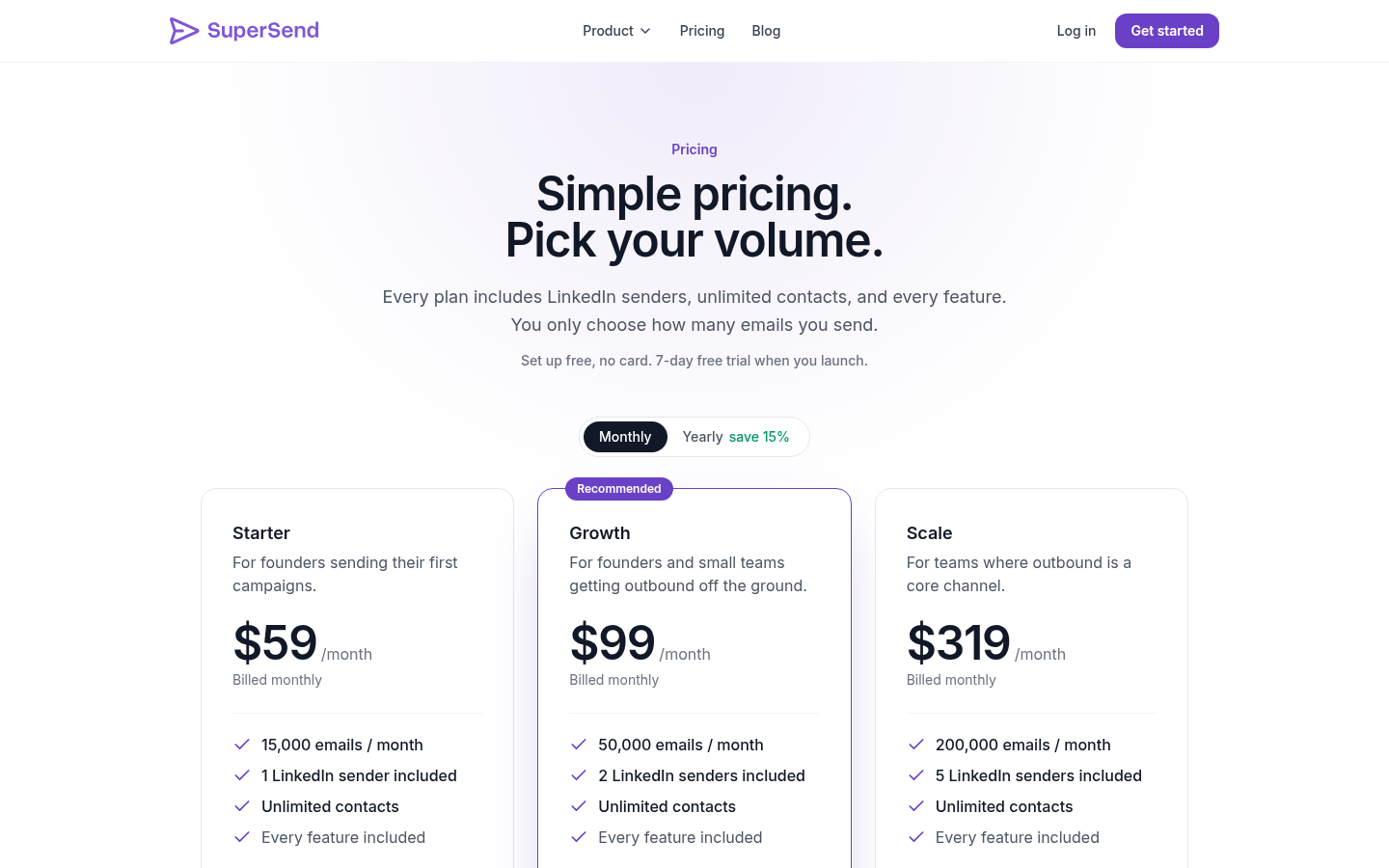
Pricing follows emails sent, not contacts or seats. Every feature is in every plan. Starter is $59 a month for 15,000 emails and 1 LinkedIn sender, Growth is $99 for 50,000 emails and 2 senders, and Scale is $319 for 200,000 emails and 5 senders. Yearly billing saves about 15% ($50, $84 and $271 a month respectively). Contacts are unlimited on every plan. Extra LinkedIn senders are $29 a month each, and email over the plan limit on monthly plans is billed per email ($0.006 on Starter, $0.004 on Growth, $0.0025 on Scale). Signup is free with no card; launching a campaign or turning on warmup starts a 7-day trial with a card on file. Full detail is on the SuperSend pricing page.
SuperSend is not built for agencies running client accounts. If that is you, Skylead's Agency tier or Expandi's Agency tier is the better fit.
The pick, by situation
You started LinkedIn-only and want email in the same sequence. SuperSend. One contact record across both channels is the whole point, and plans start at $59 a month with every feature included.
You want a more capable LinkedIn-first sequencer with email as a follow-up step. Expandi's Business plan at $99 a month, with If/Action branching and email follow-ups in the same sequence.
You are one seat and want the most email volume and data tooling on a single plan. Skylead's All-in-one at $100 per seat, with 100,000 emails a month and its B2B database.
You run an agency with client accounts. Skylead's Agency tier, which bundles the client dashboard, unibox and white label, or Expandi's Agency tier, which lists client reports, roles and permissions, and running the tool under your own brand.
Your main problem is many LinkedIn profiles, and you want to script it. HeyReach, whose API is built around attaching accounts to campaigns and adding or removing them while a campaign runs. Read our HeyReach alternatives post before committing.
You want the cheapest LinkedIn-only automation. Octopus CRM from $6.99 a month on annual billing for Starter, which covers connection requests only, after you have asked whether campaigns run with your computer off.
Your lists live in Sales Navigator. Check the import path before the price. Octopus CRM takes a CSV of profile URLs on Advanced and up, and its FAQ says it is compatible with Sales Navigator accounts. SuperSend takes a CSV, the API, post engagers, or an Apollo or HubSpot import, and sends connection requests and InMail from a Sales Navigator account, but does not import a search URL. Skylead's pricing page lists a B2B database and account-based prospecting, and Expandi's homepage lists lead generation as a product area; confirm with each which ones cover your workflow.
The two-to-six-profiles case. This is the most common shopping moment. Model it on each pricing page: Expandi's Business plan is $99 a month and its Agency tier starts at 10 seats, so ask Expandi what six seats cost before assuming a multiple; six HeyReach Growth senders at $79 ($474 a month, or $378 billed yearly); six Skylead seats at $100 ($600 a month); six Octopus CRM subscriptions, one per LinkedIn account per its FAQ, at $39.99 each for Unlimited on monthly billing ($239.94 a month) or $24.99 each on annual billing ($149.94 a month); on SuperSend, Growth at $99 with four extra senders at $29 each ($215 a month) or Scale at $319 with one extra sender ($348 a month, with 200,000 emails included). Then ask each vendor the reply-handling question above. Price without that answer is only half the comparison.
Staying on Dripify. Valley's comparison makes the case that if your motion is simple linear drips on a known-good list, Dripify's simplicity is hard to beat. If that is still you, there is no reason to move.
FAQ
Is Dripify LinkedIn-only? No. Dripify's pricing FAQ says it runs LinkedIn and email in the same sequence on every paid plan: you connect your own inbox, find emails with its built-in finder (100 credits a month), and add email steps alongside connection requests, messages, InMails and profile views. Its inbox shows only conversations with Dripify leads, so check how replies on both channels reach you.
What is the cheapest Dripify alternative? Of the tools here, Octopus CRM, at $6.99 a month on annual billing for its Starter plan (connection requests only) and $24.99 for Unlimited. It automates LinkedIn only, and you pay once per LinkedIn account.
Which alternative has email built in? Skylead lists email automation, warm-up and an email finder on its All-in-one plan. Expandi's pricing page lists email follow-ups as a step in the same LinkedIn sequence. HeyReach's API lists an email enrichment endpoint. SuperSend puts email and LinkedIn steps in one sequence with one inbox for replies from both.
Will any of these keep my LinkedIn account safe? No tool can promise that, and you should distrust one that does. Every tool operates inside LinkedIn's limits; what differs is whether the vendor helps you stay inside them or advertises ways past them. For the limits themselves, see our post on LinkedIn automation limits linked above.
I am leaving Expandi because we are going from two profiles to six. What should I compare? Price per profile first, then email. Expandi and Skylead charge per seat, Octopus CRM charges per LinkedIn account, HeyReach charges $79 per sender and its API is built around several accounts on one campaign, and SuperSend prices by emails sent with LinkedIn senders as a $29 add-on. Then ask the email question of every vendor on your shortlist: when a prospect replies on LinkedIn, do the pending email steps stop? If email is part of your motion, choose a tool where both channels share one sequence.
Do I lose my sequences when I switch? You rebuild sequences in the new tool; what you carry over is the contact list. Octopus CRM imports and exports CSVs on Advanced and up, Skylead's pricing page lists a built-in B2B database, HeyReach's API has list and lead endpoints, and SuperSend takes a CSV with a LinkedIn profile URL or email per row, an API import, LinkedIn post engagers, or an Apollo or HubSpot import. Alex Berman's guide also recommends pausing automation for several days before relaunching on a new tool rather than switching the same day.
Does SuperSend work with Sales Navigator? Partly. Connection requests and InMail work from a Sales Navigator account. There is no import from a Sales Navigator search, so you bring the list in as a CSV.
Can I run LinkedIn-only sequences on SuperSend? Yes. A sequence can use only LinkedIn steps, only email steps, or both, and LinkedIn replies land in the same inbox as email replies.
Next step
If the problem you are solving is "LinkedIn works, now add email without a second tool," create a free SuperSend account with no card, connect an inbox and a LinkedIn account, and build one sequence that uses both. The 7-day trial starts when you launch.