A cold email sequence has one job: get a reply you can act on. Not an open, not a click, a reply. That sounds obvious until you look at how most sequences are written. The first email is written to get opened, the follow-ups are written to get read, and the whole thing is judged by an open rate that tells you a tracking pixel loaded. Write every step to earn one reply, stop the moment you get one, and judge the sequence by how many of those replies were interested. Everything below follows from that rule: the step count, the spacing, whether follow-ups thread, and when to stop.
This guide is for a founder or a two-person sales team sending their own outbound. If you run campaigns for clients, the advice still mostly holds, but the volume and infrastructure sections assume one company and a few mailboxes.
Decide who gets it before you write a word
The sequence is the last thing to write, not the first. Two decisions upstream of it decide most of your reply rate.
The first is the list. A sequence sent to a job-title export will underperform a plain sequence sent to forty accounts you could explain out loud. Every row needs a reason to be there, and the best reason is something observable that happened recently: a hire in the team you sell to, a funding announcement, a new location, a tool showing up on their careers page. That trigger becomes the first line of email one, and it is what makes the email feel written rather than merged.
The second is the ask. If the first email asks for a 30-minute demo of your product, you are asking a stranger to start a project with someone they have never met. Ask for something smaller than what you sell: a yes or no on a specific question, a look at three accounts you pulled for them, permission to send one thing. A small ask gets answered either way, and a "no" that arrives is worth more than a "yes" that never does, because it ends the sequence cleanly and frees the mailbox for someone else.
With a list and an ask in hand, you can size the sequence.
How many steps and how far apart
Three emails is the right default for a founder-run sequence. One is a lottery ticket. Two leaves the "I was busy, remind me" reply on the table. Four or more starts to read as pressure, and each extra step costs you sending volume you could spend on a new contact. If you want the longer argument for a specific count, our post on how many cold email follow-ups to send lays out a sequence you can copy step by step. This page stays at the level of the whole sequence.
Spacing matters more than people expect. Follow-ups that arrive 24 hours apart feel automated because they are. A gap that widens as the sequence goes on reads like a person checking back, not a script firing.
| Step | Sent | Gap from previous | What it does |
|---|---|---|---|
| Email 1 | Day 1 | n/a | Names the trigger, makes the small ask |
| Email 2 | Day 4 | 3 days | Adds one new piece of information, repeats the ask |
| Email 3 | Day 10 | 6 days | Closes the loop and gives an easy out |
Send on business days in the contact's own timezone, inside working hours. An email that lands at 2am local looks like what it is. Most sequencers will skip weekends and shift a step forward to the next working day, so a "Day 4" email may actually go out on Day 6. That is fine. The schedule above is a shape, not a timetable.
Thread or new email
A follow-up can either reply in the same thread as the first email, carrying the original subject line and the first message underneath, or go out as a new email with its own subject.
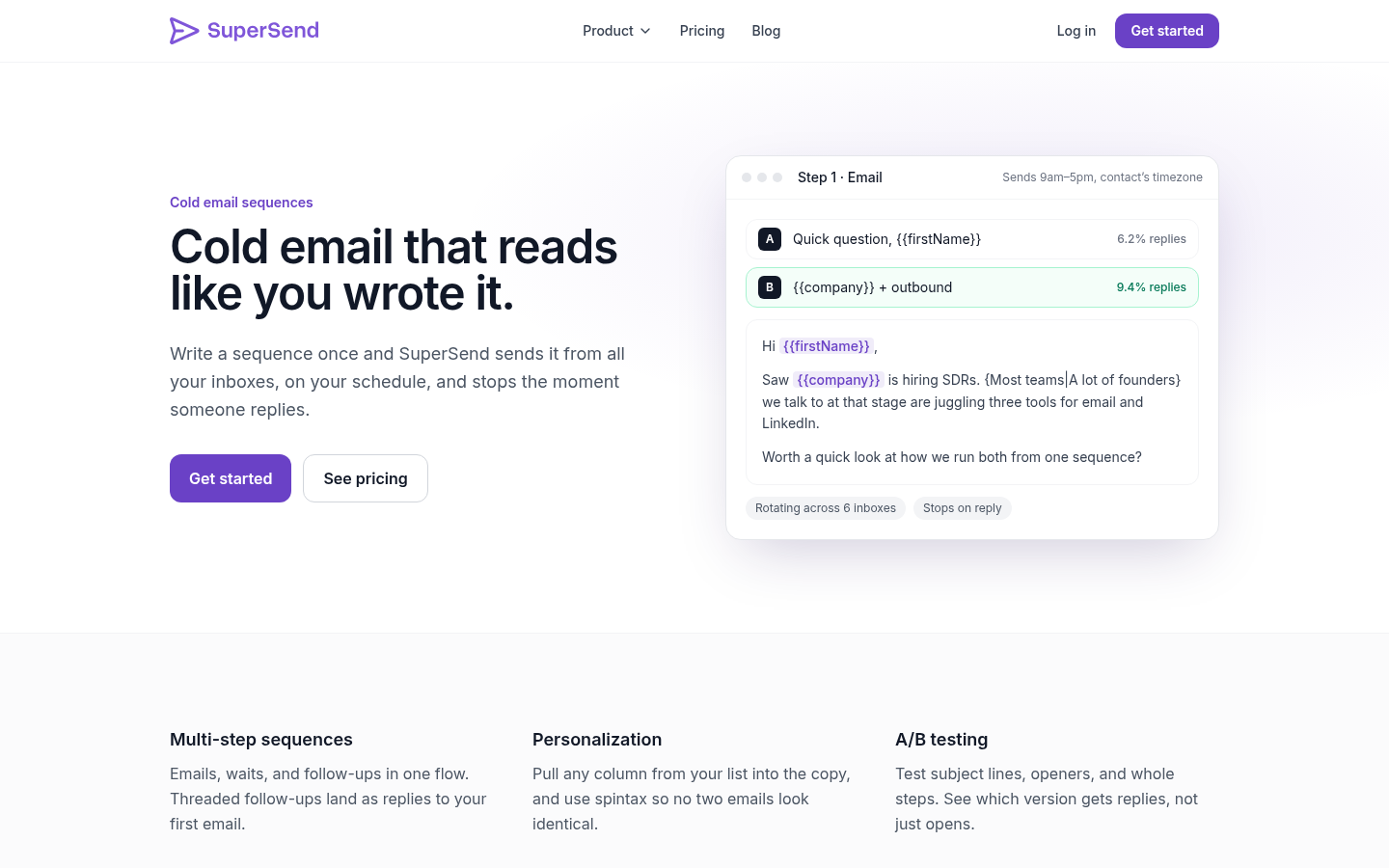
Thread by default. A threaded follow-up puts your first email right below the new one, so the reader does not have to remember who you are. It also matches how a real person follows up: they hit reply on their own sent mail, they do not compose a fresh message with a new subject. Email 2 should almost always be a threaded reply of a few lines.
Start a new thread in one case: when the first subject line was the problem. If email one tested a subject that did not land, email three can go out fresh with a different one and a different opener. Treat that as a second attempt at a first impression rather than a follow-up. Do it once per sequence at most. Three different subject lines from the same sender in ten days looks like three different campaigns hitting the same person.
Whichever you choose, each follow-up should contain something the previous email did not. "Just bumping this" is a step that spends the reader's attention and gives nothing back.
Write each step to earn one reply
Here is what each email in a three-step sequence is for, and what it is not for.
Email 1: the trigger and the ask. Four or five sentences. The first names the trigger and makes it clear you looked at them specifically. The second connects the trigger to the problem you solve, in their words rather than yours. The third is the small ask. There is no company introduction, no "I hope this finds you well", no bullet list of features. The subject line is short and specific to them, not to you. "{{company}} + outbound" beats "Transform your sales process".
Email 2: one new fact. Two or three sentences, sent as a reply in the thread. Add a single piece of information that was not in email one: a result from a company like theirs, a specific thing you noticed, an answer to the objection they most likely had. Then repeat the ask in different words. Do not apologise for following up.
Email 3: close the loop. Two sentences. State that this is the last email, and give them an easy out. "If this is not a priority, reply no and I will stop" does two things: it earns a reply from people who would otherwise ignore you, and that reply ends the sequence instead of leaving the contact in limbo. Some of the best replies to a sequence arrive on the last step, from people who read all three and finally had a minute.
A few rules that hold across every step. Write to one person, and read the email aloud before you save it. Use personalization fields for facts you actually have in the list, and nothing else: a {{firstName}} that merges in as "Sales Team" announces the merge. If your tool supports spintax, use it to vary openers and phrasing across the list so no two sends are identical, but never let it change the meaning of a sentence. Test one variable at a time: two subject lines on email one, or two openers, not both at once, and judge the winner by replies.
A worked three-email sequence
This is an example sequence from a founder selling an outbound tool to a company that just posted a sales hire. Swap the trigger, the problem and the ask for your own. The point is the shape.
Email 1, Day 1 Subject: {{company}} hiring an SDR
Hi {{firstName}},
Saw {{company}} posted an SDR role last week. Most founders we talk to at that stage are about to hand a new hire three separate tools for email, LinkedIn and replies, and then wonder why the handoff takes a month.
I pulled a short list of ten accounts that match what your job post says you sell into. Want me to send it over, or is that the wrong direction?
Email 2, Day 4, replies in the same thread
{{firstName}}, one thing I left out: the list is sorted by a trigger, not by headcount, so each account has a reason to be there this month rather than "SaaS, 50 to 200 people".
Worth a look before the SDR starts, or should I hold it?
Email 3, Day 10, replies in the same thread
Last one from me. If outbound is not the priority this quarter, reply "no" and I will close this out.
If it is, say the word and the list is yours.
Count the sentences. Email one is five, email two is three, email three is three. Nothing in any of them describes a product. Each one asks a question a stranger can answer in two words, and two of the three replies that question can produce end the sequence.
Stop rules: what ends the sequence and what should happen
A sequence is only as good as its stop rules. The worst outbound experience a prospect can have is answering you and then getting your scheduled follow-up anyway. Before you launch, know what each of these events does.
A human reply. Stops every remaining step for that contact, on every channel, with no exceptions. This is not configurable in spirit even if your tool makes it a toggle. A reply, including a "no", means the contact is finished with the sequence and the work moves to you.
A meeting booked. Same as a reply. If someone books through a link in email one, email two must not fire.
An out-of-office auto-reply. This is the one people get wrong in both directions. An auto-reply is not a human reply, so treating it as one ends a sequence the person never saw. But firing the next step on schedule means your follow-up lands in a pile they will skim on return. The right handling is to label the auto-reply separately from real replies, so it does not bury interested ones, and then decide: pause the contact and resume after the date in the message, or let the sequence run and accept the risk. Either is defensible. Leaving the decision to default is not.
A bounce. Removes the contact immediately. Beyond that, a bounce rate is a signal about the whole campaign, not one row. If a meaningful share of a batch bounces as invalid recipients, the list is the problem, and continuing to send to it damages the domain for everyone else on the list. A sequence should be able to pause itself on that signal rather than wait for you to notice.
An unsubscribe. Stops the contact, and suppresses that address from every future campaign, not just this one.
Send volume: fit the sequence to your mailboxes
Most sequences that die do not die of bad copy. They die because the mailbox behind them sent too much, too soon, from a domain too new to carry it, and the emails stopped reaching inboxes. By the time the founder notices the silence and rewrites the subject line, the domain reputation is already the problem.
Size the volume before you launch. The arithmetic is simple. Multiply contacts by steps to get total emails, then divide by what each mailbox can safely send over the sequence's run.
Take a 300-contact list and the three-step sequence above: 900 emails. If each mailbox sends 15 emails a day on 20 working days, that is 300 emails per mailbox per month, so this sequence needs three mailboxes to clear in roughly a month. Want to reach 1,000 contacts a month with three steps? That is 3,000 emails, or ten mailboxes at the same cap. Run the numbers on your own list, and if they say you need more mailboxes than you have, cut the list before you raise the cap.
A few rules that go with the math. Warm a new mailbox before it carries any of the sequence, and keep warmup running alongside sending rather than switching it off on launch day. Rotate sends across every mailbox you have so no one sender carries the whole list. Keep SPF, DKIM and DMARC in place on every sending domain, and send your first batch to a small slice of the list before the rest. Our cold email deliverability checklist walks through each of those in order, and the setup guide on domains and inboxes for cold email covers how to add mailboxes when the arithmetic says you need them.
Read the results before you rewrite anything
When a sequence underperforms, the instinct is to change the copy. New subject line, new opener, new ask. Two weeks later nothing moves, because the emails were never reaching the inbox.
Separate the two questions before touching a word. The first is whether the mail is landing. Look at the total volume of anything coming back, including out-of-office auto-replies, because autoresponders generally only fire on mail that reached an inbox. If a sequence to a few hundred working professionals produced no replies and no auto-replies at all, treat that as a deliverability problem and go back to the previous section. A placement test against seed inboxes at Google and Outlook will tell you the same thing faster.
The second question is whether the offer works, and only real replies from people answer it. If auto-replies are coming back but humans are not, the mail is landing and the copy, the list or the ask is the problem. That is when rewriting pays off, one variable at a time.
Notice what is not in that read: opens. An open rate can be inflated by security scanners, suppressed by image blocking, and tells you nothing about intent either way. Steer by replies, and by the share of replies that were interested.
Adding LinkedIn without nudging people twice
Once a three-step email sequence is working, the natural next move is adding LinkedIn: a profile view before email one, a connection request after email two. Done well, it gives the person a second place to recognise your name. Done badly, it means someone who replied to your email yesterday gets a connection request today with the same pitch, because the LinkedIn tool did not know about the reply.
The rule from the stop-rules section applies across channels: a reply anywhere ends the sequence everywhere. That only works if email and LinkedIn steps live in one sequence with one contact record. If they live in two tools, you are reconciling replies by hand, and you will miss one. Our playbook for cold email and LinkedIn in one sequence covers step order and timing in detail. Do not add the channel until the email sequence alone is producing replies you can read.
Running this sequence
Everything above is tool-agnostic. For the record, this is how it runs in SuperSend, the sequencer we build for any team that needs cold email and LinkedIn in one sequence. Its cold email sequence builder defaults every follow-up step to replying in the original thread, and you can switch any step to a new email with its own subject when the case above calls for it. It sends inside business hours in each contact's timezone, rotates across all your connected inboxes, and A/B tests subject lines, openers or whole steps with results reported as replies rather than opens. A reply on email or LinkedIn stops the remaining steps for that contact. The default send cap is 25 emails per mailbox per day, adjustable per mailbox, and a campaign pauses itself when its invalid-recipient bounce rate passes 3%, checked after 100 sends. Replies land in a unified inbox where each is labeled as interested, meeting request, not now, out of office or unsubscribe, and out-of-office replies are labeled separately so you choose how to handle them instead of having them buried among real replies. Plans start at $59 a month with unlimited contacts on every plan, and full detail is on the pricing page. Signup is free with no card, and launching a campaign starts a 7-day free trial. If you have a list and three emails drafted, you can create your account and send the first batch to a small slice of it today.