Cold email software is the tool a founder or a small sales team uses to send personalized, sequenced email from many mailboxes to people who have not asked to hear from them, and to do it without landing in spam. That last clause is the whole job, and it is why deliverability belongs inside the campaign rather than beside it: warmup, authentication checks, bounce monitoring, and placement tests should sit next to the send button, because the alternative is finding out about spam-folder placement from the silence afterward. A newsletter tool sends one message to a list that opted in, from one domain, through infrastructure built for consent-based mail. Cold email runs the other way: many sending identities, small daily volumes per identity, follow-ups spaced over weeks, and a reply, not a click, as the goal. Increasingly it also runs LinkedIn steps in the same sequence, because the person you are emailing is the same person you would connect with. Tools built for the newsletter case tend to fail at the cold case, and the failure shows up as a sender reputation you cannot repair quickly.
Where a marketing platform stops and a cold email tool begins
Three things separate the two categories, and they explain most of the features you will see on a vendor's page.
Sending identity. Marketing platforms send from their own servers on your behalf. Cold email software connects to mailboxes you own, usually Google Workspace or Microsoft 365 accounts, and sends through them. Each mailbox has its own reputation and its own daily ceiling. The tool's job is to spread a campaign across many mailboxes so no single one sends enough to look like a machine.
Reply as the outcome. A marketing email is measured on opens and clicks. A cold email is measured on whether a human wrote back and what they said. That changes the product: the inbox where replies land matters as much as the editor where the message is written, and classification of replies (interested, not now, wrong person, unsubscribe) is core work rather than a reporting nicety.
Reputation management. Because you send from your own mailboxes to people who did not opt in, mailbox providers judge you on complaint rates, bounce rates, and engagement. Cold email software exists in large part to keep those numbers healthy: warming new mailboxes, verifying addresses before sending, throttling volume, and telling you when placement slips so you can stop before a domain is burned.
If a product has none of these three, it is a marketing tool wearing a different label, and it will struggle the first month you push real volume through it.
The parts that carry the weight
Most tools in the category list the same features. The difference is which ones are included, which are sold as add-ons, and how well each works when you have dozens of mailboxes instead of two. The table below covers what each part does and what to verify before you commit.
| Capability | What it does | What to verify before you buy |
|---|---|---|
| Sequences and follow-ups | Sends a series of emails over days or weeks, stops when the person replies, and lets you branch on behavior | Whether a reply anywhere in the thread stops every mailbox in the campaign, not just the one that sent the last step |
| LinkedIn steps | Adds profile visits, connection requests, and messages as steps in the same sequence as the emails, on the same contact record | Whether a reply on LinkedIn stops the email steps and a reply by email stops the LinkedIn steps, whether the sequence can wait for a connection to be accepted before messaging, and how many LinkedIn accounts a plan includes |
| Mailbox and domain management | Connects many sending accounts, rotates sends across them, and enforces a daily cap per mailbox | How many mailboxes a plan allows, whether the cap is per account or per plan, and how rotation handles a mailbox that starts bouncing |
| Authentication checks | Confirms SPF, DKIM, and DMARC records are present and correct on each sending domain | Whether the tool checks every domain you connect and tells you what to fix, or leaves you to run a separate checker |
| Warmup | Exchanges automated emails with a network of other mailboxes so a new account builds a history of being opened and replied to | Whether warmup is included or billed separately, whether it runs on every mailbox or a subset, and whether it keeps running after campaigns start |
| Placement testing | Sends a real email to seed addresses at major providers and reports whether it landed in the primary inbox, promotions, or spam | Whether it is included, how many seed inboxes it uses, and whether it tests from the actual sending mailbox rather than a generic one |
| Email verification | Checks that an address exists before you send so bounces stay low | Whether verification is built in, credit-based, or a third-party step, and how it handles catch-all domains |
| Unified inbox | Pulls replies from every connected mailbox and LinkedIn account into one view, lets a team assign and label them, and pushes outcomes to a CRM | Whether it is one inbox across all channels and workspaces, how fast replies sync, and whether follow-ups sent from the inbox honor the sequence's sending limits |
| Personalization | Merges fields, supports conditional text and spintax, and in some tools generates copy per recipient | Whether variations are spread across mailboxes so the same message is not sent in bulk, which is what spam filters key on |
| Reporting | Shows sends, replies, bounces, and placement by campaign and by mailbox | Whether you can see per-mailbox health, because campaign averages hide the one account dragging the rest down |
| Integrations and API | Moves leads in from a data source and replies out to a CRM | Whether the API is included or gated behind a higher tier, and whether webhooks fire on reply and bounce |
A product can be weak on personalization and still work for a team with good copy. A product that is weak on mailbox management or has no placement visibility will cost you domains, and domains take weeks to rebuild.
Email and LinkedIn in one sequence
Cold email software increasingly runs LinkedIn alongside email, and it is worth understanding what that means in practice before you decide whether you need it.
A combined sequence interleaves the two channels on one timeline. A typical shape: visit the prospect's profile on day one so your name is familiar, send the first email on day two, send a connection request on day three with or without a note, wait until the request is accepted, then send a LinkedIn message, or fall back to the next email if they never connect. Each step draws on the same variables as the emails, and each action is logged on the same contact record, so you can see at a glance what the person has already seen. If you want a worked example of the timing and the copy for each step, our post on building a cold email and LinkedIn sequence walks through one end to end.
The reason this belongs in one tool rather than two is the reply. If email runs in one product and LinkedIn in another, a prospect who answers on LinkedIn on Tuesday still gets email step three on Thursday, because the email tool has no idea the conversation ended. Reconciling that by hand works for ten contacts and breaks at a hundred. The check that matters is simple: a reply on either channel should stop the sequence on both, without an export or a Zapier step in between.
Two more things to verify. First, LinkedIn accounts have their own tolerance for automated activity, so the tool should let you set a daily action limit per account and pace actions through working hours rather than firing them in a burst. Second, confirm where LinkedIn replies land. If they stay inside LinkedIn while email replies go to the tool's inbox, you are back to two places to check, which is the problem the combined sequence was meant to remove.
How volume changes what you need
A founder sending from one inbox can get by with a sequence tool and a spreadsheet. The category gets complicated the moment a team wants to send more than a single mailbox can safely handle each day. Three things follow from that.
You need more mailboxes, which means more domains. Spreading sends across many mailboxes keeps each one under a volume that looks human. Those mailboxes should sit on secondary domains rather than your main company domain, so that if one domain's reputation falls, your transactional and support mail is untouched. The software has to connect all of them, rotate across them, and treat each one's health separately. Our guide to setting up cold email domains and inboxes covers how many domains to buy, how to name them, and how many mailboxes to put on each.
Every new mailbox starts cold. A fresh Google Workspace or Microsoft 365 account with no sending history is treated with suspicion. Warmup exists to give it a history before real prospects see it. At volume, warmup is not a one-time setup step; it is a background process running on dozens of accounts at once, and a tool that charges per warmed mailbox gets expensive fast.
Reply handling becomes the bottleneck. With many mailboxes live, replies arrive in many places. If a rep has to log into each account to find them, response time drops, and slow replies cost meetings. It also means bounces and unsubscribe requests sit unprocessed, which is where complaint rates climb. The unified inbox is often described as a convenience. At volume it is the mechanism that keeps the operation from quietly degrading.
Warmup and placement tests do different jobs
These two features are frequently confused, and some vendors sell one while describing it as if it were the other.
Warmup is an input. It creates engagement history for a mailbox so the mailbox has a reputation before you need it. It runs continuously and it tells you very little about where your campaign email actually lands, because the warmup messages are being opened and replied to by other warmup accounts, not by your prospects' mail servers.
A placement test is a measurement. It sends your actual message, from your actual mailbox, to seed addresses at the major providers and reports which folder each one landed in. It answers the question warmup cannot: right now, with this copy and this sender, are we in the primary inbox?
You want both. Warmup without placement testing means you discover a deliverability problem through a silent drop in reply rate, days after it started. Placement testing without warmup means you can see the problem but have no way to build the reputation to fix it. When you compare tools, check whether each is included and whether the placement test uses the real sending mailbox rather than a shared test account, because a shared account tells you about the vendor's reputation rather than yours. The rest of what to check before a launch, from DNS records to list hygiene, is in our cold email deliverability checklist.
Pricing models and how each one behaves as you grow
Vendors in this category price in four broad ways. None is wrong, but each one grows along a different axis, and the one that looks cheapest on the pricing page is often not the cheapest for your setup.
Per seat. You pay for each user who logs in. This suits a team where each rep manages their own mailboxes and the mailbox count per rep is small. It punishes a setup where one operator runs outreach from many mailboxes.
Per mailbox. You pay for each connected sending account, sometimes with warmup billed on the same unit. This is predictable but scales linearly with exactly the thing you need more of to send safely. Teams running dozens of mailboxes feel this quickly.
Per contact or per send. You pay for how many people are in active sequences or how many emails go out in a month. The two are not the same. A contact tier charges for the size of your list, so a good list that outgrows the tier has to be pruned or moved up a plan whether or not you email everyone on it. A send tier charges for what actually goes out, which is kind to teams whose volume rises and falls and harsher on teams with a steady high volume.
Flat. One price covers the plan regardless of seats or mailboxes, with caps on something else or no caps at all. This favors high-volume senders, and the thing to check is what is actually included, because a flat base price with warmup, placement tests, and the API sold as add-ons is not flat in practice.
Whatever the model, read the plan for what it caps and what it excludes. The common exclusions are warmup, placement testing, verification credits, the API, LinkedIn accounts, and extra workspaces. Add those back in before you compare two vendors' headline numbers. Our comparison of the best cold email software for founders does that for six tools, with each plan's published price and cost per 1,000 emails.
A trial protocol that tells you something
Most tools offer a free trial or a free tier. Most buyers spend it clicking through the interface. A better use of the first two weeks is to run a controlled test of the parts that matter.
- Connect a real set of mailboxes, not one. If you plan to run twenty, connect at least a handful on secondary domains so you can see how rotation, per-mailbox caps, and warmup behave across accounts.
- Turn on warmup for every mailbox and leave it on. Check whether warmup keeps running once a campaign starts, and whether the tool reports warmup health per mailbox or only in aggregate.
- Run a placement test before sending a single prospect email. Use the actual sequence copy and the actual sending mailboxes. Record the result so you have a baseline.
- Send a small campaign and watch replies land. Reply from a test inbox at each major provider and confirm the sequence stops for that contact across all mailboxes. Confirm the reply shows up in the unified inbox without delay.
- Add a LinkedIn step and answer from there. Connect one LinkedIn account, put a connection request and a message in the sequence after the first email, and reply on LinkedIn from a test profile. Confirm the pending email steps stop for that contact, the LinkedIn reply appears in the same inbox as the email replies, and the daily action limit you set is respected.
- Force a bounce and an opt-out. Include a dead address and a reply that says unsubscribe. Check that the bounce is logged against the right mailbox and that the opt-out is honored in every sequence, not just the current one.
- Run the placement test again at the end. If placement moved, you want to know whether the tool told you before you went looking.
- Price the setup you actually tested. Count mailboxes, users, LinkedIn accounts, and monthly sends, add every feature you turned on, and compare that number across vendors rather than the entry price.
A tool that passes this is a tool you understand. A tool that fails step four, five, or six will fail it louder in production.
Frequently asked questions
Is cold email software the same as email marketing software?
No. Email marketing platforms send from their own infrastructure to lists that opted in and measure opens and clicks. Cold email software sends from mailboxes you own to people who did not opt in, spreads volume across many accounts, and measures replies. Using a marketing platform for cold outreach usually violates its terms of service and risks the account.
Can cold email software send LinkedIn messages too?
Some tools can, and the difference is whether LinkedIn is a step inside the email sequence or a separate product with its own contact list. The version worth paying for keeps both channels on one contact record, lets you wait for a connection to be accepted before sending a message, and stops every remaining step the moment the person replies on either channel. If the tool only offers LinkedIn through an integration with a second product, test what happens to the email sequence after a LinkedIn reply before you rely on it.
Do I need a separate warmup tool?
Only if the cold email tool you choose does not include warmup, or caps it to a few mailboxes. Many tools now bundle it. Check whether it runs on every connected mailbox and whether it continues after campaigns begin, because a warmup that stops when sending starts does half the job.
Should I send from my main company domain?
The common practice is to send from secondary domains that resemble your main one, with mailboxes on each, so that a reputation problem on the outreach side never touches your primary domain. Forward replies to the main domain or handle them in the tool's inbox.
Which mailbox provider should I use?
Use one the tool connects to natively, which for most cold email software means Google Workspace or Microsoft 365, and check the provider's own terms on unsolicited bulk mail before you buy a batch of accounts there. Some providers tolerate cold outreach at modest per-mailbox volume and some do not, and a provider that suspends accounts for it will cost you the mailboxes and the warmup time you put into them. If you would rather not set accounts up by hand, some tools sell pre-configured inboxes and domains inside the product.
How many mailboxes do I need?
It depends on your target daily volume and how many emails per mailbox you are willing to send each day. Divide one by the other, then add headroom so you can pause a mailbox that starts bouncing without cutting total volume. A tool should show you per-mailbox health so you can make that call.
Do I need SPF, DKIM, and DMARC on every sending domain?
Yes, all three, on each domain you send from. SPF names the servers allowed to send for the domain, DKIM signs each message so the receiver can confirm it was not altered, and DMARC tells the receiver what to do when a message fails those checks and where to send reports. A new sending domain used only by your cold email tool has no legacy senders to worry about, so there is little reason to leave DMARC in monitoring mode for long. The tool should check all three records for you and name what is missing.
What does a placement test tell me that open rates do not?
Open tracking is unreliable because mail clients prefetch images and privacy features mask opens. A placement test reports the actual folder your email landed in at each provider, from your actual sending mailbox, which is the only direct answer to the question of whether you are reaching the primary inbox.
Is cold email legal?
Rules differ by country and by whether the recipient is a business or an individual. In every jurisdiction, the safe baseline is a real sender identity, an accurate subject line, a working way to opt out, and honoring opt-outs promptly. Check the law where your recipients live before launching, especially in the EU.
Why does a unified inbox matter for deliverability?
Because unanswered replies, unprocessed bounces, and unhonored opt-outs are what drive complaint rates up. One inbox across every mailbox means a human sees and acts on each of those quickly, which keeps the signals mailbox providers watch on the right side of the line.
Where SuperSend fits
SuperSend is the tool we build for this problem, for any team that needs cold email and LinkedIn in one sequence. It runs email and LinkedIn steps in one sequence on one contact record, so a reply on either channel stops both. SuperSend's LinkedIn outreach page lists the step types covered above: profile visits, connection requests with or without a note, wait until connected, and messages, with a daily action limit you set per LinkedIn account. Its deliverability page puts warmup on every connected inbox, SPF, DKIM, and DMARC checks on every sending domain, per-inbox health scores and bounce rates, and placement tests against 10 seed inboxes by default, always including Google and Outlook, next to the campaigns. A bounce guard pauses a campaign automatically when its invalid-recipient bounce rate passes 3%, checked after 100 or more sends and adjustable per campaign; a small campaign pauses after 10 invalid-recipient bounces. The default daily send cap is 15 emails per mailbox, adjustable per mailbox. Replies from both channels land in one inbox with AI labels that put interested ones on top.
Pricing follows email volume, not seats, mailboxes, or contacts, with plans from $59/mo. SuperSend's pricing page lists three plans that differ in monthly email volume and included LinkedIn senders, with every feature and unlimited contacts on each.
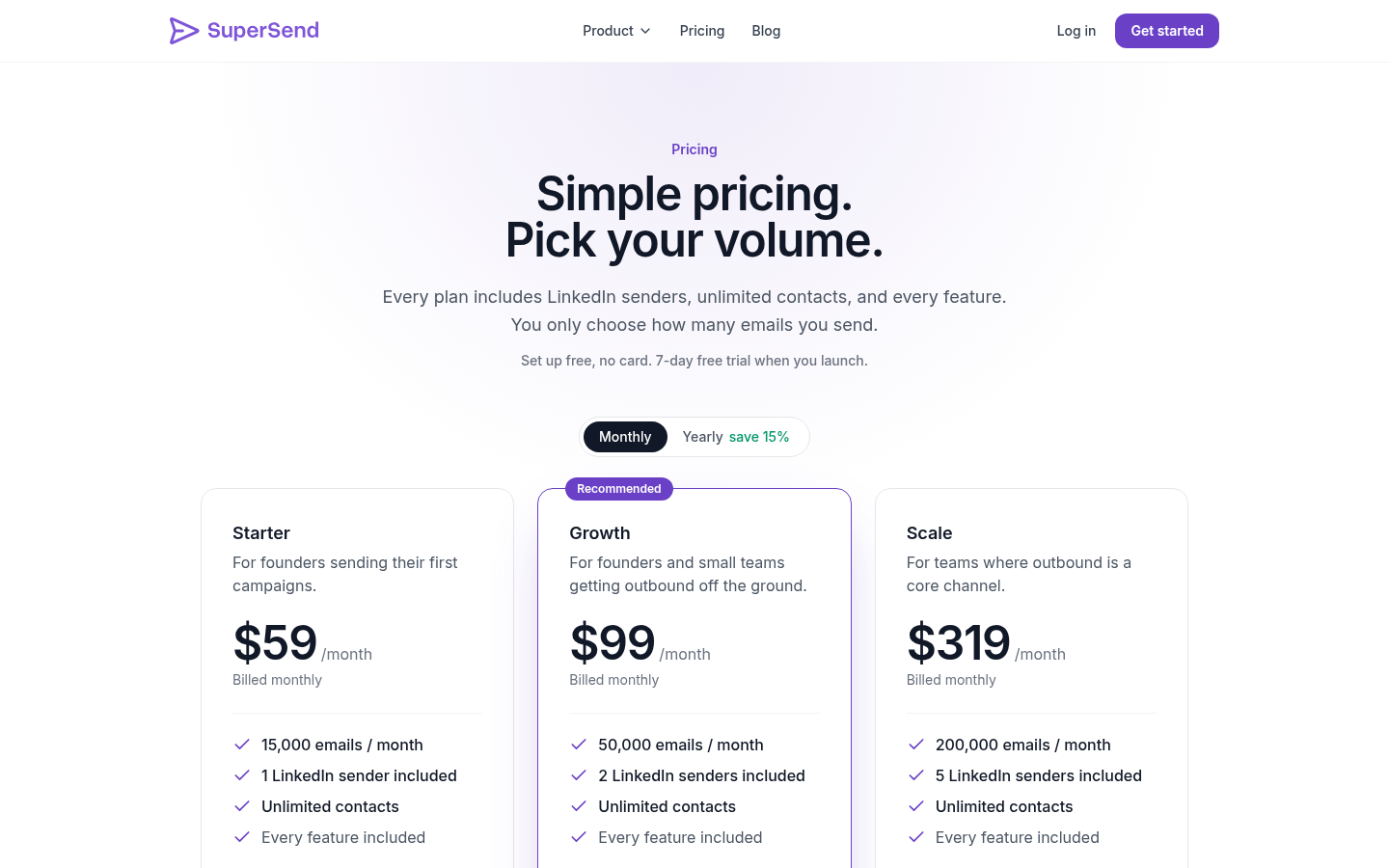
| Plan | Monthly price | Emails per month | LinkedIn senders included | Overage per email on monthly plans |
|---|---|---|---|---|
| Starter | $59 | 15,000 | 1 | $0.006 |
| Growth | $99 | 50,000 | 2 | $0.004 |
| Scale | $319 | 200,000 | 5 | $0.0025 |
Yearly billing is about 15% off: Starter $600 a year ($50 a month), Growth $1,008 ($84 a month), Scale $3,252 ($271 a month). There is no email-volume add-on; sends over the plan limit are billed at the overage rate. Extra LinkedIn senders are $29 a month each. You can connect your own Google Workspace or Outlook inboxes free, or buy inboxes inside SuperSend at $5 a month each and sending domains at $13 a year, set up with SPF, DKIM, and DMARC already in place. Email validation and placement tests draw on plan credits, 1 per validated email and 5 per placement-test seed, so a default test costs 50 credits.
Setup is free with no card: connect inboxes, import contacts, and build sequences. The 7-day free trial starts when you launch a campaign or turn on warmup, with a card on file, and you are not charged if you cancel before day 7. That is enough time to run the protocol above against it. Set up a free SuperSend account and see whether it holds.