Most cold email tools look alike on a feature page: sequences, follow-ups, a unified inbox, warmup. The difference that shows up in your reply rate is whether landing in the inbox is treated as part of the campaign or as a separate chore you bolt on. If warmup, SPF, DKIM and DMARC checks, bounce monitoring and placement tests sit next to the send button, you find out your domain is slipping before the list does. If they live in a second tool or a paid add-on, you usually find out from silence. This comparison judges six tools on that question first, then on sequences, reply handling, and what the published plans actually cost.
Who this is for
This page is for founders and small sales teams who run their own outbound: you pick the list, write the copy, connect the inboxes, and work the replies yourself. It also serves a two or three person sales team that needs one tool rather than a stack. It is not written for agencies.
The tools covered are the ones a founder actually weighs against each other: Instantly, Smartlead, Saleshandy, lemlist, Woodpecker, and SuperSend. Facts about each come from that tool's own pricing page and homepage, read on the day this page was written.
How the tools were judged
Every tool was held to the same five questions. If you want the background on what each of these parts does before comparing vendors, our explainer on what cold email software does and how to choose it covers the category from the ground up.
- Sequencing. Can you build a multi-step sequence with conditional follow-ups, and does a reply stop the sequence? Does the sequence run on email only, or on email and LinkedIn together, and if LinkedIn is there, does the tool perform the step or hand you a task to do by hand?
- Inbox health. Is warmup included? Does the tool check SPF, DKIM and DMARC on your sending domain? Does it monitor bounces and pause when a campaign is hurting the domain? Can you run an inbox placement test before launch?
- Reply handling. Is there one inbox for every reply across every connected mailbox, and does the tool sort interested replies from out-of-office and unsubscribe noise?
- Infrastructure. Can you connect the Google Workspace or Outlook inboxes you already own? Can you buy domains and mailboxes inside the tool if you need more?
- Published price. What does the entry plan cost per month, what does it cap (emails sent, contacts stored, inboxes connected, seats), and is there a free plan or trial? Only prices printed on a tool's own pricing page appear below.
Lead databases are noted but not scored, because they are a separate purchase decision. Every tool here except SuperSend bundles or sells some lead data.
The six tools at a glance
Prices are monthly billing unless noted. Caps are from each tool's pricing page.
| Tool | Entry plan (per month) | Emails per month at entry | Contacts at entry | Sender inboxes | Free plan or trial | LinkedIn in the sequence | Lead database |
|---|---|---|---|---|---|---|---|
| Instantly | Growth, $47 ($37.60 billed annually) | 5,000 | 1,000 uploaded | Unlimited, with unlimited warmup | "Start for free" on its Outreach page | Yes: email, LinkedIn and webhook sequences | Separate Credits plan from $47/mo, 450M+ leads |
| Smartlead | Base, $39 ($32.50 billed annually) | 6,000 | 2,000 (unlimited on Smart and Prime) | Unlimited mailboxes; buy Google, Outlook or SMTP mailboxes as add-ons | Free trial, 50% off the first month | Email sequences; calls via the SmartDialer add-on | 2,000 verified prospect emails on Base |
| Saleshandy | Starter, $41 ($34 billed annually) | 6,000 | 2,000 active prospects, unlimited stored | Unlimited, no per-inbox fees; buy mailboxes from $2.99/mo | 7-day trial, no card | LinkedIn named among sequence channels, alongside manual tasks | 852M+ contacts; 1,500 credits/mo on Starter |
| lemlist | Email, $69 ($55 billed annually) | 50,000 | Unlimited | Unlimited users and email senders; in-app domain and mailbox purchase | 14-day trial with Multichannel features | Yes, on the Multichannel plan ($109 per user, $87 annually) | Yes, 650M+ leads via credits |
| Woodpecker | $35 for 500 contacted prospects ($7 per 100); annual saves 33% | Up to 8,000 (prospects x 16) | 500 contacted prospects | Unlimited email accounts; Google or Microsoft mailboxes $6/mo each | 14 days or 100 cold emails, whichever comes first; no card | Yes, as a $29/mo per account add-on | Lead Finder, 100 credits free; more from $10 per 500 |
| SuperSend | Starter, $59 | 15,000 | Unlimited | Connect your own Google or Outlook, or buy inside the app; 1 LinkedIn sender on Starter | Free setup with no card; 7-day trial (card on file) when you launch or turn on warmup | Yes, email and LinkedIn in one sequence; a reply on either stops both | No |
What a thousand emails costs on each plan
Sticker prices mislead because the plans cap different things. Instantly, Smartlead and Saleshandy meter emails sent and active contacts on their lower tiers. lemlist's Email plan meters emails sent and leaves contacts and senders unlimited. Woodpecker meters contacted prospects, 500 for $35, with a ceiling of 8,000 emails on that tier. SuperSend meters emails sent and leaves contacts unlimited. Dividing the monthly price by the monthly email cap puts them all on one footing. This assumes you send the full cap; if you send half, your real cost per email doubles, and for Woodpecker the number is a ceiling rather than the unit you are actually billed on.
| Plan | Monthly price | Email cap | Price per 1,000 emails |
|---|---|---|---|
| Instantly Growth | $47 | 5,000 | $9.40 |
| Saleshandy Starter | $41 | 6,000 | $6.83 |
| Smartlead Base | $39 | 6,000 | $6.50 |
| Woodpecker entry tier (500 prospects) | $35 | 8,000 | $4.38 |
| SuperSend Starter | $59 | 15,000 | $3.93 |
| SuperSend Growth | $99 | 50,000 | $1.98 |
| SuperSend Scale | $319 | 200,000 | $1.60 |
| lemlist Email | $69 | 50,000 | $1.38 |
| Smartlead Smart | $174 | 150,000 | $1.16 |
| Smartlead Pro | $94 | 90,000 | $1.04 |
| Saleshandy Pro | $99 | 100,000 | $0.99 |
| Instantly Hypergrowth | $97 | 100,000 | $0.97 |
| Saleshandy Scale | $189 | 200,000 | $0.95 |
| Smartlead Prime | $379 | 500,000 | $0.76 |
| Instantly Light Speed | $358 | 500,000 | $0.72 |
Read this table two ways. At the entry tier, where most founders start, the plan with the larger email cap wins on cost per email. At volume, Instantly, Smartlead, Saleshandy and lemlist's Email plan are cheaper per email than SuperSend, and that gap is real. The table also leaves out what each tool sells separately: lead data, placement tests, mailboxes and LinkedIn. Those add-ons are where a plan advertised at one price becomes a stack at three times that, so each tool section below lists what is bundled and what is not.
Instantly
Instantly's pricing page splits the product into Outreach plans, Credits plans, and Bundles that combine the two. The Outreach line is the sending engine. Growth is $47 a month ($37.60 billed annually) for unlimited email accounts, unlimited warmup, 1,000 uploaded contacts, 5,000 emails a month, and chat support. Hypergrowth is $97 a month ($77.60 annually) for 25,000 uploaded contacts and premium live support; its plan card lists 125,000 emails a month while the annual card on the same page lists 100,000, so this page uses the lower figure. Light Speed is $358 a month ($286.30 annually) for 500,000 emails and 100,000 contacts, and adds what Instantly calls the SISR system: dedicated or private server and IP blocks that the company assigns and rotates for you, swapping out flagged IPs, so you do not buy private servers or proxies yourself. An Enterprise tier is priced on request.
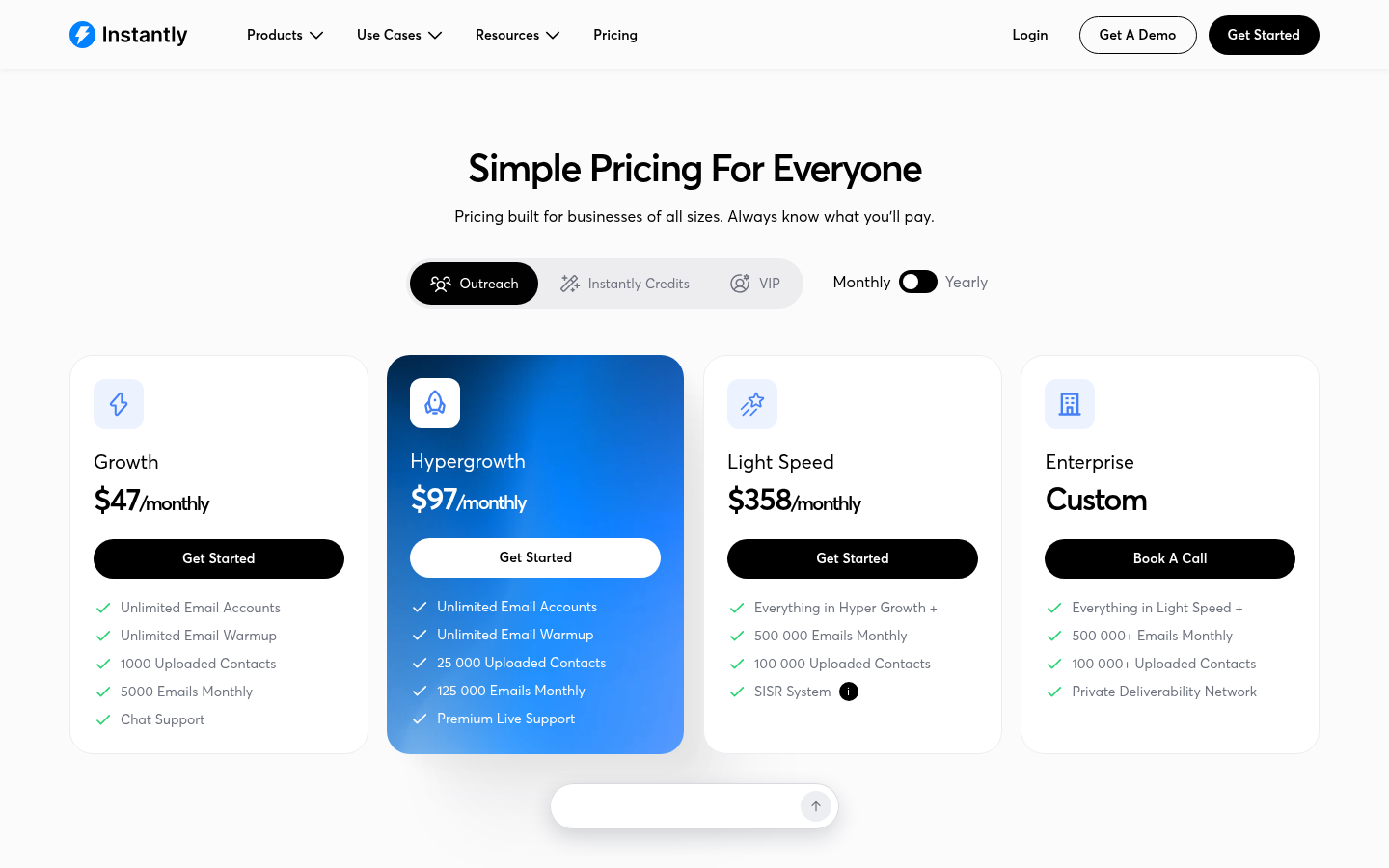
Lead data is a separate subscription. The Growth Credits plan is $47 a month for 1,500 credits against a database Instantly describes as 450M+ B2B leads, with waterfall enrichment and AI writing agents. The Bundles put the two together: Starter at $94, Scale at $194, and Agency at $555 a month. The pricing page lists the AI Reply Agent, Unibox replies and advanced deliverability features under the Scale bundle, so a founder on the $47 Outreach plan should check which inbox and deliverability features come with the lower tier before assuming they are included. Instantly's Outreach page says you can run email, LinkedIn and webhook sequences, that warmup is built in, and that replies land in Unibox with AI reply labels. The button on that page reads "Start for free".
Where Instantly wins: unlimited inboxes and warmup from the first plan, the cheapest cost per email of any tool here at the top tier, and a managed infrastructure option at Light Speed for teams that have burned domains and want someone else to handle IPs. Where it costs more than it looks: the 1,000 contact cap on Growth, and the fact that data and the fuller reply and deliverability set are separate purchases.
Smartlead
Smartlead's pricing page offers four plans and a free trial, with the page inviting you to try for free and pick a plan later, and advertising half off the first month. Base is $39 a month ($32.50 billed annually) for 2,000 contacts, 6,000 email sends and 2,000 verified prospect emails. Pro is $94 a month ($78.30 annually) for 30,000 contacts, 90,000 sends and 30,000 verified emails. Smart, marked most popular, is $174 a month ($144.50 annually) for unlimited contacts, 150,000 sends and 50,000 verified emails. Prime is $379 a month ($314.60 annually) for unlimited contacts, 500,000 sends, 170,000 verified emails and three SmartServers included. Smartlead's product list includes a Unified Master Inbox, email follow-up automation, email verification, a warmup pool it calls Ultra Premium Warmup, API and webhooks, and a mobile app. Its homepage says it handles DNS, warm-ups and sender rotation, and that SmartServers track bounce rates, spam flags and reputation signals in real time.
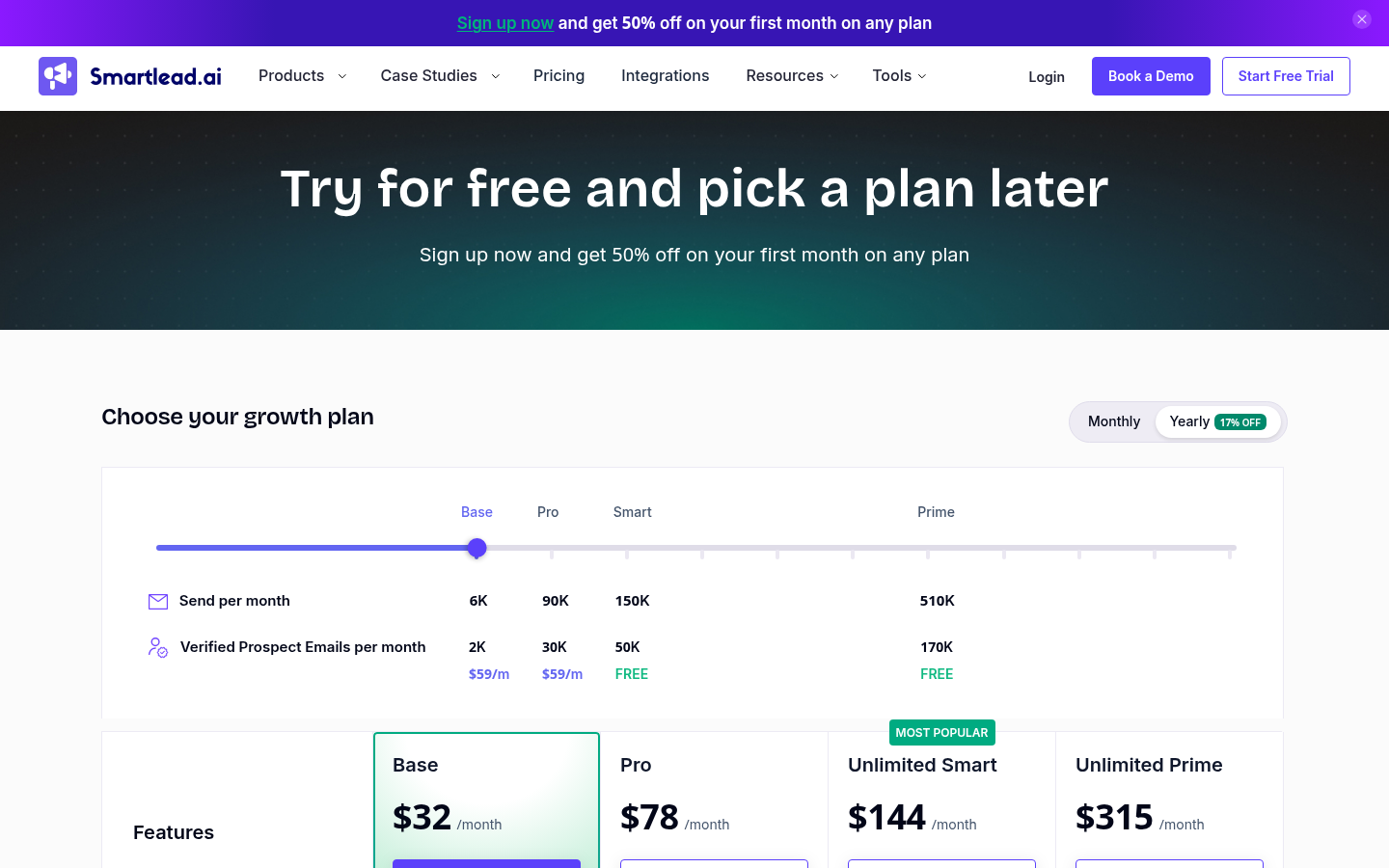
The add-ons matter for a founder's budget. SmartSenders sells mailboxes in a couple of clicks: Google and Outlook mailboxes are $4.50 a month each plus $13 per domain per year, and SMTP mailboxes are $3.99 a month plus $19 per domain per year. SmartDelivery, the inbox placement product, is sold separately at $49 a month for 120 campaign sequence tests, $174 a month for unlimited tests with placement-optimised copy, or $599 a month at the expert tier. SmartServers, the dedicated-IP option, are $39 per server per month. Email verification credits are sold in blocks, from $32 for 6,000 on the one-time rate. Calls come through the SmartDialer add-on.
Where Smartlead wins: the most granular infrastructure menu of any tool here. If you want to pick a mailbox provider, add a dedicated server and run placement tests at scale, every piece is on the pricing page with a price. Where it costs more than it looks: placement testing is a separate line item, so the deliverability stack you read about on the homepage is partly an add-on on the lower plans, and the sequence channels on its pricing page are email sends plus the dialer add-on. If that agency-scale setup is more than a small team needs, our roundup of Smartlead alternatives for small teams covers who each replacement fits.
Saleshandy
Saleshandy's pricing page lists three plans, each with a 7-day free trial, and its homepage adds that no credit card is needed. Starter is $41 a month ($34 billed annually) for one user, 2,000 active prospects, 6,000 emails a month and 1,500 lead finder credits a month. Pro is $99 a month ($76 annually) for ten users, 30,000 active prospects, 100,000 emails and 4,000 credits. Scale is $189 a month ($149 annually) for unlimited users, unlimited active prospects under a fair usage policy, 200,000 emails and 8,000 credits. Every plan connects unlimited sending mailboxes with no per-inbox fee and stores unlimited prospects; the active-prospect cap applies only to contacts in live sequences. The database is described as 852M+ contacts across 42M+ companies, at one credit per verified work email and six per phone number, with no credit charged when nothing verified comes back. Multichannel sequences are described as reaching prospects across email, calls, LinkedIn and WhatsApp, plus manual tasks you can assign; the plan rows list email, call, WhatsApp and tasks as the step types. An Enterprise tier adds SSO and whitelabel for agencies, priced on request.
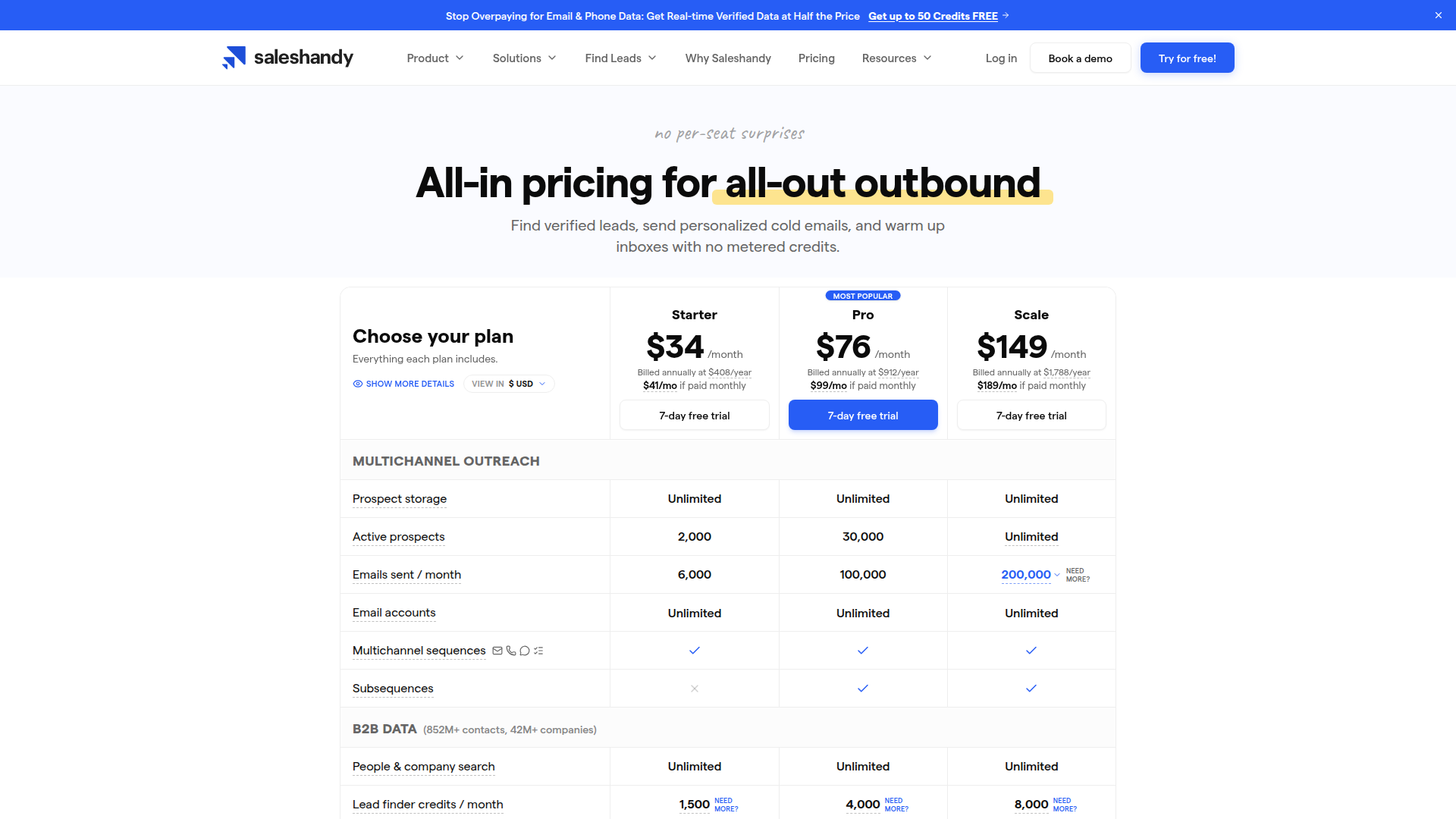 Saleshandy's pricing page, as of October 3, 2026.
Infrastructure is an add-on. Google Workspace or Microsoft mailboxes cost $2.99 a month each on an annual fixed term, $3.49 on annual flexi, or $3.99 quarterly, with SPF, DKIM and DMARC auto-configured and up to five mailboxes per domain; the page recommends three per domain. Inbox Placement, extra credits and a dialer are also sold as add-ons.
Where Saleshandy wins: a flat plan with lead credits, unlimited mailboxes and unlimited stored prospects, so one subscription covers data and sending, and the lowest listed price per bought mailbox on this page. Where it fits less well: Starter is a single seat with a 6,000-email cap, so a two-person team moves to Pro at $99, and placement testing is a separate add-on rather than part of the plan.
lemlist
lemlist's pricing page lists two self-serve plans and an Enterprise tier. Email is $69 a month ($55 billed annually) for 50,000 emails a month with unlimited users and email senders, the email and phone number finder, access to a database lemlist describes as 650M+ leads, the lemAgent AI agents, email warm-up and a deliverability hub, and CRM integrations and API. It does not include LinkedIn. Multichannel is $109 per user a month ($87 annually) and adds LinkedIn automation, SMS, WhatsApp as an add-on, a built-in call dialer, unlimited emails and messages, and five senders per user. Enterprise is priced on request. The trial is 14 days, and lemlist's pricing FAQ says it includes the Multichannel features except in-app calls plus 200 credits for finding emails and phone numbers.
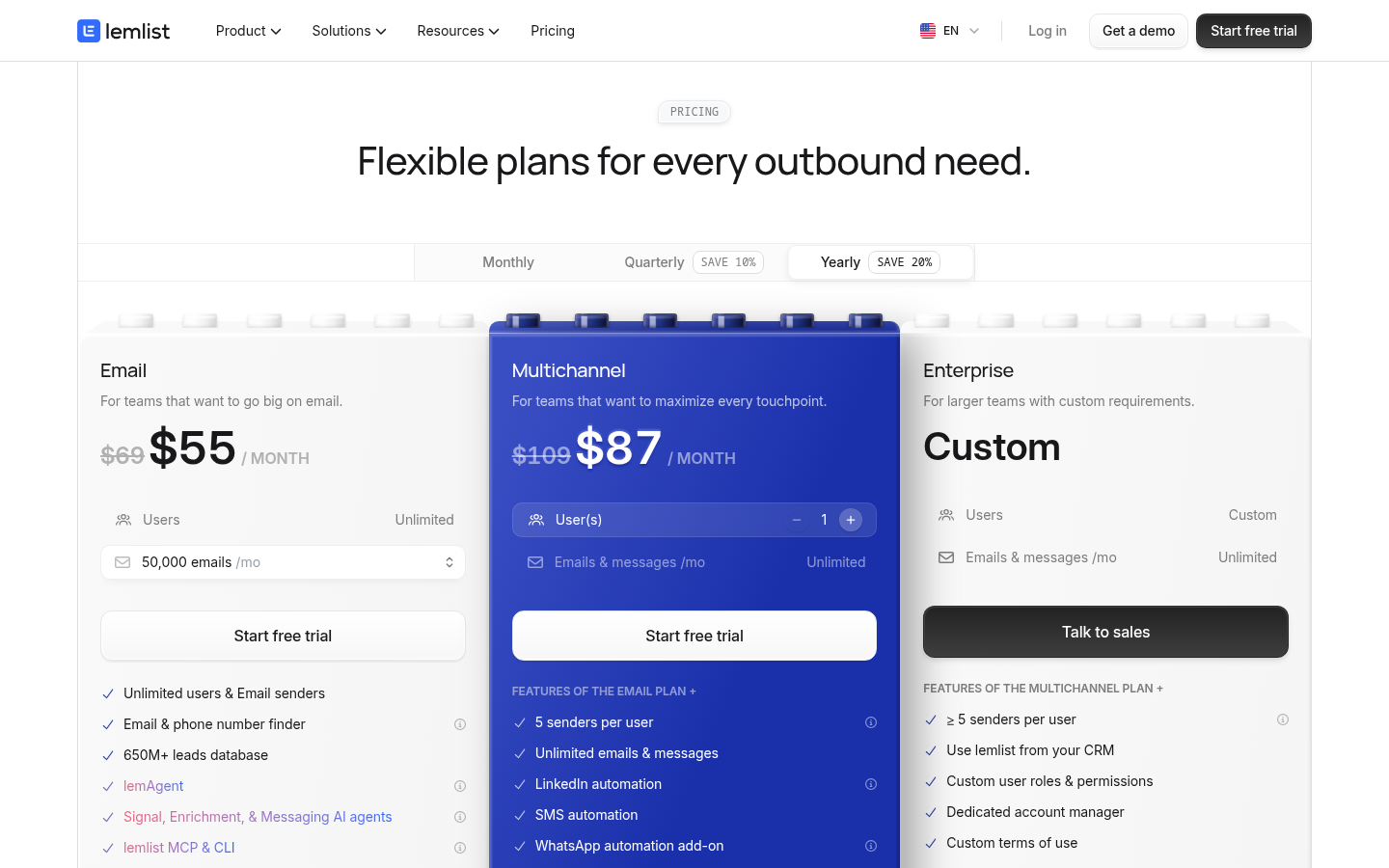 lemlist's pricing page, as of October 3, 2026.
Lead data runs on credits, with a data enrichment add-on at $20 a month ($16 annually) for 2,000 credits, which lemlist describes as roughly 400 emails or 100 phone numbers. The feature table lists conditioned next steps, auto-stop campaigns, a unified inbox, deliverability testing, a DNS setup test, inbox rotation, in-app domain and mailbox purchase, and AI reply intent detection. The LinkedIn steps cover profile visits, follows and invites, text messages, voice messages and InMail.
Where lemlist wins: the Email plan's 50,000-email cap is generous at $69, contacts and senders are unlimited, and the lead database is included rather than sold as a separate subscription. Where it costs more than it looks: LinkedIn is only on the Multichannel plan, and that plan is priced per user, so a three-person team running email and LinkedIn pays $327 a month before any data credits. If per-user pricing is what has you shopping around, we compare six lemlist alternatives for email and LinkedIn outreach separately.
Woodpecker
Woodpecker's pricing page prices by contacted prospect rather than by email or contact stored. The meter is $7 per 100 contacted prospects, so the 500-prospect entry tier is $35 a month, and the monthly email allowance is the prospect count times 16, the maximum number of campaign steps, which puts the entry tier at up to 8,000 emails; annual billing saves 33 percent. Every tier includes sequences of up to 16 steps, unlimited email verification including catch-all, unlimited team members and unlimited connected email accounts. A number of warm-ups is included free and grows with the tier, and extra warm-ups are $5 a month per email account. Google or Microsoft mailboxes bought through Woodpecker are $6 a month each with SPF, DKIM and DMARC pre-configured. The LinkedIn add-on is $29 a month per connected account and covers invites, messages and profile visits, run from the cloud rather than your browser. Its homepage lists inbox rotation, adaptive sending, a centralized inbox, a domain audit and condition-based campaigns, and a free trial of 14 days or 100 cold emails, whichever comes first, with no card.
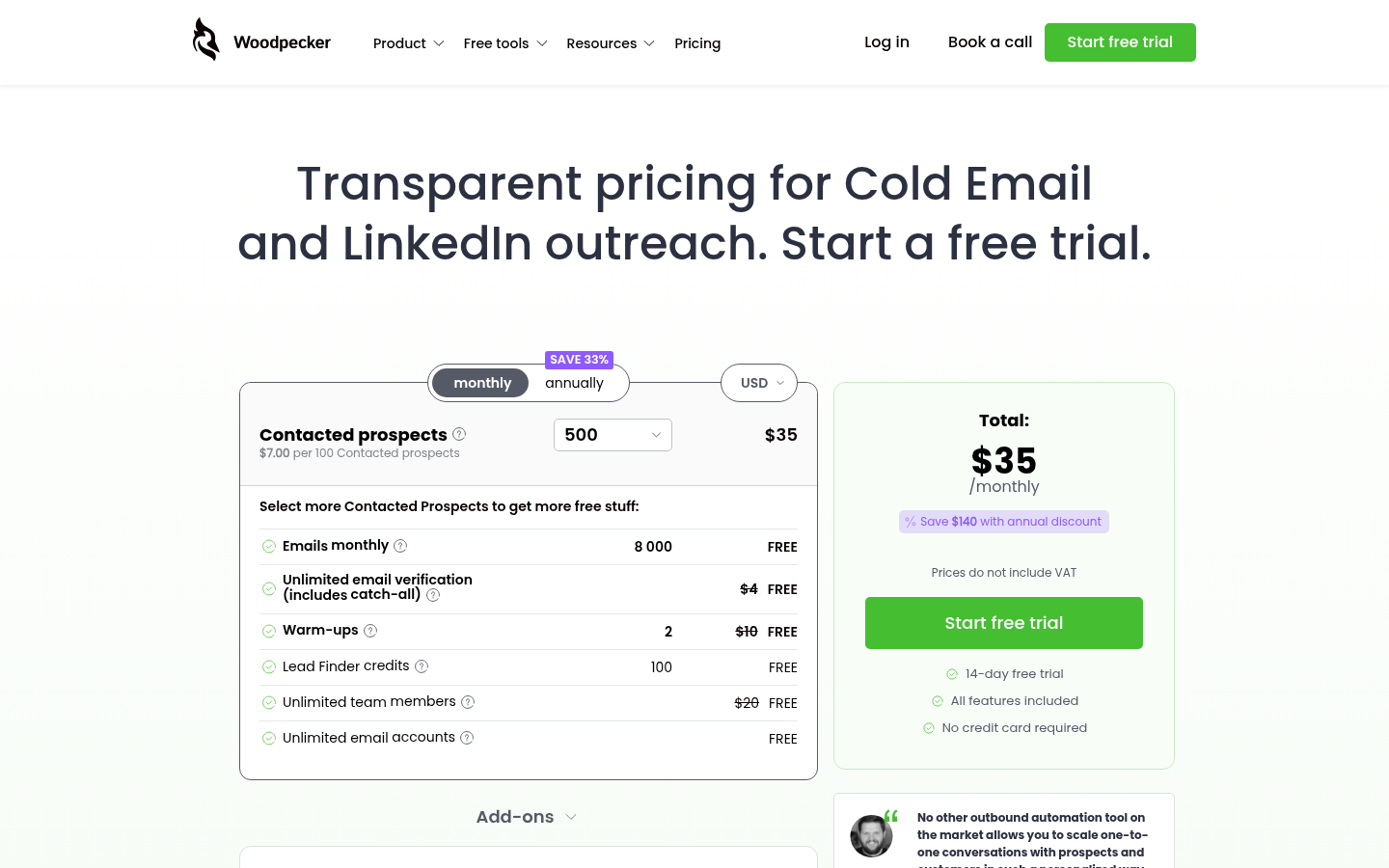 Woodpecker's pricing page, as of October 3, 2026.
Where Woodpecker wins: if your list is small and your copy is careful, paying for prospects actually contacted rather than for emails you might send or contacts you might store is the cleanest meter on this page, and unlimited verification and team members are rare at $35. Where it costs more than it looks: warm-ups beyond the free allotment, LinkedIn and mailboxes are each a separate monthly line, so a founder rotating six inboxes with LinkedIn attached is paying for the plan plus extra warm-ups plus the LinkedIn add-on. If you would rather pay a flat plan than a per-prospect meter, our guide to Woodpecker alternatives prices each option against Woodpecker's baseline.
SuperSend
SuperSend is the outbound sequencer for any team that needs cold email and LinkedIn in one sequence, and it is the tool behind this page, so weigh this section accordingly. Its answer to the five criteria above is to put everything in one place: cold email and LinkedIn steps run in one sequence against one contact record, so a reply on either channel stops both, and a prospect who answered on LinkedIn is not nudged again by email two days later. Warmup, SPF, DKIM and DMARC checks, bounce monitoring and inbox placement tests sit next to the campaigns rather than in a separate product, and a bounce guard pauses a campaign whose invalid-recipient bounce rate passes 3 percent, checked after 100 sends. Placement tests run against 10 seed inboxes by default, always including Google and Outlook, at 5 plan credits per seed, and email validation costs 1 credit per address; Starter includes 1,000 plan credits, Growth 2,000 and Scale 8,000. The deliverability monitoring feature page walks through each of those checks. Every reply across every connected mailbox lands in one inbox, labelled by AI, with interested replies on top. You connect your own Google or Outlook inboxes, or buy domains and mailboxes inside SuperSend.
Pricing: Starter is $59 a month for 15,000 emails and 1 LinkedIn sender, Growth is $99 a month for 50,000 emails and 2 LinkedIn senders, and Scale is $319 a month for 200,000 emails and 5 LinkedIn senders. Yearly billing is about 15% off: Starter $600 a year ($50 a month), Growth $1,008 ($84 a month), Scale $3,252 ($271 a month). On monthly plans, emails over the cap are billed at $0.006 each on Starter, $0.004 on Growth and $0.0025 on Scale; there is no email-volume add-on to buy. Extra LinkedIn senders are $29 a month each. Inboxes bought inside SuperSend are $5 a month each and domains are $13 a year, both set up with SPF, DKIM and DMARC. Contacts are unlimited on every plan; you pay for emails sent, not list size. Setup is free with no card, and a 7-day trial with a card on file starts when you launch a campaign or turn on warmup. Plans start from $59 a month, and the full breakdown is on the SuperSend pricing page.
Where SuperSend loses: it has no lead database, so you bring your own list or buy data elsewhere, and at the top tiers Instantly, Smartlead, Saleshandy and lemlist are cheaper per email sent. Where it fits: a team that wants email and LinkedIn in one sequence, does not want to meter contacts, and wants the deliverability checks to be part of launching a campaign rather than a second subscription.
Which one to pick
- You want the lowest cost per email at high volume. Instantly, on Hypergrowth or Light Speed. Budget for the separate Credits plan if you also need data.
- You want to assemble your own infrastructure piece by piece, email only. Smartlead. Mailboxes, dedicated servers and placement tests are each on the pricing page with a price, which also means each is a line on the invoice.
- You want one flat plan with lead credits included and unlimited mailboxes, and you are one seat for now. Saleshandy. Move to Pro when the second person joins.
- You want a large email cap, unlimited senders and a lead database in one plan, and LinkedIn only if you will pay per user for it. lemlist.
- Your list is small and you would rather pay for prospects you actually contact. Woodpecker, with the LinkedIn add-on if you need that channel.
- You run email and LinkedIn together, your list is bigger than your monthly send, and you want warmup, authentication checks and placement tests built into the send. SuperSend.
Whatever you choose, pick a tool you can run every day. The founder complaint that repeats most often is not about features; it is about spending more hours on disconnected inboxes and blacklisted domains than on messaging. The tool that shows you a placement result before launch, and pauses itself when bounces climb, saves those hours.
Questions founders ask
Is there free cold email software?
Saleshandy gives a 7-day trial with no card. lemlist gives 14 days with the Multichannel features and 200 credits. Woodpecker gives 14 days or 100 cold emails, whichever comes first, with no card. Smartlead's pricing page offers a free trial and half off the first month. Instantly's Outreach page says "Start for free". SuperSend lets you set up without a card and starts a 7-day trial when you launch or turn on warmup. After the trial, every price above is a paid plan.
Should I send from Google Workspace, Outlook, or another provider?
Every tool here that names providers names Google and Outlook. Smartlead sells Google, Outlook and SMTP mailboxes as add-ons; Saleshandy sells Google Workspace or Microsoft mailboxes from $2.99 a month; Woodpecker sells Google or Microsoft mailboxes at $6 a month; lemlist lists in-app domain and mailbox purchase; SuperSend connects Google or Outlook inboxes or sells them inside the app. The provider matters less than the domain. Do not send cold email from the domain your company uses for customers, invoices and support. Buy a secondary domain that looks like yours, set up SPF, DKIM and DMARC on it, warm it, and send from there, so a bad month costs you a cheap domain rather than your primary one's reputation. Our guide to setting up cold email domains and inboxes covers how many you need and how to split them.
Which DMARC policy should a cold email domain use?
DMARC tells receiving servers what to do with mail that fails SPF and DKIM alignment. p=none is monitoring mode: nothing is blocked, you just receive reports. p=quarantine asks receivers to treat failures as suspect, which usually means the spam folder. p=reject asks them to refuse the message. Monitoring mode exists for organizations that do not yet know every system sending on their behalf, where enforcing a strict policy immediately would break legitimate mail from a payroll tool or a marketing platform. A dedicated cold email domain has no such legacy. You control every sender on it, so once SPF and DKIM pass for your sending tool, there is no reason to leave spoofers a door open; move to reject. The tools here that check or configure authentication, including lemlist's DNS setup test, Saleshandy's auto-configured records and SuperSend's SPF, DKIM and DMARC checks, will tell you whether the records are passing before you send.
Why do my emails land in spam even after warmup?
Warmup builds a sending history for a mailbox; it does not fix a list that bounces, copy that reads like every other pitch, or a volume ramp that jumps overnight. Bounces are the fastest way to damage a fresh domain, which is why verification before sending and a bounce guard that pauses the campaign both matter. A placement test, which sends your actual sequence to seed inboxes and reports where it lands, is the only way to see the problem before your prospects do. Smartlead sells this as SmartDelivery from $49 a month; Saleshandy sells Inbox Placement as an add-on; lemlist lists deliverability testing in its plans; SuperSend runs placement tests against 10 seed inboxes on plan credits, alongside the campaign. Work through our cold email deliverability checklist before the first send.
Does the tool do LinkedIn, or does it just remind me to?
Three answers hide behind the word "multichannel". Instantly, lemlist on its Multichannel plan, Woodpecker with its $29 add-on, and SuperSend perform LinkedIn steps as part of the sequence. Saleshandy names LinkedIn among the channels of a multichannel sequence alongside manual tasks you assign to a rep, so check which LinkedIn actions run on their own before you count on it. Smartlead's pricing page meters email sends and sells calls through its dialer add-on. If a prospect replying on LinkedIn should stop the email follow-ups, check that the tool shares one contact record across both channels; a LinkedIn tool bolted onto an email tool by export cannot do that reliably. Our post on building a cold email and LinkedIn sequence shows what the step order looks like when both channels share one record.
How is cold email software different from email marketing software?
Email marketing tools send one message to many opted-in subscribers from a shared sending infrastructure, and they are built for newsletters and promotions. Cold email software sends individual, plain-text-looking messages from your own mailboxes to people who did not ask for them, one at a time, with follow-ups that stop when someone replies. It rotates across several mailboxes to keep per-inbox volume low, warms those mailboxes, and tracks replies rather than clicks. Sending cold outreach through a newsletter tool is a quick way to get that tool's account suspended and your domain flagged.
Is cold email legal?
Rules differ by the recipient's country. Business-to-business cold email is permitted in many places as long as you identify yourself honestly, give a working way to opt out and honour it, and do not use misleading subject lines; some regions require a prior relationship or consent for individuals. Check the law where your recipients live, keep your list to business addresses relevant to what you sell, and include an unsubscribe path in every sequence. None of the tools here will make an unlawful campaign lawful.
Next step
If you want to see how a sequence that runs email and LinkedIn together, with warmup and placement tests beside it, fits your outbound, set up a free SuperSend account with no card and connect one inbox. The trial starts only when you launch or turn on warmup.