A multichannel outreach platform is only multichannel if a reply on one channel ends the sequence on every channel. If a prospect answers your email and still gets your LinkedIn follow-up two days later, you do not have one sequence, you have two tools that happen to share a spreadsheet. That is the first thing to check when comparing these platforms, before price, before AI features, before anything else. The rest of this page compares Instantly, Smartlead, Snov.io, Mailshake and SuperSend on that question and on what each one actually charges for, with every price read from the vendor's own pricing page on October 6, 2026.
Who this comparison is for
This page is written for founders and small sales teams who run their own outbound: a few mailboxes, one or two LinkedIn profiles, a list you built yourself or bought, and no one whose full-time job is operating the tooling. If you are an agency sending on behalf of clients, three of the tools below sell agency plans, client workspaces or dedicated account management, and those sections note it.
Three situations keep coming up when people shop for these tools:
- You are on an email-only sequencer and paying a second vendor for warmup, and you want sending, warmup and LinkedIn under one bill.
- You are doing LinkedIn connection requests and messages by hand each morning and want them to run as steps in the same sequence as your emails.
- You have been told the tool matters less than the list, and you want to know which parts of that are true.
The last point deserves a straight answer. A bad list will fail in any tool. But a good list can be burned by a tool that cannot stop a LinkedIn step when an email reply arrives, or that keeps sending to a domain whose bounce rate has already gone past the point where mailbox providers start filtering you. The list decides whether anyone wants to hear from you. The tool decides whether the people who answer get left alone afterward and whether your next 5,000 emails land at all.
What to compare, and why
Every ranking page for this query scores tools on automation depth, channels, AI, personalization and deliverability. Those are reasonable headings. For a founder choosing between the five tools below, five more concrete questions do more work.
Does a reply stop the other channel? Email and LinkedIn need to live in one sequence against one contact record so that a reply, on either channel, marks the contact done everywhere. Our buyer's guide to LinkedIn and email outreach automation goes through how to test this in a trial.
What does the price meter? The five vendors here bill on different units: uploaded contacts and monthly emails, contacts stored and emails sent, recipients contacted plus credits, users with one mail account each, or emails sent with contacts unlimited. A "from $39" figure means nothing until you know what runs out first on your list.
What does LinkedIn cost on top? Some vendors include a LinkedIn seat in the plan; some sell it as a separate monthly slot. If you compare LinkedIn-first tools as well, our roundup of LinkedIn automation tools covers eight of them.
Is deliverability in the plan or sold next to it? Warmup, authentication checks, bounce monitoring and placement tests are either part of the subscription or a second line item. Both models exist on the pages below.
Can you connect your own Gmail or Outlook, or buy mailboxes inside the tool? Founders usually start with mailboxes they already own and add purchased domains later. The pricing pages below show which vendors sell mailboxes and at what price.
The five platforms side by side
All prices are monthly billing unless marked yearly, read from each vendor's pricing page on October 6, 2026. Yearly figures are the per-month equivalent each page shows.
| Tool | Entry plan | Entry plan limits | Higher plans | Yearly billing (per month) | Priced add-ons on the pricing page | Source |
|---|---|---|---|---|---|---|
| Instantly | Growth, $47/mo | 5,000 emails/mo, 1,000 uploaded contacts, unlimited email accounts and warmup, chat support | Hypergrowth $97/mo (125,000 emails, 25,000 uploaded contacts); Light Speed $358/mo (500,000 emails, 100,000 uploaded contacts, SISR dedicated IP system); Enterprise custom | Growth $37.60; Hypergrowth $77.60; Light Speed $286.30 | Credits plans from $47/mo for the 450M+ lead database and AI agents; bundles of Outreach plus Credits from $94/mo (Starter), $194/mo (Scale), $555/mo (Agency) | Instantly pricing page |
| Smartlead | Base, $39/mo | 6,000 emails/mo, 2,000 contacts, Foundation warmup tier | Pro $94/mo (90,000 emails, 30,000 contacts, CRM access, API and webhooks, Growth warmup tier); Unlimited Smart $174/mo (150,000 emails, unlimited contacts, 50,000 verified emails free, call access, private OAuth for your own email network); Unlimited Prime $379/mo (500,000 emails, 170,000 verified emails free, 3 SmartServers, dedicated manager) | Base $32.50; Pro $78.30; Smart $144.50; Prime $314.60 | Mailboxes from $4.50/mailbox/mo plus $13/domain/yr; SmartDelivery placement tests from $49/mo; SmartServers $39/server/mo; verified prospect emails add-on $59/mo on Base and Pro (free on Smart and Prime); client workspaces $29 each on Pro and Smart, 3+ included on Prime | Smartlead pricing page |
| Snov.io | Starter, $39/mo | 1,000 credits, 5,000 recipients, 75 enrichment tokens, 3 email warm-ups, unlimited monthly emails, unlimited team seats | Pro $99/mo (5,000 credits, 25,000 recipients, 150 enrichment tokens, unlimited warm-ups); Ultra custom (from 200,000 credits, 400,000 recipients) | Annual billing saves 25% (page shows $117/yr saved on Starter, $297/yr on Pro) | LinkedIn automation slot $69/mo per slot | Snov.io pricing page |
| Mailshake | Starter, $29/mo | 1 email address per account, 1,500 email sends/mo, unlimited uploaded contacts, unlimited warmup, unlimited email verification, 50 data finder credits | Email Outreach $49/mo (2 email addresses, unlimited sends, unified inbox, Salesforce, Pipedrive and HubSpot); Sales Engagement $99/mo (10 email addresses, unlimited sends, 2,500 data finder credits, 5 phone numbers, power dialer); Agency plan with unlimited email addresses, talk to sales | Starter $25; Email Outreach $45; Sales Engagement $85 | Data Finder $19/mo; Ready to Use Mailboxes $12/mo; no free trial, payment collected up front | Mailshake pricing page |
| SuperSend | Starter, $59/mo | 15,000 emails/mo, 1 LinkedIn sender, unlimited contacts, every feature included | Growth $99/mo (50,000 emails, 2 LinkedIn senders); Scale $319/mo (200,000 emails, 5 LinkedIn senders) | Starter $50; Growth $84; Scale $271 (about 15% off) | Extra LinkedIn sender $29/mo; Google or Outlook inbox $5/mo each; domain $13/yr; email overage per email above the plan ($0.006 Starter, $0.004 Growth, $0.0025 Scale) | SuperSend pricing page |
Three things stand out before reading the sections. First, the lowest sticker, Mailshake Starter at $29, is also the tightest cap: 1,500 sends a month from one mail account. Second, the two $39 entry plans meter very different things: Smartlead's page caps Base at 6,000 emails and 2,000 contacts, while Snov.io's page allows unlimited emails but counts 5,000 recipients and 1,000 credits. Third, only Snov.io and SuperSend put a LinkedIn price on their pricing pages, and they do it differently: a $69 monthly slot on top of any Snov.io plan, versus a sender included in each SuperSend plan with extras at $29.
Instantly
Instantly's homepage leads with "Find Clients" and describes a Copilot that finds leads, writes copy and generates campaigns, alongside an AI Sales Agent, an AI Reply Agent and a Lead Finder Agent. The product menu on that page groups the offering into Lead Generation and Data (a lead database, verification, website visitors), Outreach and Engagement (outreach, CRM, managed services) and Deliverability and Infrastructure (AirMail, email accounts, deliverability, inbox placement).
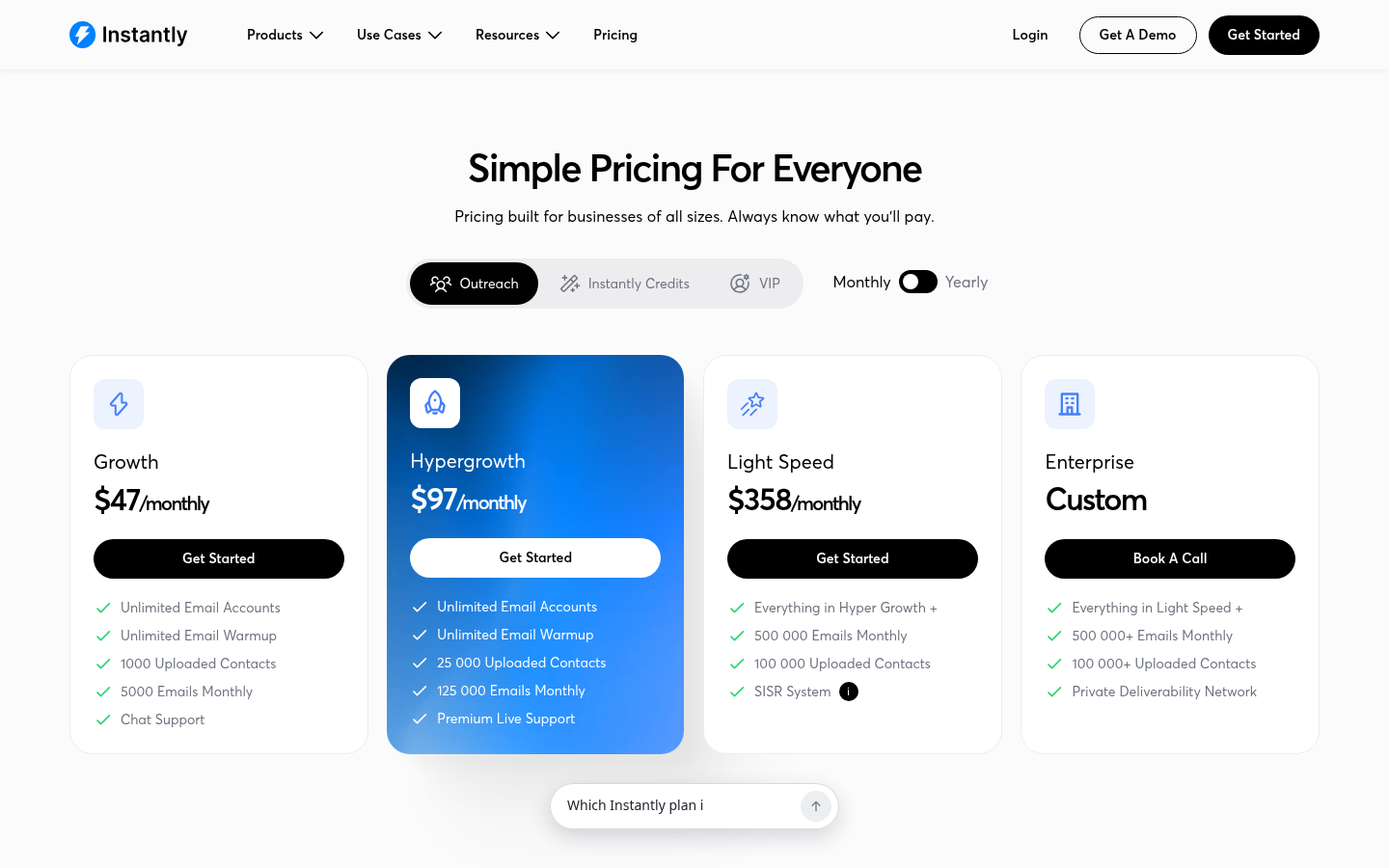
The pricing page splits into Outreach plans, Credits plans and Bundles. On the Outreach side, Growth is $47/mo for 5,000 emails and 1,000 uploaded contacts with unlimited email accounts and unlimited warmup. Hypergrowth is $97/mo and lifts that to 125,000 emails and 25,000 uploaded contacts on monthly billing; the yearly listing shows 100,000 emails at $77.60/mo, so read the toggle you plan to buy on. Light Speed at $358/mo adds 500,000 emails, 100,000 uploaded contacts and the SISR system, which the page describes as automatically assigning dedicated server and IP blocks and swapping out flagged IPs. The Credits plans start at $47/mo for 1,500 Instantly credits against the 450M+ lead database, with enrichment, AI writing and CRM export. The Scale bundle at $194/mo is marked most popular and is where the page lists the AI Reply Agent, Unibox replies and advanced deliverability features.
The contact cap is the number to watch. On Growth you can upload 1,000 contacts for 5,000 emails, which suits a tight list with a long follow-up sequence and nothing larger. Warmup is unlimited on every Outreach plan, so the complaint about paying a second vendor for warmup does not apply here.
Fits: teams whose outbound is email volume first and who want the lead database and AI agents from the same vendor. If the contact caps or the bundle pricing push you elsewhere, our comparison of Instantly alternatives puts six tools next to it on price.
Smartlead
Smartlead's homepage calls the product "Cold Email Software for Sales Teams That Run Outbound at Scale," and its product list reads like an infrastructure catalog: SmartInfra for dedicated servers, Ultra Premium Warmup, SmartDelivery for inbox placement data, SmartSenders for buying mailboxes, Email Verification, a Unified Master Inbox, and SmartDialer, which the page describes as AI multichannel calls with full context. The case studies on the homepage are mostly agencies and API-first setups.
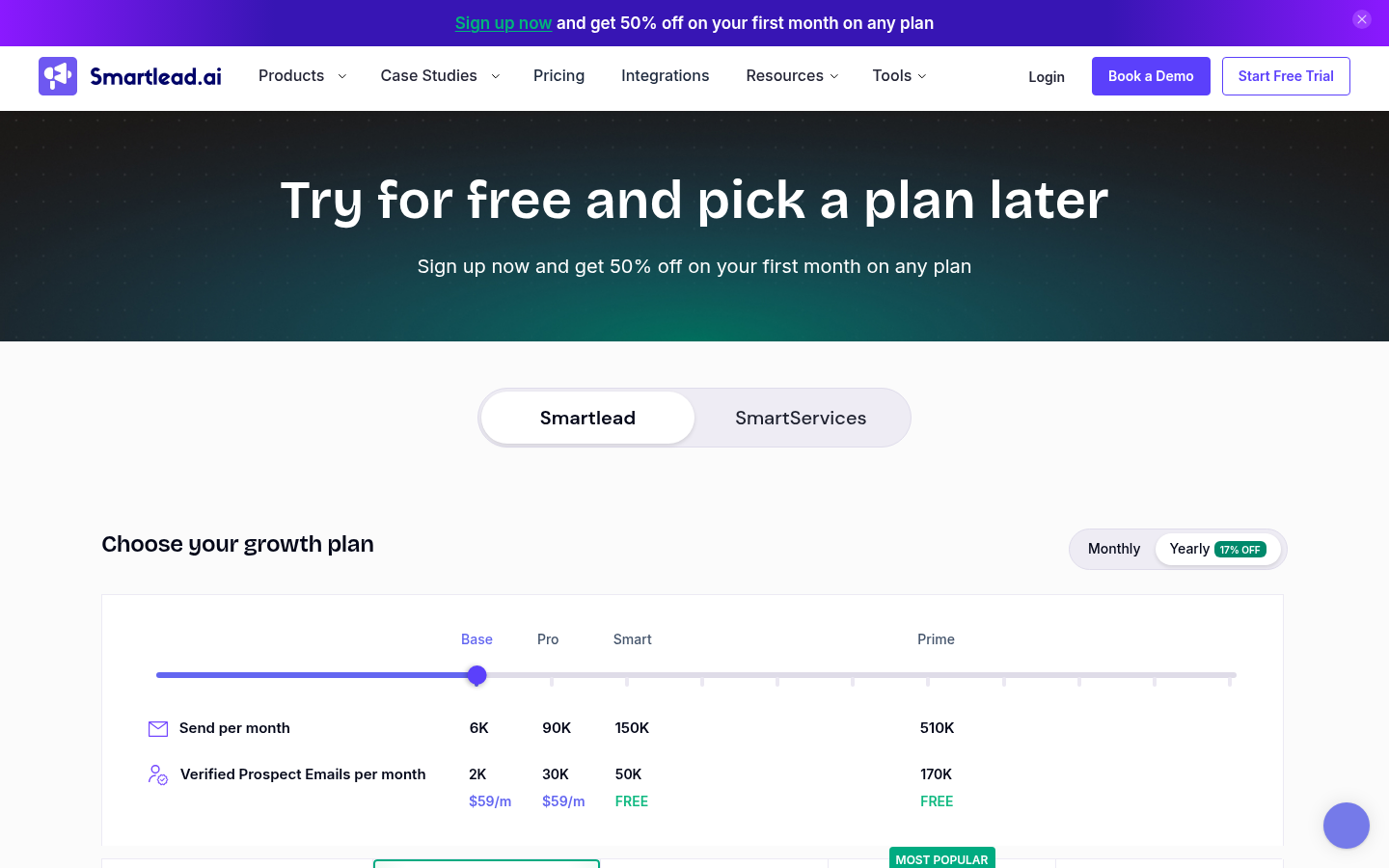
Smartlead's pricing page, as of October 6, 2026.
The pricing page lists four plans. Base at $39/mo stores 2,000 contacts, sends 6,000 emails and uses the Foundation warmup tier. Pro at $94/mo moves to 30,000 contacts and 90,000 emails, adds CRM access, API and webhooks and the Growth warmup tier, and sells private infrastructure at $39 and client workspaces at $29 as add-ons. Unlimited Smart at $174/mo, marked most popular, removes the contact cap, sends 150,000 emails, includes 50,000 verified prospect emails free and adds call access and private OAuth for your own email network. Unlimited Prime at $379/mo sends 500,000 emails, includes 170,000 verified emails, 3 SmartServers, 3 or more client workspaces, a dedicated manager and a private Slack channel. Yearly billing takes 17% off: $32.50, $78.30, $144.50 and $314.60 per month respectively. The page also offers a free trial and 50% off the first month of any plan.
The add-on catalog is where Smartlead differs from the others. SmartSenders sells Google and Outlook mailboxes at $4.50 per mailbox per month plus $13 per domain per year through Zapmail, with pre-warmed mailboxes at $9 per month and SMTP options from $3.99. SmartDelivery placement testing is a separate subscription from $49/mo for 120 campaign sequence tests. SmartServers are $39 per server per month. For a founder, that means the entry price is low but a complete setup with placement testing and purchased mailboxes is priced piece by piece.
Fits: teams and agencies sending high email volume who want dedicated infrastructure, verification and placement data from one vendor, and who are comfortable assembling the add-ons. Our comparison of Smartlead alternatives covers the tools that bundle email and LinkedIn instead.
Snov.io
Snov.io's homepage describes the product in three steps: find leads, enrich them with emails and phone numbers, send outreach campaigns. The product menu lists a B2B leads database, email finder and verifier, email warmup, drip campaigns, multichannel outreach, LinkedIn automation, an AI email writer and a sales CRM, with integrations to Pipedrive, HubSpot, Clay and n8n.
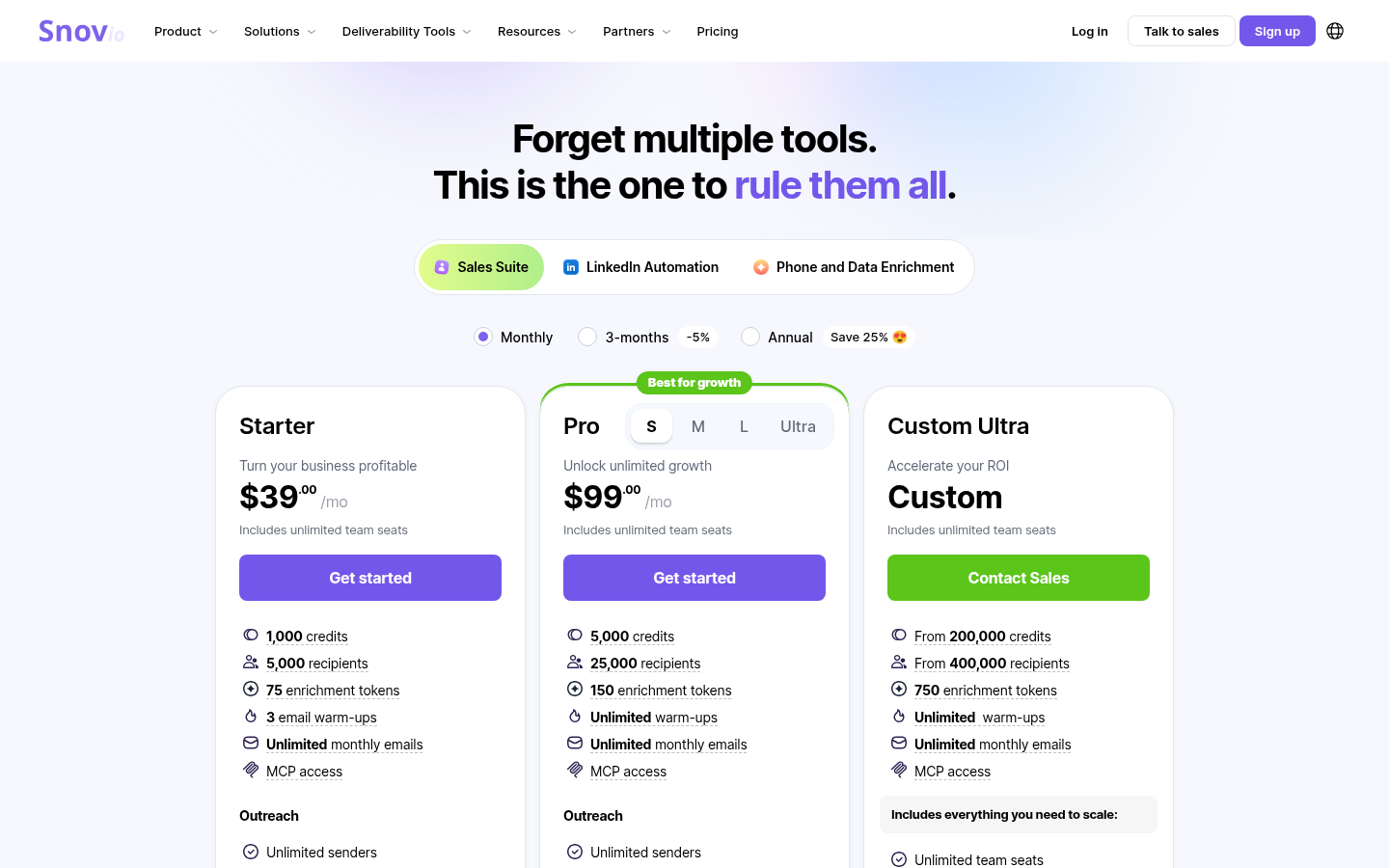
Snov.io's pricing page, as of October 6, 2026.
The pricing page bills on recipients and credits rather than emails or contacts. Starter at $39/mo includes 1,000 credits (each prospect search or email verification costs one), 5,000 recipients, 75 enrichment tokens, 3 simultaneous email warm-ups and unlimited monthly emails. The page defines a recipient as a lead you contact for the first time by email or LinkedIn in a billing period, with all follow-ups to that lead free. Pro at $99/mo includes 5,000 credits, 25,000 recipients, 150 enrichment tokens and unlimited warm-ups, and comes in S, M, L and Ultra sizes. Ultra is custom from 200,000 credits and 400,000 recipients. Annual billing saves 25% and quarterly saves 5%. Every plan includes unlimited team seats.
LinkedIn is where the price changes. The page lists multichannel campaigns and LinkedIn automation on every plan but marks LinkedIn account slots as purchased separately at $69/mo per slot. So a founder on Starter running one LinkedIn profile pays $39 plus $69 on monthly billing, or $108/mo, for email plus LinkedIn in one sequence. The feature list also includes a Unibox, a high bounce rate safeguard, reply sentiment analysis, deliverability and placement checks, and a sales CRM, which covers most of the deliverability and reply-handling criteria above inside the plan.
Fits: teams who want prospecting data and the sequencer from one vendor and will pay a per-slot price to add LinkedIn, especially teams with several people who benefit from unlimited seats.
Mailshake
Mailshake's homepage leads with "Email Automation That Lands in Inboxes, Gets Replies, and Books Meetings." The feature menu lists a Data Finder for prospect emails, the SHAKEspeare AI email writer, email deliverability, mail merge, automated follow-ups, a Lead Catcher that surfaces the most engaged leads, and a dialer for cold calling inside campaigns. The page also lists Social Automation, described as sending messages automatically on social networks for multi-channel social selling, and says you use your own email provider.
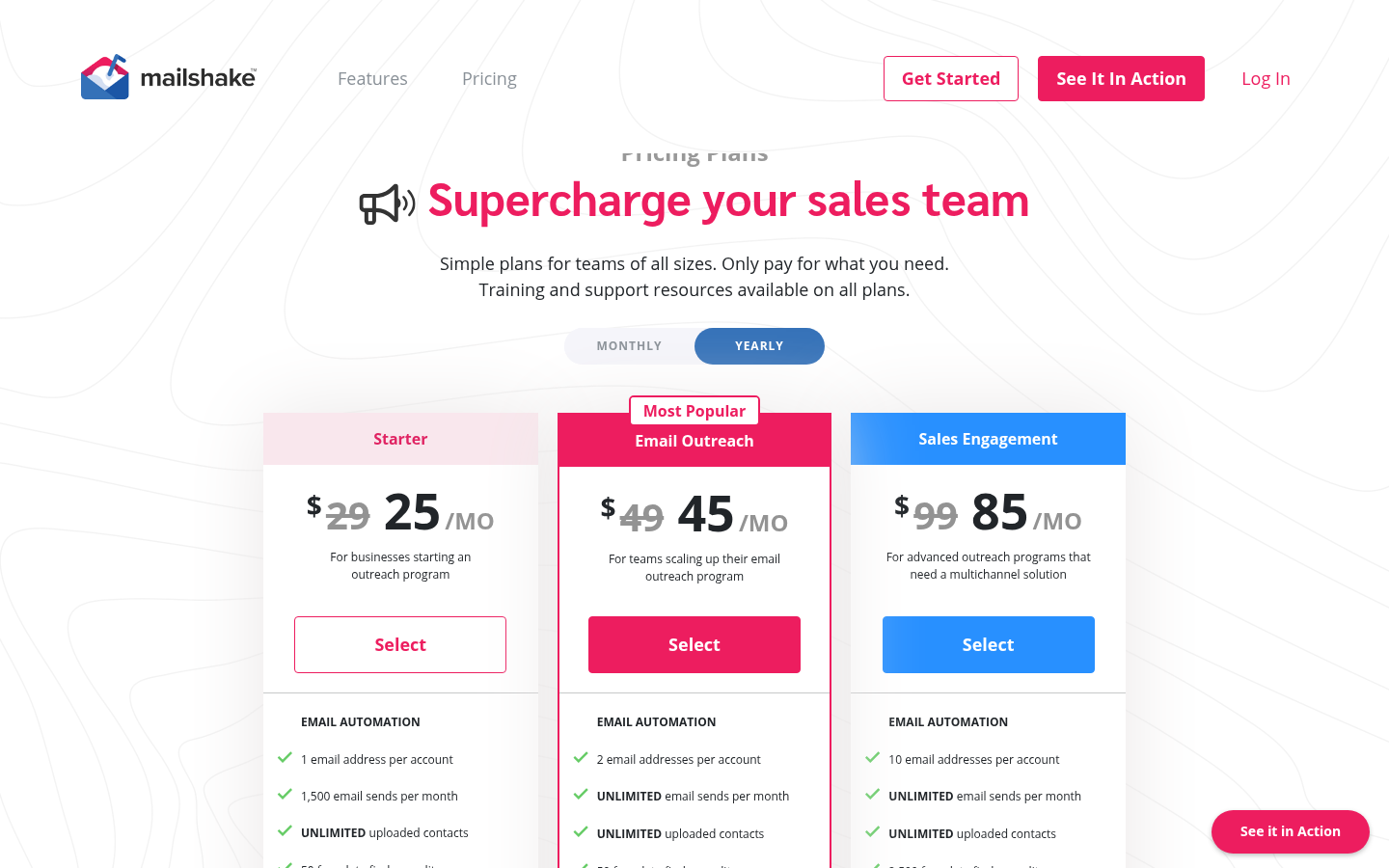
Mailshake's pricing page, as of October 6, 2026.
The pricing page lists three plans plus an agency tier, and bills per user. Starter at $29/mo ($25 on yearly billing) allows 1 email address per account, 1,500 email sends a month, unlimited uploaded contacts, 50 data finder credits, unlimited warmup, unlimited campaigns and unlimited email verification, with automated sequences, A/B testing and AI email writing. Email Outreach at $49/mo ($45 yearly), marked most popular, moves to 2 email addresses and unlimited sends, and adds email rotation, personalization, advanced scheduling and throttling, a unified inbox, Salesforce, Pipedrive and HubSpot integrations, Zapier, and a browser extension. Sales Engagement at $99/mo ($85 yearly) is described as for programs that need a multichannel solution: 10 email addresses, 2,500 data finder credits, 5 phone numbers, a power dialer with unlimited minutes to North American numbers, phone scripts, lead temperature and a one-on-one onboarding call. The Agency plan includes everything in Sales Engagement with unlimited email addresses, priced through sales.
Two details on the page matter for a founder. The FAQ says there is no free trial and payment is collected up front, with cancellation allowed before the renewal date. Each paid user connects one mail account, so a solo founder who wants three sending mailboxes pays for three users. Add-ons are Data Finder at $19/mo ($17 yearly) and Ready to Use Mailboxes at $12/mo ($11 yearly). The page says Mailshake works with Gmail, G Suite, Office 365, most Outlook and Exchange accounts, and most SMTP and IMAP mailboxes.
Fits: email-first teams who want phone calls in the same tool and a simple per-user price, and who are fine committing without a trial. The multichannel plan on the page is built around the dialer rather than LinkedIn.
SuperSend
SuperSend is the outbound sequencer for any team that needs both channels together: cold email and LinkedIn steps in one sequence, inbox health built in, and every reply in one inbox. Email and LinkedIn steps share one sequence and one contact record, so a reply on either channel stops both, which is the test this page opened with. Replies from both channels land in one inbox where the AI labels them and puts the interested ones on top.
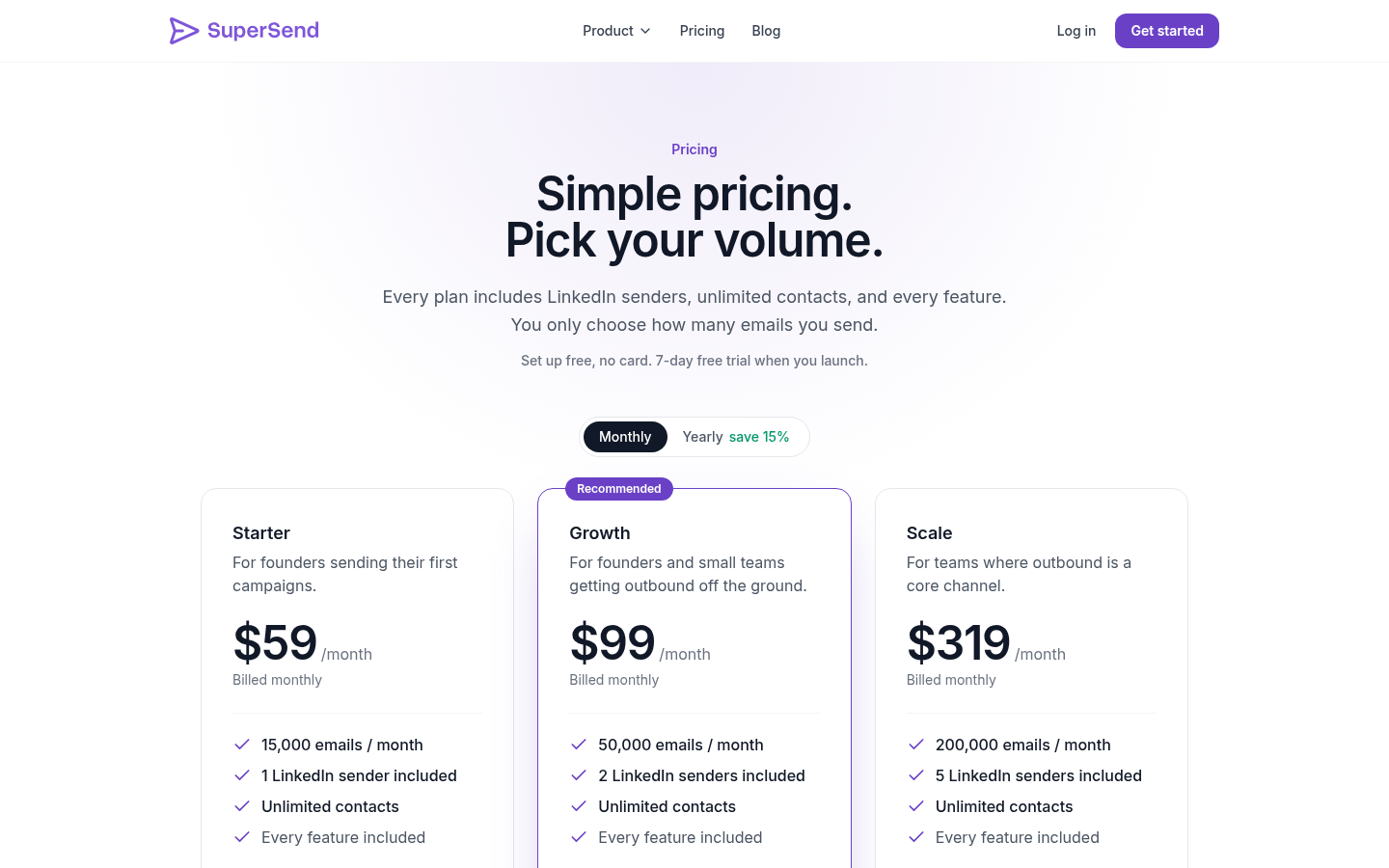
Plans start at $59/mo, and every feature is on every plan; the plans differ only in email volume and LinkedIn senders. Starter at $59/mo sends 15,000 emails with 1 LinkedIn sender. Growth at $99/mo sends 50,000 emails with 2 LinkedIn senders. Scale at $319/mo sends 200,000 emails with 5 LinkedIn senders. Yearly billing is about 15% less: $50, $84 and $271 per month. Contacts are unlimited on every plan, so the price follows emails sent rather than list size. Going over the email limit on a monthly plan bills per email at $0.006, $0.004 or $0.0025 depending on plan; there is no email-volume add-on to buy. An extra LinkedIn sender is $29/mo.
Deliverability sits next to the campaign rather than on a separate invoice. Warmup, SPF, DKIM and DMARC checks, bounce monitoring and placement tests are included. Placement tests run against 10 seed inboxes by default, always including Google and Outlook, at 5 credits per seed from the plan's credit balance. Email validation costs 1 credit per address. A bounce guard pauses a campaign when its invalid-recipient bounce rate passes 3%, checked after 100 or more sends; small campaigns pause after 10 invalid-recipient bounces. The default send cap is 25 emails per mailbox per day, adjustable per mailbox. You can connect the Google or Outlook inboxes you already own, or buy inboxes at $5/mo each and domains at $13/yr inside the app, with SPF, DKIM and DMARC set up on purchase.
Signup is free with no card. Launching a campaign or turning on warmup starts a 7-day free trial with a card on file, charged on day 7 unless cancelled. The trial includes LinkedIn steps as well as email, with full plan limits. For how the sequence itself should be built across the two channels, our playbook for cold email and LinkedIn in one sequence lays out the step order.
Fits: teams who want email and LinkedIn in one sequence with deliverability included, at a price that tracks sending volume.
Which one to pick
The right answer depends on what your outbound is made of, so here is the decision by situation rather than a single winner.
You send email only, at volume, and want data from the same vendor. Instantly's Outreach plans give unlimited email accounts and warmup from $47/mo, with its lead database on a separate Credits plan from $47/mo or bundled from $94/mo. Smartlead's Base plan at $39/mo is cheaper to start, with mailboxes, placement testing and dedicated servers priced as add-ons as you grow.
You want cold calls in the same tool as email. Mailshake's Sales Engagement plan at $99/mo includes 5 phone numbers, a power dialer and unlimited minutes to North American numbers alongside unlimited email sends from 10 addresses. There is no trial, so budget for the first month up front.
You run an agency or manage several client inboxes. Smartlead's Pro and Smart plans sell client workspaces at $29 each, and Prime includes 3 or more plus a dedicated manager. Instantly's Agency bundle at $555/mo covers 500,000 emails and 100,000 uploaded contacts. Mailshake's Agency plan adds unlimited email addresses through sales. SuperSend bills on emails sent with unlimited contacts on every plan, so a long client list does not raise the price: Scale is $319/mo for 200,000 emails and 5 LinkedIn senders, with extra senders at $29/mo.
You want prospecting, enrichment and sequencing in one place, and have several teammates. Snov.io's Starter at $39/mo includes unlimited team seats, a lead database and unlimited emails metered by recipients, with LinkedIn at $69/mo per slot on top.
You run email and LinkedIn as one motion. SuperSend at $59/mo includes a LinkedIn sender, unlimited contacts, warmup, placement tests and the bounce guard in the plan, and a reply on either channel ends the sequence on both.
If you are unsure which situation you are in, run one small list through a trial with both channels on and check what happens to the LinkedIn step after you reply to your own test email from the prospect's side. That one check separates a multichannel sequencer from an email tool with a LinkedIn add-on.
Frequently asked questions
Do I still need a separate warmup tool?
Not with any of the five. Instantly's pricing page lists unlimited email warmup on every Outreach plan. Smartlead's lists a warmup pool tier on each plan, Foundation on Base up to Premium on Smart and Prime. Snov.io's lists 3 simultaneous warm-ups on Starter and unlimited on Pro. Mailshake's lists unlimited email warmup on every plan. SuperSend includes warmup on every plan. If you are paying a second vendor for warmup today, moving to any of these ends that invoice.
What does the price actually count?
Instantly meters uploaded contacts and emails per month. Smartlead meters contacts stored and emails sent per month, with contacts unlimited from the Smart plan up. Snov.io meters recipients contacted per billing period plus credits for prospect search and verification, with emails unlimited. Mailshake bills per user, with one mail account per user, and caps Starter at 1,500 sends while the higher plans send unlimited emails to unlimited contacts. SuperSend meters emails sent per month, with contacts unlimited on every plan. Before comparing prices, work out which of those your list exhausts first.
How much does adding LinkedIn cost?
On Snov.io's pricing page, LinkedIn account slots are $69/mo each, on top of any plan. SuperSend includes 1 LinkedIn sender on Starter, 2 on Growth and 5 on Scale, with extra senders at $29/mo.
Is the tool the bottleneck, or the list?
The list decides whether anyone replies. The tool decides two things the list cannot: whether a prospect who replies on one channel stops hearing from you on the other, and whether your sending reputation survives the campaign. Fix the list first, then choose a tool that will not undo it.
Should I connect my own Gmail or Outlook, or buy inboxes inside the tool?
Start with the mailboxes you own if they are on their own domain and already authenticated. When you need more, Smartlead's pricing page sells Google and Outlook mailboxes from $4.50 per mailbox per month plus $13 per domain per year, Mailshake's sells Ready to Use Mailboxes at $12/mo, and SuperSend sells inboxes at $5/mo each and domains at $13/yr with SPF, DKIM and DMARC configured on purchase. Either way you never run a mail server.
Which is the cheapest way to start?
Mailshake Starter is $29/mo, Smartlead Base and Snov.io Starter are both $39/mo, Instantly Growth is $47/mo and SuperSend Starter is $59/mo, all on monthly billing. The caps differ enough that the cheapest sticker is not the cheapest month: Mailshake Starter sends 1,500 emails from one mail account with no trial, Smartlead Base sends 6,000 emails to 2,000 contacts, Snov.io Starter reaches 5,000 new recipients with unlimited emails but charges $69/mo for a LinkedIn slot, Instantly Growth sends 5,000 emails to 1,000 uploaded contacts, and SuperSend Starter sends 15,000 emails to unlimited contacts with a LinkedIn sender included.
Try it on one list
If your outbound is email plus LinkedIn, the fastest way to settle this is to put one list through a real sequence with both channels on. You can create your SuperSend account without a card, connect a mailbox and a LinkedIn sender, and the 7-day trial starts only when you launch a campaign or turn on warmup.